Windows 7 Forums


Windows 7: Screen Magnification

29 Jul 2012   #1

Windows Seven Premium
West Sussex
 
 
Screen Magnification

I used to be able to increase or decrease my screen magnification from an option that appeared in the right hand side of my sys tray, a + or - sign. (I am running Windows7 Home Premium) Since I have tried to alter the sreen resolution slightly myself, only to make things worse, this opotion has now disapeared.

Can anyone please tell me how to get it back??

Regards,

RonBin79

My System SpecsSystem Spec

29 Jul 2012   #2

Win 7 Pro 64-bit
South Central Texas


Try doing a system restore to a date/time prior to the issue first appearing.

System Restore
My System SpecsSystem Spec
29 Jul 2012   #3
Arc

Windows 7 Home Premium 64 Bit SP 1


Hello RonBin79.

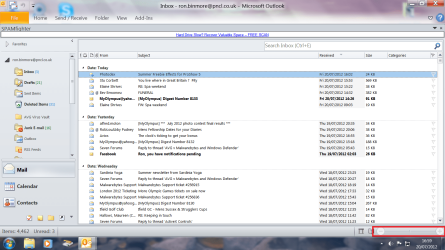
I guess this is your screenshot.

Screen Magnification-screen.png

Are you talking about the area I have boxed ? if so, I also guess that you have answered earlier .... this is for MS office, works only when an office document is open and active. Otherwise not. Not in file browser or elsewhere.

It is not an windows function at all.
My System SpecsSystem Spec
.


29 Jul 2012   #4

Windows 7 Home Premium 32-Bit - Build 7600 SP1
Houston, Texas


You can do a Control + to magnify the screen.
My System SpecsSystem Spec
29 Jul 2012   #5
whs

Vista, Windows7, Mint Mate, Zorin, Windows 8
Florida in winter, Black Forest/Germany


You can use the Magnifier which is in Accessories > Ease of Access. Pin it to the taskbar. You can stop it with WIN+Esc
My System SpecsSystem Spec
Reply

 Screen Magnification problems?


Thread Tools


Similar help and support threads for: Screen Magnification
Thread Forum
errratic magnification General Discussion
Solved magnification.dll General Discussion
window magnification Software
Need magnification.dll for W7 Ultimate General Discussion
Need magnification.dll General Discussion


All times are GMT -5. The time now is 02:50 PM.


Seven Forums Android App Seven Forums IOS App Follow us on Facebook

Windows 7 Forums is an independent web site and has not been authorized,
sponsored, or otherwise approved by Microsoft Corporation.
"Windows 7" and related materials are trademarks of Microsoft Corp.
© Designer Media Ltd
  

1 2 3 4 5 6 7 8 9 10 11 12 13 14 15 16 17 18 19 20 21 22 23 24 25 26 27 28 29 30 31 32