Windows 7 Forums


Windows 7: How to burn a Pana_DVD.frm firmware update file in .iso... format?

02 Aug 2012   #1

Windows 7 Pro (32)
 
 
How to burn a Pana_DVD.frm firmware update file in .iso... format?

I need to do a firmware update for my Panasonic Blu-Ray player-

Several coasters later?- I can't figure out how to force Windows 7 to do anything but copy it in data format (not readable on my Pany).
The Pana_DVD.frm file, needs to be burned in .iso... format?

I tried right clicking on the blank CD/DVD in Explorer/Format, but Create an MS-DOS startup disk is greyed out?

My System SpecsSystem Spec

02 Aug 2012   #2

Windows 7 Pro X64
Space Coast of Florida


What instructions are provided at the Panasonic web site? Can you give us a link to where you downloaded the firmware update from?
My System SpecsSystem Spec
02 Aug 2012   #3

Windows 7 Pro 64 SP1
East Bay Area, CA


I update my Panasonic through the internet, I guess that's not an option for you?

If it's similar to these instructions, SC-BTT370/770 Firmware Download (North America) | Download | Blu-ray Disc Player/Recorder | Digital AV | Consumer Products | Support | Panasonic Global

You need to make it an ISO file first.

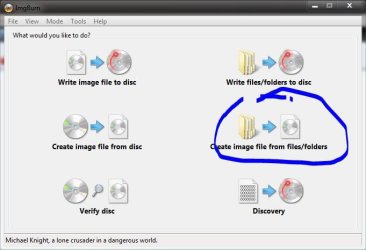
The Official ImgBurn Website will do that, First, in easy mode, select Create image file from Files/Folders,

How to burn a Pana_DVD.frm firmware update file in .iso... format?-capture.jpg

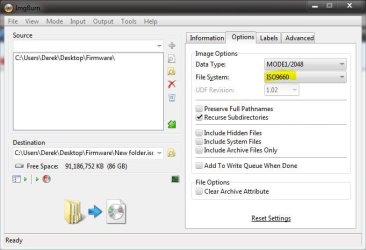
Then select your source (put the PANA_DVD.FRM in an empty folder) and destination folders, and under the options tab change the file type to ISO9660 (Stated in the instructions from Panasonic)

How to burn a Pana_DVD.frm firmware update file in .iso... format?-options.jpg

It will ask you if you just want the contents of the folder in the image file, yes.

It only takes a few seconds to create the ISO, then you can burn that to a CD with imgburn or windows.
My System SpecsSystem Spec
.


02 Aug 2012   #4

Windows 7 Pro (32)


Quote   Quote: Originally Posted by Ztruker View Post
What instructions are provided at the Panasonic web site? Can you give us a link to where you downloaded the firmware update from?
This is the firmware link for my DMP-BDT210-
DMP-BDT110/111/210/215/310 Firmware Download | Download | Blu-ray Disc Player/Recorder | Digital AV | Consumer Products | Support | Panasonic Global

This the link for their installation .pdf-
http://panasonic.jp/support/global/c..._Procedure.pdf
The problem here is that it deals mostly with XP...

I also tried calling Pany's Clueless Tech Support (5 times), and they were No help with Win 7?
My System SpecsSystem Spec
02 Aug 2012   #5

Windows 7 Pro 64 SP1
East Bay Area, CA


The same method I posted above will work for the link you just posted.

I made the ISO twice while I was posting above.
My System SpecsSystem Spec
02 Aug 2012   #6

Windows 7 Pro (32)
 
 
Updated without making it ISO...!

This time I downloaded the .exe file from, Panasonic North America Support (instead of Global compressed file), and saved it to Desktop (instead of a Desktop Folder) -
Pansonic Product Support - DMP-BDT210

I then burned the .ini & .RAR file"s" to my blank CD (No ISO, and Close when Finished ticked), per the NA .pdf instructions...-
http://shop.panasonic.com/docs/firmw...RM-INSTALL.pdf

Installed in about 10min, and my Blu-Ray player is working Good!

Last edited by scottls59901; 03 Aug 2012 at 02:19 PM..
My System SpecsSystem Spec
02 Aug 2012   #7

Windows 7 Pro 64 SP1
East Bay Area, CA


Glad you got it, happy viewing.
My System SpecsSystem Spec
Reply

 How to burn a Pana_DVD.frm firmware update file in .iso... format? problems?


Thread Tools


Similar help and support threads for: How to burn a Pana_DVD.frm firmware update file in .iso... format?
Thread Forum
update firmware Drivers
OCZ SSD Firmware update for... Hardware & Devices
TV Tuners: What file format and can I burn to DVD? Media Center
How can I burn a CD in ISO9660 format under Windows 7? General Discussion


All times are GMT -5. The time now is 05:33 PM.


Seven Forums Android App Seven Forums IOS App Follow us on Facebook

Windows 7 Forums is an independent web site and has not been authorized,
sponsored, or otherwise approved by Microsoft Corporation.
"Windows 7" and related materials are trademarks of Microsoft Corp.
© Designer Media Ltd
  

1 2 3 4 5 6 7 8 9 10 11 12 13 14 15 16 17 18 19 20 21 22 23 24 25 26 27 28 29 30 31 32