| Windows 7: same computer x-64 3.75GB Usable x-86 2.75GB useable |
11 Aug 2012
|
#1 | | W7 X-64 RTM,SUSE 11.1, XP PRO SP3 as a VM, VMware ESXi Hafnarfjörður IS |
same computer x-64 3.75GB Usable x-86 2.75GB useable Hi there
installed Windows 7 Enterprise on a netbook equipped with 4GB RAM. Before installing ANY updates / drivers etc I noticed that on Windows 7 X-64 the computer showed 3.75GB of Ram was useable. On the X-86 version at the same stage of installation it showed that 2.75 GB of Ram was useable.
Any Gurus out there -- why is x-86 saying to me it has less memory over than the X-64 system -- computer hasn't changed in the slightest -- this was immediately after install and before any hardware specific drivers etc were installed.
Cheers
jimbo | My System Specs |
| System Manufacturer/Model Number Custom built OS W7 X-64 RTM,SUSE 11.1, XP PRO SP3 as a VM, VMware ESXi CPU Q9400 QUAD Motherboard P5QL-CM Memory 8GB Graphics Card On Motherborad Sound Card Realtek HD audio Monitor(s) Displays Apple Cinema display Mouse Toshiba wireless laser Hard Drives 4 X 1TB SATA Internet Speed > 20MB up |
11 Aug 2012
|
#2 | | Windows 7 Home Premium x64 SP1 Arkansas |
64 but version of windows can use 4gb or more of ram the 32 (86) bit version cannot. That is why you r seeing a big difference in allotted ram. | My System Specs | | System Manufacturer/Model Number ASUSTeK Computer/ ASUS Notebook U52F Series OS Windows 7 Home Premium x64 SP1 CPU DualCore Intel Core i3-380M 2.53GHz Memory 4.00 Graphics Card Intel(R) HD Graphics Monitor(s) Displays 15.6" Screen Resolution 1360x768 Hard Drives 596 GB, IDE Internet Speed 16MB Other Info Wireless LAN adapter: Intel(R) Centrino(R) Advanced-N 6250 AGN
Ethernet adapter: Atheros AR8131 PCI-E Gigabit Ethernet Controller |
12 Aug 2012
|
#3 | | W7 X-64 RTM,SUSE 11.1, XP PRO SP3 as a VM, VMware ESXi Hafnarfjörður IS |

Quote: Originally Posted by Grego86 64 but version of windows can use 4gb or more of ram the 32 (86) bit version cannot. That is why you r seeing a big difference in allotted ram.
Hi there
however the computer ONLY has 4GB of RAM so presumably Windows 7 x-86 can also use the full 4GB.
That's why I'm confused -- If I had installed MORE than 4GB of RAM then yet I would expect a difference in Windows 7 x-86.
Anyway it shows that even if you only have 4GB of RAM in your computer you should install the 64 bit version.
Cheers
jimbo | My System Specs | | System Manufacturer/Model Number Custom built OS W7 X-64 RTM,SUSE 11.1, XP PRO SP3 as a VM, VMware ESXi CPU Q9400 QUAD Motherboard P5QL-CM Memory 8GB Graphics Card On Motherborad Sound Card Realtek HD audio Monitor(s) Displays Apple Cinema display Mouse Toshiba wireless laser Hard Drives 4 X 1TB SATA Internet Speed > 20MB up |
13 Aug 2012
|
#4 | | Windows 7 Home Premium x64 SP1 Arkansas |
I apologize I was wrong x86 can use up to 4gb and x64 can use 4gb+ I found a chart that lays it out for ya. Memory Limits for Windows Releases | My System Specs | | System Manufacturer/Model Number ASUSTeK Computer/ ASUS Notebook U52F Series OS Windows 7 Home Premium x64 SP1 CPU DualCore Intel Core i3-380M 2.53GHz Memory 4.00 Graphics Card Intel(R) HD Graphics Monitor(s) Displays 15.6" Screen Resolution 1360x768 Hard Drives 596 GB, IDE Internet Speed 16MB Other Info Wireless LAN adapter: Intel(R) Centrino(R) Advanced-N 6250 AGN
Ethernet adapter: Atheros AR8131 PCI-E Gigabit Ethernet Controller |
13 Aug 2012
|
#5 | | Windows 7 Ultimate 64-bit SP1 New Jersey |
It`s all about what your motherboard will support, whether it`s 32 or 64 bit. | My System Specs | | Computer type PC/Desktop System Manufacturer/Model Number Custom Built by Me ! OS Windows 7 Ultimate 64-bit SP1 CPU Intel Core i5 3570k @ 4.0 GHz Motherboard MSI Z77A-G45 Memory 16GB Corsair Vengeance @ 1600 MHz 10-10-10-27 Graphics Card MSI GTX660 Twin Frozr3 OC Sound Card Realtek HD Monitor(s) Displays Dell 19" HP 23" Sony Bravia 40" Screen Resolution 1920 x 1080 Keyboard Fellowes KWD 855 Mouse Microsoft Wireless PSU Corsair HX750 80+Gold Case Corsair Vengeance Series C70 Gun Metal Black Cooling Cooler Master Hyper N520, Arctic Alumina Thermal Compound Hard Drives OCZ Vertex 4 119GB SSD,
WD Black 500, Blue 500, Caviar SE 320 x 2 Internet Speed Download 25.81 Mbps Upload 5.07 Mbps Antivirus MSE MBAM Browser Chromium Other Info Boston BA745 2.1 Speaker System, Lightscribe Dual Layer DVD Burner |
13 Aug 2012
|
#6 | | Win 7 Pro x64 SP1, Win 7 Ult x86 SP1 NC, USA |
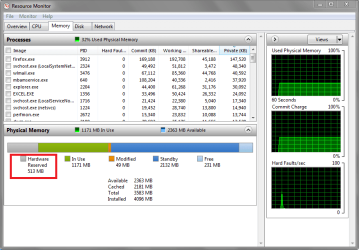
It's possible to change the amount of usable memory in a Win 32 bit OS depending on the settings in BIOS.
I don't know how much and what you can change in BIOS with a netbook.
I look through the BIOS settings available, try different settings, and check the results in Windows.
For the system i am using for the screen prints, i have an IGP (integrated Graphics) and a dedicated GPU.
I can and did disable the IGP in BIOS for this desktop MB, so there is no 'hardware reserved' needed by the IGP.
I can also adjust the amount of memory used by the IGP if i want to use the IGP.
On this MB i have had usable memory at 2.75GB, and now have it at 3.50GB by making BIOS adjustments.
It may be your netbook will perform better with more memory allocated to video rather than usable by Windows.
My guess is it depends on how you use the netbook, and what programs you run most often.
You would need to see what you can do with the netbook BIOS settings, and decide what works best.
Look for any adjustments in BIOS than can change memory allocations such as
- IGP video memory settings
- Memory remapping
hth,
David | My System Specs | | Computer type PC/Desktop System Manufacturer/Model Number home built OS Win 7 Pro x64 SP1, Win 7 Ult x86 SP1 CPU AMD Athlon II x4 620 Motherboard Gigabyte GA-MA785G-UD3H Memory 6GB GSkill DDR2 800 Graphics Card AMD 4670 GPU + AMD 4200 IGP Sound Card on board Realtek ALC889A Monitor(s) Displays RCA 40" LCD TV, Insignia 32" LCD TV, HP 15" LCD monitor Screen Resolution 1680 x 1050... Keyboard Gyration wireless, Logitech wireless, Dell USB wired Mouse Gyration wireless, Logitech wireless, V7 USB wired PSU Corsair 500 W Case Rosewill mid tower Cooling CM 90mm Tower Hard Drives OCZ Vertex 3 120GB,
Samsung F3 1TB (3),
Several others - WD, Seagate, Hitachi, ... Internet Speed Uverse - 12Mbps D / 1.5Mbps U Antivirus Avast free OR MSE. (+ MBAM Pro). Browser 1-Firefox, 2-IE. (Chrome and Opera for testing) Other Info 2 PCs: Primary: dual-boot, Test: triple-boot.
Mainly HTPC/Gen purpose (no gaming).
Trendnet USB KVM.
LG DVD burner/Blue Ray Player.
Tray system for removable SATA backup drives.
Not currently OCd, under-volted.
I use Hybrid sleep, rarely re-boot or shutdown.
Hauppauge HD-PVR, Avermedia PCIe TV Tuner, Hauppauge PCI TV Tuner. |
13 Aug 2012
|
#7 | | Win 7 Ultimate x64 Etobicoke, Ontario |
Jimbo what is the make/model/specs of the laptop? | My System Specs | | System Manufacturer/Model Number Me OS Win 7 Ultimate x64 CPU Phenom II x4 955 @ 4 GHz. Motherboard Asus M5A97 EVO Memory 2x2 GB Kingston HyperX DDR3 1600 Graphics Card Sapphire HD 6850 Sound Card Xonar DGX w/ Logitech X-530 Monitor(s) Displays Acer S232HL Abid Screen Resolution 1920x1080 Keyboard Logitech Wave Mouse Logitech G5 v2 PSU Antec Earthwatts 650W Green Case Antec Three Hundred Cooling Cooler Master 212 EVO Hard Drives 120 GB OCZ Vertex 3
500 GB Seagate 7200.12 Internet Speed 24000/1000 |
13 Aug 2012
|
#8 | | Vista, Windows7, Mint Mate, Zorin, Windows 8 Florida in winter, Black Forest/Germany |
It is not a matter of RAM per se - it is a matter of address space. In 64bit you have plenty of address space and any space requirement will not restrict the 4GBs. But in 32bit, all address space requests have to be honored within the 4GB limit.
It sounds like you have a hardware component that needs 1GB of extra address space - maybe a graphics facility. In 64bit you won't see it but in 32bit it takes the space from withing the 4GB. | My System Specs | | System Manufacturer/Model Number HP, Dell, Gateway, Toshiba - 4 laptops and 2 desktops OS Vista, Windows7, Mint Mate, Zorin, Windows 8 CPU from 1.6GHz Duo to i7 Monitor(s) Displays 2x HP w2207 Keyboard with trackball - no mices Mouse Trackball mice Hard Drives 5x HDD, 7x SSD, 12x Externals Internet Speed DSL 6000 |
13 Aug 2012
|
#9 | | Win 7 Pro x64 SP1, Win 7 Ult x86 SP1 NC, USA |

Quote: Originally Posted by whs It is not a matter of RAM per se - it is a matter of address space. In 64bit you have plenty of address space and any space requirement will not restrict the 4GBs. But in 32bit, all address space requests have to be honored within the 4GB limit.
It sounds like you have a hardware component that needs 1GB of extra address space - maybe a graphics facility. In 64bit you won't see it but in 32bit it takes the space from withing the 4GB. nicely explained and well said ! | My System Specs | | Computer type PC/Desktop System Manufacturer/Model Number home built OS Win 7 Pro x64 SP1, Win 7 Ult x86 SP1 CPU AMD Athlon II x4 620 Motherboard Gigabyte GA-MA785G-UD3H Memory 6GB GSkill DDR2 800 Graphics Card AMD 4670 GPU + AMD 4200 IGP Sound Card on board Realtek ALC889A Monitor(s) Displays RCA 40" LCD TV, Insignia 32" LCD TV, HP 15" LCD monitor Screen Resolution 1680 x 1050... Keyboard Gyration wireless, Logitech wireless, Dell USB wired Mouse Gyration wireless, Logitech wireless, V7 USB wired PSU Corsair 500 W Case Rosewill mid tower Cooling CM 90mm Tower Hard Drives OCZ Vertex 3 120GB,
Samsung F3 1TB (3),
Several others - WD, Seagate, Hitachi, ... Internet Speed Uverse - 12Mbps D / 1.5Mbps U Antivirus Avast free OR MSE. (+ MBAM Pro). Browser 1-Firefox, 2-IE. (Chrome and Opera for testing) Other Info 2 PCs: Primary: dual-boot, Test: triple-boot.
Mainly HTPC/Gen purpose (no gaming).
Trendnet USB KVM.
LG DVD burner/Blue Ray Player.
Tray system for removable SATA backup drives.
Not currently OCd, under-volted.
I use Hybrid sleep, rarely re-boot or shutdown.
Hauppauge HD-PVR, Avermedia PCIe TV Tuner, Hauppauge PCI TV Tuner. |
13 Aug 2012
|
#10 | | W7 X-64 RTM,SUSE 11.1, XP PRO SP3 as a VM, VMware ESXi Hafnarfjörður IS |
Thanks everyone
Anyway it shows that even on a sub 350 USD netbook if you've 4GB RAM then it's always worth installing the 64 bit OS.
BTW STILL even in these days of tablets etc don't underestimate the usefulness of Netbooks -- still a viable part of Computing on the Go
(Netbook an Acer Aspire 1 with 4GB RAM fitted and HDD swapped for an SSD. Model nr AOS521)
Not the fastest performer in the world but with the mods described perfectly "fit for purpose" for about 80% of what I need to do when I'm travelling -- and it also has full HDMI out for watching DVD's / Movies etc. Even gives passable output on a 50 inch screen. !!!
Cheers
jimbo | My System Specs | | System Manufacturer/Model Number Custom built OS W7 X-64 RTM,SUSE 11.1, XP PRO SP3 as a VM, VMware ESXi CPU Q9400 QUAD Motherboard P5QL-CM Memory 8GB Graphics Card On Motherborad Sound Card Realtek HD audio Monitor(s) Displays Apple Cinema display Mouse Toshiba wireless laser Hard Drives 4 X 1TB SATA Internet Speed > 20MB up same computer x-64 3.75GB Usable x-86 2.75GB useable problems? All times are GMT -5. The time now is 04:05 PM. | |