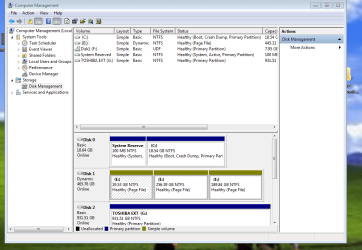
I am trying to format my E drive and convert the dynamic drive to a basic drive. I then want to Extend the C drive with this space. Can anyone please help? The format option for the E drive is grayed out. I attached a photo.
Ah ok, i was hoping i could take space from E and add it to C. Looks like I should buy a different PC. I tried installing the new Max Payne to E and then running it but it kept giving me errors. Thank you for the help though. I appreciate it.
Why not convert Disk1 to Basic and Clean Install Win7 on there to have much more space to work with?
To do this back up your data on the HD, wipe it with the convert command in Brink's tutorial, then boot the WIn7 installer to Clean Reinstall - Factory OEM Windows 7 which steps are the same for retail.
You'd want to unplug the other HD first before doing this, set Disk1 first to boot in BIOS setup, or swap the DIsk0 data cable to it. Afterwards plug back in Disk0 to access it's data, boot it using one-time BIOS Boot menu key, or wipe it with Diskpart Clean Command to repartition in Disk Mgmt as you please.