Windows 7 Forums


Windows 7: strange "residue" on taskbar

20 Aug 2012   #1

Windows 7 Ultimate x64
Warsaw, Poland
 
 
strange "residue" on taskbar

I'm using Windows 7 Ultimate x64 with classic theme and NVidia 450GTS with latest drivers.
I have this strange behaviour with taskbar. For example:

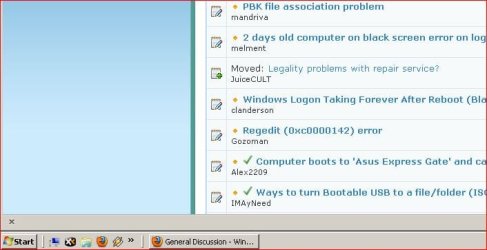
pic.1 - everything looks good
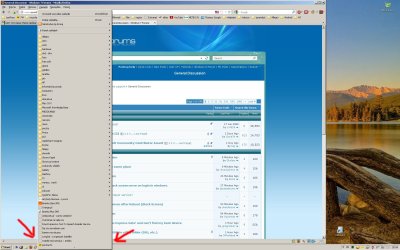
pic.2 - expand firefox bookmarks which cover taskbar area
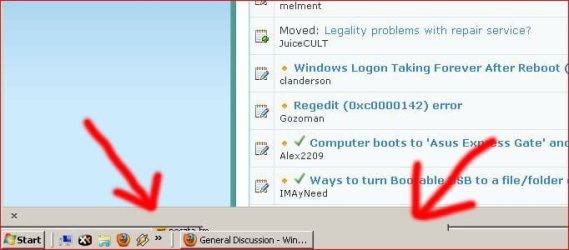
pic.3 - a little remnant remains on taskbar

anybody meets that problem? is this a graphic driver? I have no idea. there is a quite fresh system installation, about two weeks ago.

that happens also in "Win 7 Basic" theme but not i Aero. When Aero is ON everything is good. But I don't want Aero.

Attached Thumbnails
strange "residue" on taskbar-1.jpg   strange "residue" on taskbar-2.jpg   strange "residue" on taskbar-3.jpg  
My System SpecsSystem Spec

20 Aug 2012   #2

Windows 7 Home Edition 64 Bit


Welcome to the forum.
  1. Click on the firefox tab
  2. Click on Options Options
  3. Go to the Advanced tab
  4. Unselect Use hardware accelerations when available
  5. Restart firefox. See if the problem goes.
Keep us posted.
My System SpecsSystem Spec
20 Aug 2012   #3

Windows 7 Ultimate x64
Warsaw, Poland


Big thanks for that clue!
After disabling hardware acceleration in FF everything seems good

Thanks again!
My System SpecsSystem Spec
.


20 Aug 2012   #4

Windows 7 Home Edition 64 Bit


Good to know!

You can mark the thread as solved
My System SpecsSystem Spec
20 Aug 2012   #5

Windows 7 x64 (SP1)


Why do you not want Aero?
My System SpecsSystem Spec
20 Aug 2012   #6

Windows 7 Ultimate x64
Warsaw, Poland


Because i'm "old school" user ;-) Just an old habit, I also used classic theme on XP at work and at home (before Windows 7)
My System SpecsSystem Spec
20 Aug 2012   #7

Windows 7 x64 (SP1)


Seems quite a waste, your graphics card has all this power that Aero takes advantage of...but you rather put the burden of UI on your CPU...rethinking your old habit would be of benefit. With Aero almost the whole UI resides on the GPU and in video memory. Without Aero, the UI is handled by the CPU.
My System SpecsSystem Spec
20 Aug 2012   #8

Win7 Pro SP1 32-bit
W. Mass.


I have had that "residue" with FF and Classic Theme as well. Gonna have to see if online video plays properly with acceleration disabled.
UPDATE: Okay, no, video does not play back properly with FF acceleration switched off. Loss of audio sync. I'll live with the residue until I relaunch FF.

Last edited by OvenMaster; 20 Aug 2012 at 10:20 PM..
My System SpecsSystem Spec
21 Aug 2012   #9

Windows 7 Ultimate x64
Warsaw, Poland


Just checked YouTube video with and without acceleration in FF. On my system there is no differences. I played 1080p clip and is EXACTLY the same cpu load. But there's a strange thing that cpu load is smaller on full screen than normal play in YouTube window. On full screen 1080p clip is play under 5% cpu load (typically 3-5%) and in window (no matter smaller or bigger window) cpu load is 8-10% - so I leave acceleration off.
My System SpecsSystem Spec
21 Aug 2012   #10

Windows 7 x64
Houston


Honestly I think you are being ridiculous to even sweat this.
Your system specs are very close to mine.
I don't understand why you are jumping through hoops for this. I really don't.
I run full aero and can still play any game title on the market maxed without trouble.
About the only thing I don't use is wallpaper. I think it's useless. I just set the background to black.
My System SpecsSystem Spec
Reply

 strange "residue" on taskbar problems?


Thread Tools


Similar help and support threads for: strange "residue" on taskbar
Thread Forum
My c:\windows folder has a couple of strange files: "Dõ„" and "@ù#" General Discussion
Changing the "minimize" "maximize" and "close" buttons of a theme Customization
Taskbar icons with custom lists, or different taskbar "modes"? Customization
Wierd "error loading OS" problem, strange keyboard prob Hardware & Devices
Taskbar "Aways Combine" & "Combine when full" shortcut? Customization


All times are GMT -5. The time now is 12:19 AM.


Windows 7 Forums is an independent web site and has not been authorized,
sponsored, or otherwise approved by Microsoft Corporation.
"Windows 7" and related materials are trademarks of Microsoft Corp.
© Designer Media Ltd