Windows 7 Forums


Windows 7: Can't Access Important Partition

23 Aug 2012   #1

Windows 8 Enterprise x64
Near Dallas
 
 
Can't Access Important Partition

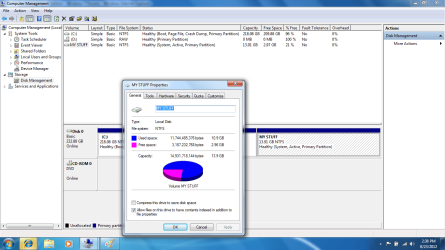
Okay, my Windows 7 Ultimate x86 decided to stop booting, and after I tried some recovery options, I just resinstalled. I did as I've done many times, and the install was fine. Now, I go to Start>My Computer> My Stuff Partition, where my drivers and IMPORTANT FILES are saved. I have reinstalled like this many times, and no problems. My data on the partition was there, without doing anything. So, I searched on the Internet, and saw that it might have to do with not being the owner, and I went to Disk Managment and did that. Still not working. The thing is, in disk managment, I can see my partition with the label, and I can right click>properties and see how much of the partition is being used. I just can't access it. So, please, amazing seven forums community, HELP ME! I am and right now.

Attached Thumbnails
Can't Access Important Partition-disk.png  
My System SpecsSystem Spec

23 Aug 2012   #2

Win7 x 6 PC's
California, Florida, Boston


Give the partition a Drive letter in Disk Mgmt so Explorer can access it: Drive Letter - Add, Change, or Remove in Windows 7 - Windows 7 Forums

You need a backup solution as running without it is reckless. Sort your data into User folders, drag them to DVD, External HD, another computer on the network, or upload up to 7gb free storage to the cloud with each Windows Live ID using Skydrive. YOu can even sync your User folders to Skydrive and back down to your other machines and devices using Sync Any Folder to Your SkyDrive Account. Or access them on the internet from any computer.
My System SpecsSystem Spec
23 Aug 2012   #3

Windows 8 Enterprise x64
Near Dallas


Quote   Quote: Originally Posted by gregrocker View Post
Give the partition a Drive letter in Disk Mgmt so Explorer can access it: Drive Letter - Add, Change, or Remove in Windows 7 - Windows 7 Forums

You need a backup solution as running without it is reckless. Sort your data into User folders, drag them to DVD, External HD, another computer on the network, or upload up to 7gb free storage to the cloud with each Windows Live ID using Skydrive. YOu can even sync your User folders to Skydrive and back down to your other machines and devices using Sync Any Folder to Your SkyDrive Account. Or access them on the internet from any computer.
My holy Lord, thank you, thank you, THANK YOU! I almost had a heart attack. Never again will I not backup my files. I just bought a 32 GB flash drive. Plan on getting an external hard drive. Once again, thank you! Rep will be given as deserved.
EDIT: Can't give you rep, as I repped you a few days ago, but, thank you.
My System SpecsSystem Spec
.


23 Aug 2012   #4
mgo

win7 ultimate 64bit


I notice there is no drive letter assigned to that partition. Try the followind:
  1. Open Computer Management (Local).
  2. In the console tree, click Computer Management (Local), click Storage, and then click Disk Management.
  3. Right-click a partition, logical drive, or volume, and then click Change Drive Letter and Paths.
  4. Do one of the following:
    • To assign a drive letter, click Add, click the drive letter you want to use, and then click OK.
This information is from:

Assign, change, or remove a drive letter: Storage Services; Local File Systems

Hope this helps...
My System SpecsSystem Spec
23 Aug 2012   #5

Windows 8 Enterprise x64
Near Dallas


Quote   Quote: Originally Posted by mgo View Post
I notice there is no drive letter assigned to that partition. Try the followind:
  1. Open Computer Management (Local).
  2. In the console tree, click Computer Management (Local), click Storage, and then click Disk Management.
  3. Right-click a partition, logical drive, or volume, and then click Change Drive Letter and Paths.
  4. Do one of the following:
    • To assign a drive letter, click Add, click the drive letter you want to use, and then click OK.
This information is from:

Assign, change, or remove a drive letter: Storage Services; Local File Systems

Hope this helps...
It helps, (exactly what I did, see above ) but, rep will be given.
My System SpecsSystem Spec
Reply

 Can't Access Important Partition problems?


Thread Tools


Similar help and support threads for: Can't Access Important Partition
Thread Forum
Can OS partition access a dual boot partition if encrypted w/Bitlocker General Discussion
How important is it to use a third-party firewall or access control? System Security
Partition Access Denied General Discussion
Solved Partition appeared from no where (no access) Hardware & Devices
Second Partition Access Denied General Discussion


All times are GMT -5. The time now is 08:09 AM.


Seven Forums Android App Seven Forums IOS App Follow us on Facebook

Windows 7 Forums is an independent web site and has not been authorized,
sponsored, or otherwise approved by Microsoft Corporation.
"Windows 7" and related materials are trademarks of Microsoft Corp.
© Designer Media Ltd
  

1 2 3 4 5 6 7 8 9 10 11 12 13 14 15 16 17 18 19 20 21 22 23 24 25 26 27 28 29 30 31 32