- Local time
- 9:47 PM
- Messages
- 7,877
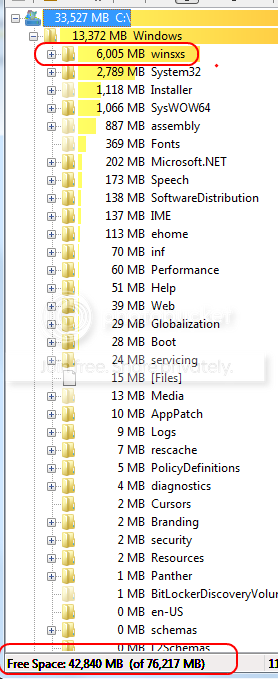
I've seen a recurring post on many forums discussing the absurd amount of disk space being consumed by the C:\Windows\WinSXS folder.
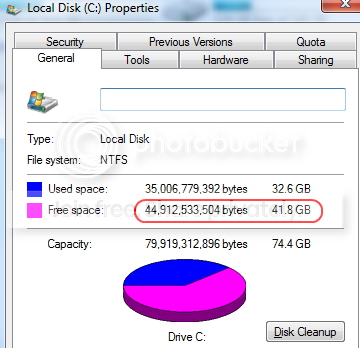
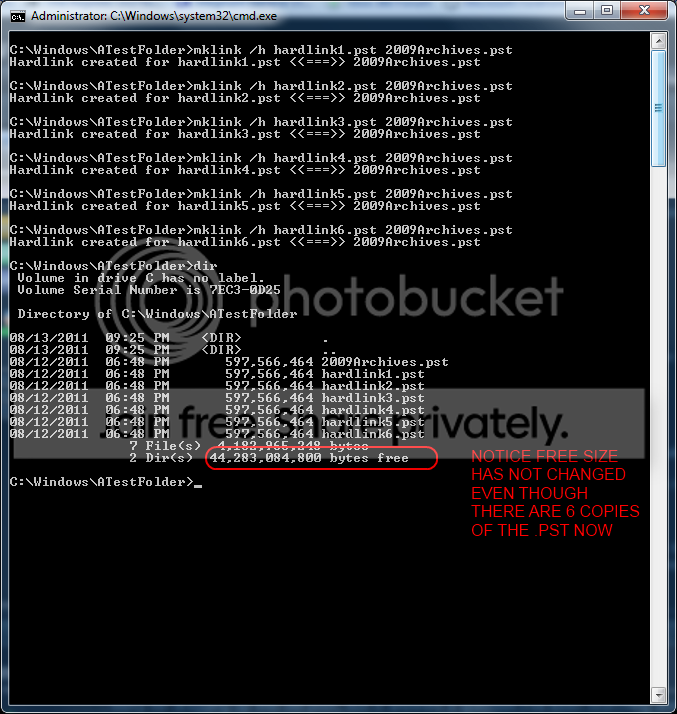
I've done some testing in house to confirm the fact that the files in this folder are predominantly hard links to a small number of files and it's not really taking up anywhere near the space that Windows Explorer is reporting.
Here is a link to better explain what I am talking about:
WinSxS Disk Space Usage: It’s Not What You Think (David's Blog)
Here was my conclusive test:
1). I took a virtual machine and created a new 200MB hard drive that I assigned the drive letter E:
2). I created a subfolder on E: called WinSXS. So, I had E:\WinSXS
3). I copied in a 13MB zip file into E:\WinSXS.
4). I then created 20 hard links to that zip file with the command shown in the link above (mklink /h hardlink#.zip original file
5). According to Windows Explorer, E:\WinSXS is now 267MB in size.....even though the entire E drive is only 200MB.
6). From a cmd prompt, running dir on E:\ shows 174,543,872 bytes free.
Therefore, tools like Windows explorer and TreeSizePro will report that that WinSXS folder is consuming massive amounts of space....while the true fact is that the folder is being misrepresented because the reporting tools do not understand the difference between hardlinks and real files.
I've done some testing in house to confirm the fact that the files in this folder are predominantly hard links to a small number of files and it's not really taking up anywhere near the space that Windows Explorer is reporting.
Here is a link to better explain what I am talking about:
WinSxS Disk Space Usage: It’s Not What You Think (David's Blog)
Here was my conclusive test:
1). I took a virtual machine and created a new 200MB hard drive that I assigned the drive letter E:
2). I created a subfolder on E: called WinSXS. So, I had E:\WinSXS
3). I copied in a 13MB zip file into E:\WinSXS.
4). I then created 20 hard links to that zip file with the command shown in the link above (mklink /h hardlink#.zip original file
5). According to Windows Explorer, E:\WinSXS is now 267MB in size.....even though the entire E drive is only 200MB.
6). From a cmd prompt, running dir on E:\ shows 174,543,872 bytes free.
Therefore, tools like Windows explorer and TreeSizePro will report that that WinSXS folder is consuming massive amounts of space....while the true fact is that the folder is being misrepresented because the reporting tools do not understand the difference between hardlinks and real files.
My Computer
At a glance
Windows 7 Ultimate x64Intel Q9550 2.83Ghz OC'd to 3.40Ghz8GB G.Skill PI DDR2-800, 4-4-4-12 timingsEVGA 1280MB Nvidia GeForce GTX570
- Computer Manufacturer/Model Number
- Self-Built in July 2009
- OS
- Windows 7 Ultimate x64
- CPU
- Intel Q9550 2.83Ghz OC'd to 3.40Ghz
- Motherboard
- Gigabyte GA-EP45-UD3R rev. 1.1, F12 BIOS
- Memory
- 8GB G.Skill PI DDR2-800, 4-4-4-12 timings
- Graphics Card(s)
- EVGA 1280MB Nvidia GeForce GTX570
- Sound Card
- Realtek ALC899A 8 channel onboard audio
- Monitor(s) Displays
- 23" Acer x233H
- Screen Resolution
- 1920x1080
- Hard Drives
- Intel X25-M 80GB Gen 2 SSD
Western Digital 1TB Caviar Black, 32MB cache. WD1001FALS
- PSU
- Corsair 620HX modular
- Case
- Antec P182
- Cooling
- stock
- Keyboard
- ABS M1 Mechanical
- Mouse
- Logitech G9 Laser Mouse
- Internet Speed
- 15/2 cable modem
- Other Info
- Windows and Linux enthusiast. Logitech G35 Headset.