Windows 7 Forums


Windows 7: How to default windows 7 keyboard setting?

28 Aug 2012   #1

Windows 7 Home Premium 64bit
Phuket
 
 
How to default windows 7 keyboard setting?

Four weeks ago I changed my laptop, then I gave my old laptop to my family as a public laptop. But today I must use that laptop, so I found an issue. I can't type some key with shift key. When I hold shift key and press "-" key, or "=" key, there's no "_" and "+" key following. but I can't type "_" when press "-" after I put my finger of shift key.
It's really annoying. So I want to know how to default it or fix it. Anyone help me please?
Sorry for my bad English, and Advance thanks!

My System SpecsSystem Spec

29 Aug 2012   #2

Win 7 Pro x64
Council Bluffs, Iowa


This is just a guess on my part, do you have sticky keys turned on?
Using StickyKeys - Microsoft Windows
Jerry
My System SpecsSystem Spec
29 Aug 2012   #3

Windows 7 Home Premium 64bit
Phuket


No, but when I do I still have this problem.
My System SpecsSystem Spec
.


29 Aug 2012   #4

Windows 7 Pro X64
Space Coast of Florida


Check the Keyboard layout. It is probably set to English (United States) US. Perhaps it needs to be changes to your language?

Control Panel, Regional and Language, Keyboares and Languages tab.
My System SpecsSystem Spec
30 Aug 2012   #5

Windows 7 Home Premium 64bit
Phuket


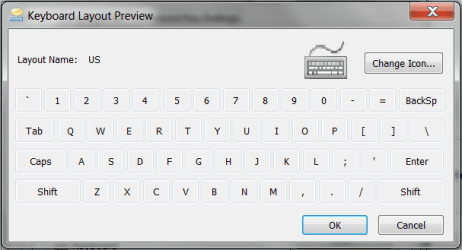
My default language's English(US), and the layout is still look like the way it is. Here's a picture http://www.sevenforums.com/attachmen...1&d=1346327495 . What should I do next?
Attached Thumbnails
How to default windows 7 keyboard setting?-layout.png  
My System SpecsSystem Spec
30 Aug 2012   #6

Windows 7 Pro X64
Space Coast of Florida


Maybe the keyboard is defective? Try connecting an external keyboard, see if that works.
My System SpecsSystem Spec
30 Aug 2012   #7

Windows 7 Home Premium 64bit
Phuket


No, I think. I can still type normally, but I must hold shift and hold a key, then remove holding shift again for typing it.
My System SpecsSystem Spec
01 Sep 2012   #8

Windows 7 Pro X64
Space Coast of Florida


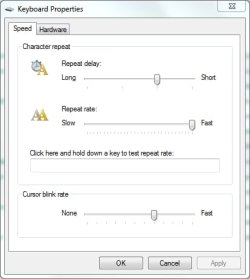
Check the Keyboard repeat settings in Control Panel / Keyboard.

Mine looks like this:

How to default windows 7 keyboard setting?-keyboard-properties.jpg
My System SpecsSystem Spec
Reply

 How to default windows 7 keyboard setting? problems?


Thread Tools


Similar help and support threads for: How to default windows 7 keyboard setting?
Thread Forum
Solved How do I reset all the fonts setting to Windows 7 default? General Discussion
Setting the default e-mail? Browsers & Mail
Setting font default in WLM Browsers & Mail
Title bar default setting General Discussion
Need help setting a default drive Browsers & Mail


All times are GMT -5. The time now is 08:38 AM.


Seven Forums Android App Seven Forums IOS App Follow us on Facebook

Windows 7 Forums is an independent web site and has not been authorized,
sponsored, or otherwise approved by Microsoft Corporation.
"Windows 7" and related materials are trademarks of Microsoft Corp.
© Designer Media Ltd
  

1 2 3 4 5 6 7 8 9 10 11 12 13 14 15 16 17 18 19 20 21 22 23 24 25 26 27 28 29 30 31 32