Windows 7 Forums Search
Welcome to Windows 7 Forums. Our forum is dedicated to helping you find solutions with any problems, errors or issues you are experiencing with Windows 7. The Windows 7 forum also covers news and updates and has an extensive Windows 7 tutorial section that covers a wide range of tips and tricks.


Windows 7 - Can't clear history of Taskbar's Address Toolbar


09-15-2009   #1


Windows 7 Ultimate


Can't clear history of Taskbar's Address Toolbar

Edit:

This has been solved.


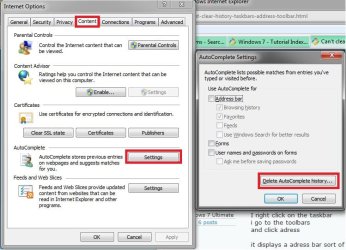
I wanted to know if there was a way to clear the history out of the adress toolbar from the taskbar.

Here is what i mean

I right click on the taskbar
i go to the toolbars
and click adress

it displays a adress bar sort of like google gadgets

the only problem i am having is that i want to clear some of the searches of websites i typed in their

i have cleared all my history and
cookies and temporary files in both Firefox and internet explorer

if anyone could help me
it would be greatly appreciated.

this is an annoyance i want to solve.

thank you for your time and help in advanced.

=]

here is an image of what i am taking about.

soryy i didnt post it before.


Last edited by xladieexo; 09-15-2009 at 11:28 PM..
My System SpecsSystem Spec
09-15-2009   #2


Windows 7 Ultimate 32bit SP1


When you hover your mouse over the URL, is there a red X next to it? If there is, then click the X to delete it.

Oh, wait .... I'm talking about typed URL's in the Address bar at the top of the Windows screen.
My System SpecsSystem Spec
09-15-2009   #3


Windows 7 Ultimate


No there isnt unfortunately.

when i hover my mouse over the url or search term all i get is this.


i click delete on my keboard but nothing happens

and i try to right click and see if i get any options but nothing comes up.

=[
My System SpecsSystem Spec
.


09-15-2009   #4


Nirs Sofer (NirSoft) has written some of the most reliable and awesome tools available. Try his classic tool.

IE HistoryView: Freeware Internet Explorer History Viewer

In IEHistoryView, you can select the history folder (By default, it gives the current user’s history folder).

If you want to see the typed URLs of Internet Explorer, just go to view –> show typed URLs.

This software it displays the number of visits for every URL. It also shows the user which has accessed the URL.
My System SpecsSystem Spec
09-15-2009   #5


Windows 7 Ultimate


unfortunately that did not work either. =[

here is a video of me trying to explain it to the best of my ability.

View My Video
My System SpecsSystem Spec
09-15-2009   #6


HKEY_CURRENT_USER\Software\Microsoft\Internet Explorer\TypedURLs

Belay that.

Is this a job for CCleaner? http://www.ccleaner.com/
My System SpecsSystem Spec
09-15-2009   #7


Viewing History
  • Microsoft Internet Explorer 7 and above users can view their history files by clicking the "Tools" menu, "Internet Options", clicking the "Settings" button under the Browsing history, and then clicking the "View Files" button.
  • Microsoft Internet Explorer 6.x users can view their history files by clicking the "Tools" menu, "Internet Options", clicking the "Settings" button, and then clicking the "View Files" button.
Deleting History
  • Microsoft Windows users running Microsoft Internet Explorer 6.x and 7.x can delete their history files by clicking the "Tools" menu, "Internet Options", and clicking the "Delete Files" or "Delete" button. Users also have the option of automatically deleting files each time the close the browser window by clicking the "Advanced" tab and checking "Empty Temporary Internet Files folder when browser is closed" under the "Security" section.
  • Microsoft Internet Explorer 4.x users on an Apple Macintosh can delete the history by clicking the "Hard Drive" icon, "System", "Preferences", "Explorer", and moving the history file into the trash.
  • Microsoft Internet Explorer 3.02 and lower users can delete their history by clicking the "View" menu, "Options", open the tab "Advanced", click the "Settings" tab, and click the "Empty Folder" button.
My System SpecsSystem Spec
09-15-2009   #8


Windows 7 Ultimate 32bit SP1


HKEY_CURRENT_USER\Software\Microsoft\Internet Explorer\TypedURLs

That works in Vista, but not Win 7. ^^^

Here's a small cleaner I use. It says it's for XP, but it works with both Vista and Windows7:
ATF Cleaner ATF-Cleaner.exe - www.atribune.org
Click "Main" > check 'select all' (except 'Prefetch') this first time using it, then click "Empty Selected". Do the same for FireFox and Opera if you use either of those browsers.

You can use CCleaner along with this app.
My System SpecsSystem Spec
09-15-2009   #9


Windows 7 Ultimate


Thank you jacee and antman. I tried both of your methods but it still doesnt work. here is my experinces.

View My Video
My System SpecsSystem Spec
09-15-2009   #10


Belay that means Ignore that. I should have deleted the text. Jacee knew it wouldn't work also.
My System SpecsSystem Spec
Reply

Can't clear history of Taskbar's Address Toolbar problems?


Thread Tools


Similar Threads for: Can't clear history of Taskbar's Address Toolbar
Thread Forum
Problem Reports and Solutions - Clear History Tutorials
How do I change the search provider in the taskbar address toolbar? General Discussion
Keyboard shortcut for Taskbar's Address Toolbar General Discussion
Clear history General Discussion
Firefox 3.6.13 clear history Browsers & Mail


All times are GMT -5. The time now is 08:37 AM.


Windows 7 Forums is an independent web site and has not been authorized,
sponsored, or otherwise approved by Microsoft Corporation.
"Windows 7" and related materials are trademarks of Microsoft Corp.
© Designer Media Ltd
  

1 2 3 4 5 6 7 8 9 10 11 12 13 14 15 16 17 18 19 20 21 22 23 24 25 26 27 28 29 30