Windows 7 Forums


Windows 7: Hosts File

03 Sep 2012   #1

Microsoft Windows 7 Home Premium 64-bit SP1
Toronto, ON, Canada
 
 
Hosts File

Hey,
I was wondering, is there any internet performance gain if you put a commonly used website's IP (like Google) in your Hosts file, so it doesn't need to ask a DNS server? I mean, because I have 30 websites I go on at least 10 times each day, and it lags when I open all of them


Thanks!
My System SpecsSystem Spec

03 Sep 2012   #2

W 7 64-bit Ultimate
The Lowcountry


Perhaps I'm not understanding your question, the Hosts File blocks web-sites.

Hosts File : Use in Windows 7 / Vista

My System SpecsSystem Spec
03 Sep 2012   #3

Microsoft Windows 7 Home Premium 64-bit SP1
Toronto, ON, Canada


Nope. Many people use the Hosts file to block websites by redirecting them to 127.0.0.1, which redirects to localhost, going nowhere.
When the browser contacts a DNS server to find the IP, I'm using the Hosts file to remove that action. Google's IP is 173.194.75.94. I can enter "google.ca 173.194.75.94" in the Hosts file, and my browser won't need to contact a DNS server to fetch the IP, thus speeding up the loading process.

However, this is just an assumption. I need this to be verified.
Also, I know that there is the risk of a website's IP being changed

But thanks for helping.
My System SpecsSystem Spec
.


03 Sep 2012   #4

Microsoft Windows 7 Home Premium 64-bit SP1
Toronto, ON, Canada


See, Wikipedia says that Hosts files are used to "map hostnames to IP addresses". It can be used to map any website to a non-functioning IP address, in this case 127.0.0.0, but it can also be used to map the proper address
My System SpecsSystem Spec
03 Sep 2012   #5

W 7 64-bit Ultimate
The Lowcountry


Helping is my pleasure mate, I learn that way too.


I'm not sure if using the Hosts File that way would work for what you want or not, though one thing I know is some sites have sever IP and that may cause issues and make it more trouble than it's worth.
My System SpecsSystem Spec
03 Sep 2012   #6

Microsoft Windows 7 Home Premium 64-bit SP1
Toronto, ON, Canada


Yeah...that's slightly problematic...
My System SpecsSystem Spec
03 Sep 2012   #7

MS Windows 7 Ultimate 64-bit SP1
Somewhere in the middle of Desert :-)


Instead of tinkering with hosts file, save the frequently used websites in to bookmarks in your browser and change the url to it's IP address in the bookmark properties. But I don't think you're going to save a lot of time in opening the websites.

You would be better off requesting your ISP for another DNS server's addresses.
My System SpecsSystem Spec
03 Sep 2012   #8

Windows 7 x64 (SP1)


Windows already caches DNS records when you use them. So no adding them to the hosts file will not help any.
Open a Command Prompt and type "ipconfig /displaydns" that will show you all the entries that are cached.
My System SpecsSystem Spec
03 Sep 2012   #9

Windows 7 Ultimate SP1 (64 bit), Windows XP SP3, Linux Mint 14 MATE (64 bit)
Adelaide
 
 
You can but ...

Quote   Quote: Originally Posted by Injust
Hey,
I was wondering, is there any internet performance gain if you put a commonly used website's IP (like Google) in your Hosts file, so it doesn't need to ask a DNS server? I mean, because I have 30 websites I go on at least 10 times each day, and it lags when I open all of them
You can put any sites you want in your Hosts file, but I'm not sure how much performance benefit there would be.

Quote   Quote: Originally Posted by Bare Foot Kid
Perhaps I'm not understanding your question, the Hosts File blocks web-sites.
IIRC, before DNS servers you had to put sites in your Hosts file (for name resolution).

You can use it to:
  • Replace a DNS request
  • Block a website.
The entries don't even have to be "real" sites.

In my networking course, we had to add a "fake" site the Hosts file, because the TAFE campus doesn't allow students to modify their DNS server.
The "fake" site was a dummy website that we had created on a virtual server.

Quote   Quote: Originally Posted by logicearth View Post
Windows already caches DNS records when you use them. So no adding them to the hosts file will not help any.
Open a Command Prompt and type "ipconfig /displaydns" that will show you all the entries that are cached.
It would stop the first DNS request being sent though (i.e. they won't be forgotten when you shutdown).
My System SpecsSystem Spec
04 Sep 2012   #10

Microsoft Windows 7 Home Premium 64-bit SP1
Toronto, ON, Canada


Quote   Quote: Originally Posted by logicearth View Post
Windows already caches DNS records when you use them. So no adding them to the hosts file will not help any.
Open a Command Prompt and type "ipconfig /displaydns" that will show you all the entries that are cached.
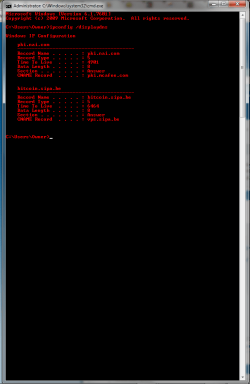
BTW, when I enter ipconfig /displaydns in CMD, this comes up :P
Attached Thumbnails
Hosts File-cmd.png  
My System SpecsSystem Spec
Reply

 Hosts File problems?


Thread Tools


Similar help and support threads for: Hosts File
Thread Forum
Solved Hosts file-S?? System Security
HOSTS File - Create a "Edit HOSTS file" Shortcut Tutorials
HOSTS file Network & Sharing


All times are GMT -5. The time now is 11:46 AM.


Seven Forums Android App Seven Forums IOS App Follow us on Facebook

Windows 7 Forums is an independent web site and has not been authorized,
sponsored, or otherwise approved by Microsoft Corporation.
"Windows 7" and related materials are trademarks of Microsoft Corp.
© Designer Media Ltd
  

1 2 3 4 5 6 7 8 9 10 11 12 13 14 15 16 17 18 19 20 21 22 23 24 25 26 27 28 29 30 31 32