
Blackfang535
New member
- Local time
- 1:41 PM
- Messages
- 8
This Error popped up on my Screen today
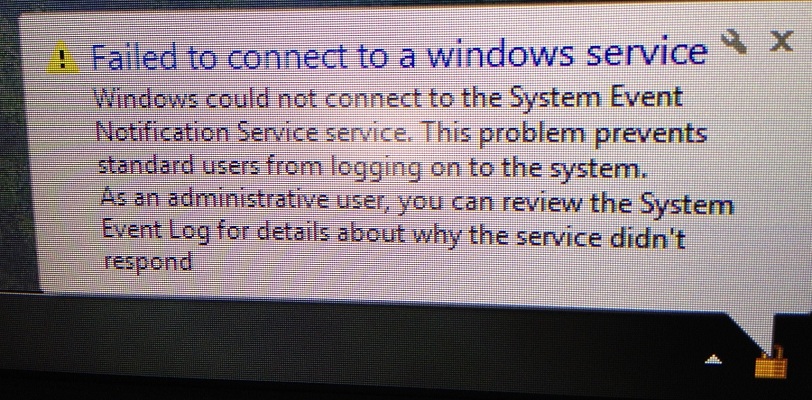
My Nvidia control panel, among other programs do not seem to start with windows any more ( i noticed this right away because my screen configuration had changed)
I have checked the service and all of its dependencies and all of them are working fine. a quick Google search yielded no fixes that worked for me and I'm stumped as how to solve this
Thanks In Advance
Garrett
My Nvidia control panel, among other programs do not seem to start with windows any more ( i noticed this right away because my screen configuration had changed)
I have checked the service and all of its dependencies and all of them are working fine. a quick Google search yielded no fixes that worked for me and I'm stumped as how to solve this
Thanks In Advance
Garrett
My Computer
At a glance
Windows 7 Pro x64 Sp1Intel I7-3930K @ 4.3GHz & 1.35v16GB Corsair VengenceSLI EVGA Gtx 680 4gb Ftw
- Computer type
- PC/Desktop
- Computer Manufacturer/Model Number
- Custom Desktop
- OS
- Windows 7 Pro x64 Sp1
- CPU
- Intel I7-3930K @ 4.3GHz & 1.35v
- Motherboard
- Asus P9X79 Deluxe
- Memory
- 16GB Corsair Vengence
- Graphics Card(s)
- SLI EVGA Gtx 680 4gb Ftw
- Sound Card
- Realtek Onboard 7.1
- Monitor(s) Displays
- 3x Asus PA248Q 24"
- Screen Resolution
- 3600*1920
- Hard Drives
- Crucial M4 128gb C400 SSD
Western Digital 1Tb Black
Western Digital 2Tb Green
- PSU
- Corsair HX 850
- Case
- Cooler Master HAF XM
- Cooling
- Corsiar H100i
- Keyboard
- Logitech G110
- Mouse
- Logitech G700
- Internet Speed
- 15 Mbps
- Antivirus
- Avast Free
- Browser
- FireFox


