Windows 7 Forums


Windows 7: 2 desktops in windows resources

29 Sep 2012  
Florio

Windows 7 Home Premium 64bit
35 posts
Italy
 
 
2 desktops in windows resources

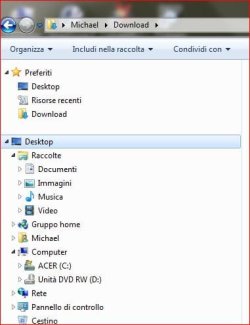
I've just noticed that I have two desktop folders in windows explorer (see attachment). The first one is where it should be, while the second seems to enclose practically everything on the computer!! Perhaps I accidentally dragged the normal desktop folder to the lower position; I don't know.

Is there a way to delete the second desktop folder without losing everything else that is inside it?


P.S. My version of Windows is in Italian, but I think you can work out what the various folders are.
Attached Thumbnails
2 desktops in windows resources-windows-explorer.jpg  

Last edited by Florio; 29 Sep 2012 at 05:02 AM..
My System SpecsSystem Spec

29 Sep 2012  
logicearth

Windows 7 x64 (SP1)
5,254 posts


There is nothing wrong here. It is how it is suppose to be.
My System SpecsSystem Spec
29 Sep 2012  
Alonso Chocano

Windows 8 Enterprise x64
887 posts
Near Dallas


Well, there shouldn't be a second folder there, but is it causing any problems? Why do you want it gone? Anyway, just right click it and remove, it'll only remove the link, not anything inside it.
My System SpecsSystem Spec
.


29 Sep 2012  
logicearth

Windows 7 x64 (SP1)
5,254 posts


Quote   Quote: Originally Posted by 714 View Post
Well, there shouldn't be a second folder there...
The settings the OP is using, it is correct, nothing is out of place, this second desktop folder is just a logical representation of the same desktop folder. Trying to remove it would remove the actual desktop.
My System SpecsSystem Spec
29 Sep 2012  
pbcopter

Windows 7 Ultimate x64 SP1, Windows 8 Pro x64
860 posts
Florida, USA


While I'm not sure if the display of the folder structure as shown is a real problem, I have never seen Desktop in the position above Libraries in all the Windows 7 computers I have worked on.
My System SpecsSystem Spec
29 Sep 2012  
logicearth

Windows 7 x64 (SP1)
5,254 posts


Organize on Explorer's tool bar > Folder Options > General > Show all folders.
Now you have seen "Desktop in the position above Libraries".
My System SpecsSystem Spec
29 Sep 2012  
Layback Bear

Windows 7 Home Premium 64 bit. SP-1
8,761 posts
Northern Ohio


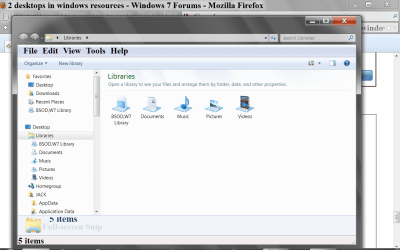
I see it all the time.
2 desktops in windows resources-now-only.png
My System SpecsSystem Spec
29 Sep 2012  
pbcopter

Windows 7 Ultimate x64 SP1, Windows 8 Pro x64
860 posts
Florida, USA


Quote   Quote: Originally Posted by logicearth View Post
Organize on Explorer's tool bar > Folder Options > General > Show all folders.
Now you have seen "Desktop in the position above Libraries".
Thank you for pointing that out. I guess I prefer to leave it displayed as the default.

Quote   Quote: Originally Posted by logicearth View Post
The settings the OP is using, it is correct, nothing is out of place, this second desktop folder is just a logical representation of the same desktop folder. Trying to remove it would remove the actual desktop.

It would have been nice if you guys would have told the OP that it could be changed and the way he sees it is just one way that it can be shown, rather than just telling him it is normal. Just a thought.
My System SpecsSystem Spec
30 Sep 2012  
Florio

Windows 7 Home Premium 64bit
35 posts
Italy


Thanks guys. It's good to know that this 'problem' was just a due to the current folder display option.
My System SpecsSystem Spec
Reply

 2 desktops in windows resources problems?


Thread Tools


Similar help and support threads for: 2 desktops in windows resources
Thread Forum
Making Windows 7 Desktops Hibernate Like Laptops Hardware & Devices
Windows 7 Professional changing desktops whenever General Discussion
Cannot open windows update GUI on VM desktops Windows Updates & Activation
Windows 7 laptop cannot access files or printers on Windows 7 desktops Network & Sharing
Windows 7 powering 21% of corporate desktops; XP still at 60% News


All times are GMT -5. The time now is 06:48 PM.


Windows 7 Forums is an independent web site and has not been authorized,
sponsored, or otherwise approved by Microsoft Corporation.
"Windows 7" and related materials are trademarks of Microsoft Corp.
© Designer Media Ltd