Windows 7 Forums


Windows 7: Help! I inadvertantly might have messed up my external hard drive

30 Sep 2012   #1

Windows 7 64 bit
 
 
Help! I inadvertantly might have messed up my external hard drive

Hey folks I have one of those WD My Book external hard drives that I have been basically using as a storage device for all my images and other essential items I need.
Somewhere along the way I must have done something wrong. Now when I have it connected to my laptop it only shows that it is showing as "CD Drive (I; ) WD Smartware" and at only one gigabyte, this is a 1 TB hard drive. I cannot get the computer to access the rest of the HD, it just shows it as an unrecognisable partition.
is there any thing out there I can use so that I can force the computer to access the rest of this hardrive?
Hopefully I have explained this right. The hard drive used to just be the I drive where I have stored tons of photos and other crucial information that I need to recover. I am thinking of just taking it into some computer guru locally to get all that info back, but I first want to know If I can take care of it myself.

My System SpecsSystem Spec

30 Sep 2012   #2

Windows 7 Ultimate 64
Southern California


I have two 2tb My Books and I find that one of them has to be unplugged and reconnected to be seen. Have you pulled the usb and reconnected and see what the lappy does. You can also power it totally down and power back up then report what your laptop does and see's.
Also what is it's exact model and model number?
My System SpecsSystem Spec
30 Sep 2012   #3

Windows 8 Enterprise x64
Near Dallas


Open disk management (Start-Right Click Computer-Manage-Disk Management), right click the drive you are having trouble with, click change drive letter and paths, remove it, then right click it again, Drive Letter and Paths, and add it. Just click OK in the box.
My System SpecsSystem Spec
.


30 Sep 2012   #4

Vista Ultimate X64/ Windows 7 Dual-boot


Sounds to me like you have the WD software DVD in your DVD drive...
My System SpecsSystem Spec
30 Sep 2012   #5

Windows 7 64 bit


Quote   Quote: Originally Posted by 714 View Post
Open disk management (Start-Right Click Computer-Manage-Disk Management), right click the drive you are having trouble with, click change drive letter and paths, remove it, then right click it again, Drive Letter and Paths, and add it. Just click OK in the box.
I did that and and when I try to open the drive, it wants to reformat in order for me to use it
My System SpecsSystem Spec
30 Sep 2012   #6

Windows 7 64 bit


Quote   Quote: Originally Posted by patio View Post
Sounds to me like you have the WD software DVD in your DVD drive...
No, it is not in the drive, I somehow or another managed to make it so that it always comes up like that....I know absolutely nothing about computers,
My System SpecsSystem Spec
30 Sep 2012   #7

Windows 8 Enterprise x64
Near Dallas


Quote   Quote: Originally Posted by Birddude007 View Post
Quote   Quote: Originally Posted by 714 View Post
Open disk management (Start-Right Click Computer-Manage-Disk Management), right click the drive you are having trouble with, click change drive letter and paths, remove it, then right click it again, Drive Letter and Paths, and add it. Just click OK in the box.
I did that and and when I try to open the drive, it wants to reformat in order for me to use it
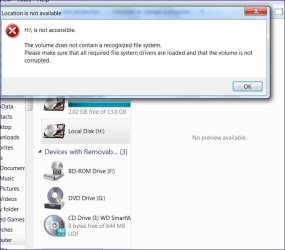
Oooh. I think something is wrong with the HD and you might have to format it in order to use it. I had the same thing happen to me with an SD card. Can you post a screenshot of the error your getting?

File and data recovery software to unformat, undelete files. Recover deleted files and recover formatted disk or corrupt drives - EaseUS Data Recovery Wizard.
Screenshots and Files - Upload and Post in Seven Forums
My System SpecsSystem Spec
30 Sep 2012   #8

Windows 7 64 bit


Here ya go-
Help! I inadvertantly might have messed up my external hard drive-capture.jpg
My System SpecsSystem Spec
30 Sep 2012   #9

Windows 8 Enterprise x64
Near Dallas


Are there any drivers or software disks for it? You're gonna have to try some data recovery like the Easeus link in my post above yours, or take it to a local computer shop if not.
My System SpecsSystem Spec
30 Sep 2012   #10

Windows 7 64 bit


Quote   Quote: Originally Posted by 714 View Post
Are there any drivers or software disks for it? You're gonna have to try some data recovery like the Easeus link in my post above yours, or take it to a local computer shop if not.
I am doing that right now and it is actually the first software that I tried that is actually scanning the drive, I will let you know the outcome.

PS: By the way- GO Jr! he really needs to get up on that wheel to get that championship, I have seen some serious improvement with him this year, hope he gets the Cup
My System SpecsSystem Spec
Reply

 Help! I inadvertantly might have messed up my external hard drive problems?


Thread Tools


Similar help and support threads for: Help! I inadvertantly might have messed up my external hard drive
Thread Forum
I think I messed up my Hard Drive, should I replace it? Hardware & Devices
Solved Messed Up External Hard Drive Icon Performance & Maintenance
Hard drive permission messed up System Security
Messed up with Permissions on my external drive. Help!! System Security


All times are GMT -5. The time now is 10:37 AM.


Seven Forums Android App Seven Forums IOS App Follow us on Facebook

Windows 7 Forums is an independent web site and has not been authorized,
sponsored, or otherwise approved by Microsoft Corporation.
"Windows 7" and related materials are trademarks of Microsoft Corp.
© Designer Media Ltd
  

1 2 3 4 5 6 7 8 9 10 11 12 13 14 15 16 17 18 19 20 21 22 23 24 25 26 27 28 29 30 31 32