Search Programs and files (from start menu), Tooltips

JackDinn

New member
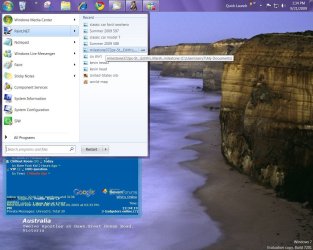
Please correct me if im wrong but im sure the last time i used the search bit on the start button the i could see the location (path) of folders/files on the tooltip, but now i cant?

Did i imagine it or has something changed?
0920-16 14  38150.jpg

Thx.
 

My Computer

Computer Manufacturer/Model Number
Me
OS
Windows 7 Ultimate Media Center Edition
CPU
AMD x64 duel core 5200+ 2.69GHz
Motherboard
Nvidia ALiveNF7G-FullHD.
Memory
3G DDR2-SDRAM PC2-6400 (399 MHz) - [DDR2-800]
Graphics Card(s)
NVIDIA GeForce 9500 GT & onboard NVIDIA GeForce 7
Sound Card
On Board MCP67 High Definition Audio
Monitor(s) Displays
DELL E771p & COMPAQ MV540
Screen Resolution
1280 x 1024 @ 60 Hz
Hard Drives
MAXTOR STM3500320AS ATA Device 500GB
Maxtor 6Y080L0 ATA Device 80GB
PSU
500w
Internet Speed
8Mb/s 500Kb/s
Bump,

should it show the path in the tooltip? (im almost %100 sure it was doing so)

could someone have a quick look for me please, thx.
 

My Computer

Computer Manufacturer/Model Number
Me
OS
Windows 7 Ultimate Media Center Edition
CPU
AMD x64 duel core 5200+ 2.69GHz
Motherboard
Nvidia ALiveNF7G-FullHD.
Memory
3G DDR2-SDRAM PC2-6400 (399 MHz) - [DDR2-800]
Graphics Card(s)
NVIDIA GeForce 9500 GT & onboard NVIDIA GeForce 7
Sound Card
On Board MCP67 High Definition Audio
Monitor(s) Displays
DELL E771p & COMPAQ MV540
Screen Resolution
1280 x 1024 @ 60 Hz
Hard Drives
MAXTOR STM3500320AS ATA Device 500GB
Maxtor 6Y080L0 ATA Device 80GB
PSU
500w
Internet Speed
8Mb/s 500Kb/s
Are you highlighting a folder with multiple instances and locations?

Each of my tooltips report a range of info, but the path is shown when applicable.
 
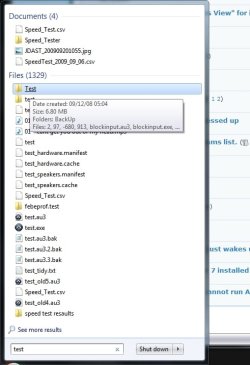
hmm i kinda thought that might be whats going on, However on the screen shot i provided the top 2 results are separate folders that i made in completely different locations both called test, to test this idea.
 

My Computer

Computer Manufacturer/Model Number
Me
OS
Windows 7 Ultimate Media Center Edition
CPU
AMD x64 duel core 5200+ 2.69GHz
Motherboard
Nvidia ALiveNF7G-FullHD.
Memory
3G DDR2-SDRAM PC2-6400 (399 MHz) - [DDR2-800]
Graphics Card(s)
NVIDIA GeForce 9500 GT & onboard NVIDIA GeForce 7
Sound Card
On Board MCP67 High Definition Audio
Monitor(s) Displays
DELL E771p & COMPAQ MV540
Screen Resolution
1280 x 1024 @ 60 Hz
Hard Drives
MAXTOR STM3500320AS ATA Device 500GB
Maxtor 6Y080L0 ATA Device 80GB
PSU
500w
Internet Speed
8Mb/s 500Kb/s
I was not able to get tool tips with addresses with a search but I could with recent program jump list.
tool tip.JPG
 

My Computer

Computer Manufacturer/Model Number
Gateway GT5692
OS
Windows 7 Ulti. x64
CPU
AMD Phenom 8450 triple-core 2.10 ghz
Memory
4GB
Graphics Card(s)
ATI Radion HD 3200
Monitor(s) Displays
Gateway FPD1775W
Screen Resolution
1280x720
Hard Drives
465.6613 Gibibytes
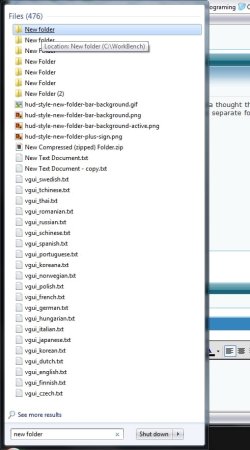
hmm is very odd.

iv chosen a folder name that i know there might be a few of around my computer all in different locations "New Folder"

the odd thing is that only the top one shows the path ? all the others do not.

0921-19 51  06222.jpg


what do you mean by "when applicable" ?


Thx all.
 

My Computer

Computer Manufacturer/Model Number
Me
OS
Windows 7 Ultimate Media Center Edition
CPU
AMD x64 duel core 5200+ 2.69GHz
Motherboard
Nvidia ALiveNF7G-FullHD.
Memory
3G DDR2-SDRAM PC2-6400 (399 MHz) - [DDR2-800]
Graphics Card(s)
NVIDIA GeForce 9500 GT & onboard NVIDIA GeForce 7
Sound Card
On Board MCP67 High Definition Audio
Monitor(s) Displays
DELL E771p & COMPAQ MV540
Screen Resolution
1280 x 1024 @ 60 Hz
Hard Drives
MAXTOR STM3500320AS ATA Device 500GB
Maxtor 6Y080L0 ATA Device 80GB
PSU
500w
Internet Speed
8Mb/s 500Kb/s
That is my point. Which path should it show?

I am intrigued by the -680.

The -680 is just a scripting file nothing it shouldn't be showing.


which path should it show, well i wouldn't mind knowing the path for every file/folder but if it only shows the path for duplicate names in different locations then that would do, but its not doing that either, well not all the time. Sometimes it shows and sometimes it dont? (see above post).


Thx.
 

My Computer

Computer Manufacturer/Model Number
Me
OS
Windows 7 Ultimate Media Center Edition
CPU
AMD x64 duel core 5200+ 2.69GHz
Motherboard
Nvidia ALiveNF7G-FullHD.
Memory
3G DDR2-SDRAM PC2-6400 (399 MHz) - [DDR2-800]
Graphics Card(s)
NVIDIA GeForce 9500 GT & onboard NVIDIA GeForce 7
Sound Card
On Board MCP67 High Definition Audio
Monitor(s) Displays
DELL E771p & COMPAQ MV540
Screen Resolution
1280 x 1024 @ 60 Hz
Hard Drives
MAXTOR STM3500320AS ATA Device 500GB
Maxtor 6Y080L0 ATA Device 80GB
PSU
500w
Internet Speed
8Mb/s 500Kb/s
I do not have an answer, but we have stumbled upon something. I also used New Folder as my test. One return was New Folder (2) - when I click it, I got this - but I think the index just needs to be refreshed.

For multiple instances, I get the path on one and contents on another. Sometimes, the tooltip won't appear until I hover a different item and then return to the one where the tooltip did not appear.

I only enabled tooltips for this experiment.

.
 

Attachments

  • Capture.PNG
    Capture.PNG
    29.7 KB · Views: 12
yea that was the message box i got just before it stopped showing the paths, I cant remember exactly what i was doing or what i did but after getting that popup & i might have clicked Delete shortcut not sure but after that i stopped getting the paths.

I did try rebuilding the index (a couple of days ago now) but still acting odd if you ask me, i would expect a path for all files/folders.

@myzr7
yea i get full paths in the jump lists & recent so why dont it do the same here. Is odd.

I know i only have to click on "see more results" at the bottom but thats another click :P

Thx all.
 

My Computer

Computer Manufacturer/Model Number
Me
OS
Windows 7 Ultimate Media Center Edition
CPU
AMD x64 duel core 5200+ 2.69GHz
Motherboard
Nvidia ALiveNF7G-FullHD.
Memory
3G DDR2-SDRAM PC2-6400 (399 MHz) - [DDR2-800]
Graphics Card(s)
NVIDIA GeForce 9500 GT & onboard NVIDIA GeForce 7
Sound Card
On Board MCP67 High Definition Audio
Monitor(s) Displays
DELL E771p & COMPAQ MV540
Screen Resolution
1280 x 1024 @ 60 Hz
Hard Drives
MAXTOR STM3500320AS ATA Device 500GB
Maxtor 6Y080L0 ATA Device 80GB
PSU
500w
Internet Speed
8Mb/s 500Kb/s
Back
Top