| Windows 7: Expanding the downloads folder in Windows explorer |
03 Oct 2012
|
#1 | | Windows 7 home premium 64bit |
Expanding the downloads folder in Windows explorer just made the transition from Win2000 to seven with this new computer, there are a number of things I am having trouble with.
In Windows Explorer there is no way to expand the download folder (there is no little triangle to click) in the left hand pane, I am used to sorting files in the download folder by dragging them to their appropriate folder in the left pane, if there is a way to expand that folder in the left pane I haven't figured it out, thanks. | My System Specs |
| System Manufacturer/Model Number HP Pavilion dv6 Notebook PC OS Windows 7 home premium 64bit CPU Intel Core i7-2630QM CPU @ 2.00GHz Memory 4.00 GB RAM Graphics Card Intel HD Graphics Family Screen Resolution 1366x768 Keyboard Logitech USB Mouse Logitech wireless Hard Drives 500GB Internet Speed pathetic |
03 Oct 2012
|
#2 | | x64 (6.1.7601) Win7_SP1 HomePrem Penn's Forest |
Try right clicking in the Navigator pane (left pane) and setting the options found there to your liking.
If there are no folders in the download folder - there is nothing to expand. | My System Specs | | System Manufacturer/Model Number HP Laptop: Pavilion dv6-6c10us OS x64 (6.1.7601) Win7_SP1 HomePrem CPU AMD A6-3420M APU with Radeon(tm) HD Graphics Motherboard Hewlett-Packard 1805 Memory 6.00 GB Graphics Card AMD Radeon(TM) HD 6520G Sound Card (1) AMD High Definition Audio Device (2) IDT High Definiti Monitor(s) Displays HP W2072a 20" LCD (1600 x 900) @ 60 Hz Screen Resolution 1366 x 768 x 32 bits (4294967296 colors) @ 60 Hz Hard Drives ST640LM0 00 HM641JI SATA Disk Device Internet Speed 15/5 | 54 MB Wireless 'n' Antivirus Realtime: Avast | On-demand: Malwarebytes, ESET Browser IE9 Other Info Media..........| Gimp | Audacity | VLC |
Comm..........| WEmail 2012 | Skype |
Productivity..| OpenOffice | Textpad |
Utils............| MS: Sysinternals | Piriform: cCleaner, Speccy, Defraggler | |
03 Oct 2012
|
#3 | | Windows 7 home premium 64bit |
thank you, I have tried this and right clicking in a empty place in the left pane gives me two check boxes: "show all folders" and "expand to current folder" Right clicking on the folder itself gives a context menu, including "properties" I have played around with that and tried every possible option and nothing will make that folder expand. And there are a dozen or so sub folders within the download folder. | My System Specs | | System Manufacturer/Model Number HP Pavilion dv6 Notebook PC OS Windows 7 home premium 64bit CPU Intel Core i7-2630QM CPU @ 2.00GHz Memory 4.00 GB RAM Graphics Card Intel HD Graphics Family Screen Resolution 1366x768 Keyboard Logitech USB Mouse Logitech wireless Hard Drives 500GB Internet Speed pathetic |
03 Oct 2012
|
#4 | | Windows 7 Ultimate SP1 (64 bit), Windows XP SP3, Linux Mint 14 MATE (64 bit) Adelaide |
Weird There should be a triangle for you to click.   | My System Specs | | System Manufacturer/Model Number n/a OS Windows 7 Ultimate SP1 (64 bit), Windows XP SP3, Linux Mint 14 MATE (64 bit) CPU AMD Phenom II x6 1055T, 2.8 GHz Motherboard ASRock 880GMH-LE/USB3 Memory 8GB DDR3 1333 G-Skill Ares F3-1333C9D-8GAO (4GB x 2) Graphics Card ATI Radeon HD6450 Sound Card Realtek? Monitor(s) Displays Samsung S23B350 Screen Resolution 1920x1080 Mouse Wired Optical Case Tower Hard Drives Western Digital 1 TB (SATA), Western Digital 1.5 TB (SATA), Western Digital 2 TB (SATA) Internet Speed DSL Other Info Ubuntu 10.04 (64 bit) replaced with Linux Mint 14 MATE (64 bit) - 2013-01-14
RAM & Graphics Card Upgraded - 2013-01-13
Monitor Upgraded - 2012-04-20
System Upgraded - 2011-05-21, 2010-07-14
HDD Upgraded - 2010-08-11, 2011-08-24 |
03 Oct 2012
|
#5 | | x64 (6.1.7601) Win7_SP1 HomePrem Penn's Forest |
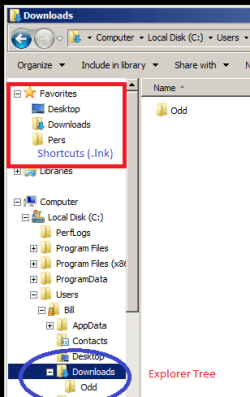
Hmmm, perhaps we're speaking of different things. The Favorites section and folder contain shortcuts. The computer section displays an explorer tree.
You need to expand the folder in the computer section - shortcuts don't have the capability.
An image of your explorer might help.
. | My System Specs | | System Manufacturer/Model Number HP Laptop: Pavilion dv6-6c10us OS x64 (6.1.7601) Win7_SP1 HomePrem CPU AMD A6-3420M APU with Radeon(tm) HD Graphics Motherboard Hewlett-Packard 1805 Memory 6.00 GB Graphics Card AMD Radeon(TM) HD 6520G Sound Card (1) AMD High Definition Audio Device (2) IDT High Definiti Monitor(s) Displays HP W2072a 20" LCD (1600 x 900) @ 60 Hz Screen Resolution 1366 x 768 x 32 bits (4294967296 colors) @ 60 Hz Hard Drives ST640LM0 00 HM641JI SATA Disk Device Internet Speed 15/5 | 54 MB Wireless 'n' Antivirus Realtime: Avast | On-demand: Malwarebytes, ESET Browser IE9 Other Info Media..........| Gimp | Audacity | VLC |
Comm..........| WEmail 2012 | Skype |
Productivity..| OpenOffice | Textpad |
Utils............| MS: Sysinternals | Piriform: cCleaner, Speccy, Defraggler | |
03 Oct 2012
|
#6 | | Windows 7 Ultimate SP1 (64 bit), Windows XP SP3, Linux Mint 14 MATE (64 bit) Adelaide |
Good Point 
Quote: Originally Posted by Slartybart Hmmm, perhaps we're speaking of different things. The Favorites section and folder contain shortcuts. The computer section displays an explorer tree.
You need to expand the folder in the computer section - shortcuts don't have the capability.
An image of your explorer might help.
. That's a good point. | My System Specs | | System Manufacturer/Model Number n/a OS Windows 7 Ultimate SP1 (64 bit), Windows XP SP3, Linux Mint 14 MATE (64 bit) CPU AMD Phenom II x6 1055T, 2.8 GHz Motherboard ASRock 880GMH-LE/USB3 Memory 8GB DDR3 1333 G-Skill Ares F3-1333C9D-8GAO (4GB x 2) Graphics Card ATI Radeon HD6450 Sound Card Realtek? Monitor(s) Displays Samsung S23B350 Screen Resolution 1920x1080 Mouse Wired Optical Case Tower Hard Drives Western Digital 1 TB (SATA), Western Digital 1.5 TB (SATA), Western Digital 2 TB (SATA) Internet Speed DSL Other Info Ubuntu 10.04 (64 bit) replaced with Linux Mint 14 MATE (64 bit) - 2013-01-14
RAM & Graphics Card Upgraded - 2013-01-13
Monitor Upgraded - 2012-04-20
System Upgraded - 2011-05-21, 2010-07-14
HDD Upgraded - 2010-08-11, 2011-08-24 |
03 Oct 2012
|
#7 | | Windows 7 Professional SP1 - x64 Lost In Space, Vol 8-New Kind Of Kick |

Quote: Originally Posted by Mike jones just made the transition from Win2000 to seven with this new computer, there are a number of things I am having trouble with.
In Windows Explorer there is no way to expand the download folder (there is no little triangle to click) in the left hand pane, I am used to sorting files in the download folder by dragging them to their appropriate folder in the left pane, if there is a way to expand that folder in the left pane I haven't figured it out, thanks. Perhaps this tutorial could help: Folder Options
Search for the "Navigation Pane"=> (tick the box) "Show all folders"
Or/and
=>"Automatically expand to current folder". | My System Specs | | Computer type PC/Desktop System Manufacturer/Model Number [May-Dec-2012] - New Mid-tower - (is done!) OS Windows 7 Professional SP1 - x64 CPU Ivy Bridge Core i5 K Motherboard Asus H77 Chipset (ATX) Memory G.Skill DDR3 PC3-12800 (16Gb) Graphics Card Sapphire HD 7770 Vapor-X Oc Sound Card SBXi-Fi Xtreme Audio (w/5.1 sound system) Monitor(s) Displays Asus Led 21,5" Screen Resolution 16/9 Keyboard Razer + Razer gamepad Mouse Razer PSU 700w 80+ Gold (ErP 6 ready) Case Cooler Master Silencio 550-v2 (modded) Cooling Gelid Solutions (PWM Push/pull Fans) Hard Drives Internal:
500Go Sata 6Gb/s (x2)
500Go Sata 3Gb/s (x2)
SSD 60Go Sata 6Gb/s Antivirus MSE 4.2 Browser IE10 Rtm |
06 Oct 2012
|
#8 | | Windows 7 home premium 64bit |
Thanks for the help, yes I figured out that the icons on top (favorites) are merely shortcuts, and I need to dig through the computer tree to get to the download folder. I'm a bit confused why you would want to open the download folder without full functionality, seems that "favorites" section is just taking up space. | My System Specs | | System Manufacturer/Model Number HP Pavilion dv6 Notebook PC OS Windows 7 home premium 64bit CPU Intel Core i7-2630QM CPU @ 2.00GHz Memory 4.00 GB RAM Graphics Card Intel HD Graphics Family Screen Resolution 1366x768 Keyboard Logitech USB Mouse Logitech wireless Hard Drives 500GB Internet Speed pathetic |
06 Oct 2012
|
#9 | | Windows 7 Ultimate SP1 (64 bit), Windows XP SP3, Linux Mint 14 MATE (64 bit) Adelaide |
Favorites 
Quote: Originally Posted by Mike jones I'm a bit confused why you would want to open the download folder without full functionality, seems that "favorites" section is just taking up space. It depends on how you save your downloads.
I assume that a lot of people just dump stuff there (just like files on the Desktop).
It's handy for times when you are doing multiple operations (i.e. opening and saving files) to a folder buried in your directory tree.
You can just "pin" the target folder in "Favorites" and open the folder with a single click, instead of having to navigate to it every time.
When you're finished, you just remove it from "Favorites".
Last edited by lehnerus2000; 06 Oct 2012 at 08:36 PM..
Reason: Title Added
| My System Specs | | System Manufacturer/Model Number n/a OS Windows 7 Ultimate SP1 (64 bit), Windows XP SP3, Linux Mint 14 MATE (64 bit) CPU AMD Phenom II x6 1055T, 2.8 GHz Motherboard ASRock 880GMH-LE/USB3 Memory 8GB DDR3 1333 G-Skill Ares F3-1333C9D-8GAO (4GB x 2) Graphics Card ATI Radeon HD6450 Sound Card Realtek? Monitor(s) Displays Samsung S23B350 Screen Resolution 1920x1080 Mouse Wired Optical Case Tower Hard Drives Western Digital 1 TB (SATA), Western Digital 1.5 TB (SATA), Western Digital 2 TB (SATA) Internet Speed DSL Other Info Ubuntu 10.04 (64 bit) replaced with Linux Mint 14 MATE (64 bit) - 2013-01-14
RAM & Graphics Card Upgraded - 2013-01-13
Monitor Upgraded - 2012-04-20
System Upgraded - 2011-05-21, 2010-07-14
HDD Upgraded - 2010-08-11, 2011-08-24 |
06 Oct 2012
|
#10 | | x64 (6.1.7601) Win7_SP1 HomePrem Penn's Forest |
Mike,
This is probably just a Windows 7 learning curve. I have only been on Windows 7 since March 2012. I felt the same way when I started - sheesh! everything is so weird - why did MS do that?
Anyway, after a month or so, I figured out that Windows 7 wasn't all that bad - I had to adjust (old dog.... new tricks...). I'm fairly comfortable with it now - having spent the time figuring out that the right mouse key does a lot more than it used to, and a few other nuanced changes.
Search Sevenforums tutorial section for an answer - there's lots of good work there. I found this post that links a few of them. You might be more interested in removing favorites and Libraries than the other so that the explorer tree is top most.
Changing the target in the explorer shortcut can also manipulte the navigation pane. %windir%\explorer.exe /e,::{20D04FE0-3AEA-1069-A2D8-08002B30309D} makes the focus go directly to the explorer tree - it doesn't add or remove any objects - just changes the initial focus. Edit: huh... took my own advice and found a tut on what I found elsewhre on the web - gee, didn't have to go searching out there after all. Maybe your needs would be satisfied by putting%UserProfile%\Downloads in the explorer shortcut - that puts the initial navigation pane focus on downloads. Good hunting,
Bill
. | My System Specs | | System Manufacturer/Model Number HP Laptop: Pavilion dv6-6c10us OS x64 (6.1.7601) Win7_SP1 HomePrem CPU AMD A6-3420M APU with Radeon(tm) HD Graphics Motherboard Hewlett-Packard 1805 Memory 6.00 GB Graphics Card AMD Radeon(TM) HD 6520G Sound Card (1) AMD High Definition Audio Device (2) IDT High Definiti Monitor(s) Displays HP W2072a 20" LCD (1600 x 900) @ 60 Hz Screen Resolution 1366 x 768 x 32 bits (4294967296 colors) @ 60 Hz Hard Drives ST640LM0 00 HM641JI SATA Disk Device Internet Speed 15/5 | 54 MB Wireless 'n' Antivirus Realtime: Avast | On-demand: Malwarebytes, ESET Browser IE9 Other Info Media..........| Gimp | Audacity | VLC |
Comm..........| WEmail 2012 | Skype |
Productivity..| OpenOffice | Textpad |
Utils............| MS: Sysinternals | Piriform: cCleaner, Speccy, Defraggler | Expanding the downloads folder in Windows explorer problems? All times are GMT -5. The time now is 01:31 AM. | |