Search doesn't work for numbers in contents of a file

vividsix

New member
Local time
5:31 PM
Messages
3
I'm having no luck figuring this out. So I hope you guys will be able to help.

The search function doesn't work for me when I search for partial numeric strings.

I created a text file and put 123456789 inside it.

Search only seems to find the text file when I do a search for the exact numeric string (contents:123456789)

If I try to search for 34567 (contents:34567) it will not find the file.

The folder I'm searching in is not indexed. But I've also tried indexing it and checked the advanced indexing options. For txt files I checked off Index Properties and File Contents

Also tried adding wildcards and it still won't find the file.
 

My Computer My Computer

At a glance

Windows 7 Enterprise 64bit
OS
Windows 7 Enterprise 64bit
Welcome to SF vividsix.
I just tried the same experiment and save the txt file to the desktop. It shows up in search after I type "1234" but not before.
 

My Computer My Computer

At a glance

Windows 7 Ultimate X64 SP1Intel i5-2550K, Differing ~4.4-4.8GHz No buil...16GB G.Skill Sniper 1866MHz @ 2133MHz 2x8GBASUS GTX650TIB-DC2OC-2GD5, (650TI Boost)
Computer type
PC/Desktop
Computer Manufacturer/Model Number
Home Built Desktop By DataTech
OS
Windows 7 Ultimate X64 SP1
CPU
Intel i5-2550K, Differing ~4.4-4.8GHz No built in GPU
Motherboard
ASUS P8Z68-V PRO/GEN3
Memory
16GB G.Skill Sniper 1866MHz @ 2133MHz 2x8GB
Graphics Card(s)
ASUS GTX650TIB-DC2OC-2GD5, (650TI Boost)
Sound Card
Onboard Realtek 5-1
Monitor(s) Displays
Samsung P2570HD
Screen Resolution
1920x1080
Hard Drives
Samsung 840 Pro 256GB SSD for OS, 500GB Seagate Constellation (Enterprise drive) for Data
PSU
Corsair HX650W
Case
Inwin Dragon Rider
Cooling
Hyper 212 EVO w/two Noctua fans, push-pull, @1300 RPM
Keyboard
E-Z Eyes, bright yellow keys with large characters
Mouse
steelseries SENSEI Laser Pro Gaming
Internet Speed
48-51Mbs Mbs down, 11 Mbs up Xfinity Cable
Antivirus
Norton Internet Security 2013
Browser
IE 10, Opera, Pale Moon if needed
Other Info
4 case fans, LG BluRay-RE, ASUS DVD-RW, Mr. Fusion power supply, 1.21 gigawatts.
Thanks Britton30 for the warm welcome.

I tried the same search and 1234 worked. It seems like anything in the middle of the 123456789 string, search won't find.

What's strange is I opened the search to the entire system for 23456 and windows found the Alphabet.xml file (C:\Program Files\Common Files\microsoft shared\ink) That file has 123456789 inside which is the same string that's in my test.txt file. But windows only found the Alphabet.xml and not the test.txt.

How I came about this is I need to routinely search a text file for a 11 digit numeric string in lines that have 200+ digits and search would not find it.
 

My Computer My Computer

At a glance

Windows 7 Enterprise 64bit
OS
Windows 7 Enterprise 64bit
Search is odd to say the least. The 1234 search brought up all sorts of files with 1234 in the middle or end.
Can you name your files to make them easier to find? Or maybe just the first 4 digits of the string will work.
 

My Computer My Computer

At a glance

Windows 7 Ultimate X64 SP1Intel i5-2550K, Differing ~4.4-4.8GHz No buil...16GB G.Skill Sniper 1866MHz @ 2133MHz 2x8GBASUS GTX650TIB-DC2OC-2GD5, (650TI Boost)
Computer type
PC/Desktop
Computer Manufacturer/Model Number
Home Built Desktop By DataTech
OS
Windows 7 Ultimate X64 SP1
CPU
Intel i5-2550K, Differing ~4.4-4.8GHz No built in GPU
Motherboard
ASUS P8Z68-V PRO/GEN3
Memory
16GB G.Skill Sniper 1866MHz @ 2133MHz 2x8GB
Graphics Card(s)
ASUS GTX650TIB-DC2OC-2GD5, (650TI Boost)
Sound Card
Onboard Realtek 5-1
Monitor(s) Displays
Samsung P2570HD
Screen Resolution
1920x1080
Hard Drives
Samsung 840 Pro 256GB SSD for OS, 500GB Seagate Constellation (Enterprise drive) for Data
PSU
Corsair HX650W
Case
Inwin Dragon Rider
Cooling
Hyper 212 EVO w/two Noctua fans, push-pull, @1300 RPM
Keyboard
E-Z Eyes, bright yellow keys with large characters
Mouse
steelseries SENSEI Laser Pro Gaming
Internet Speed
48-51Mbs Mbs down, 11 Mbs up Xfinity Cable
Antivirus
Norton Internet Security 2013
Browser
IE 10, Opera, Pale Moon if needed
Other Info
4 case fans, LG BluRay-RE, ASUS DVD-RW, Mr. Fusion power supply, 1.21 gigawatts.
Unfortunately I can't. I have a lot of text files in a folder that have records that contain 200+ digits per line and I need to search for a 11 digit string in that particular folder in order to find the line that I need.

Maybe I'll use AstroGrep instead.
 

My Computer My Computer

At a glance

Windows 7 Enterprise 64bit
OS
Windows 7 Enterprise 64bit

My Computer My Computer

At a glance

Windows 7 Professional x64Intel i5 quad processor16 GBRadeon HD 5770
Computer type
PC/Desktop
Computer Manufacturer/Model Number
Custom Built
OS
Windows 7 Professional x64
CPU
Intel i5 quad processor
Motherboard
DP67BG
Memory
16 GB
Graphics Card(s)
Radeon HD 5770
Sound Card
Realtek High Definition Audio
Monitor(s) Displays
Samsung SyncMaster
Screen Resolution
1920X1080
Hard Drives
WD 2TB (SATA Internal)
WD 1TB (USB External)
PSU
Corsair GS800
Case
Tower (Generic)
Cooling
3 Internal Fans
Keyboard
MS Wireless
Mouse
MS Optical Wired
Internet Speed
54 mbps
Antivirus
Emsisoft
Browser
IE-Version 9, Palemoon-Version 24.2.0
Attachment 1: w7
banghead.gif


Attachment2: Agent Ransack
 

Attachments

  • att1.JPG
    att1.JPG
    38.7 KB · Views: 16
  • att2.JPG
    att2.JPG
    154.5 KB · Views: 19

My Computer My Computer

At a glance

W7, W8.1
Computer type
Laptop
Computer Manufacturer/Model Number
Dell \ Lenovo\ HP \ Toshiba
OS
W7, W8.1
Antivirus
MSE, Malwarebytes
Browser
FF
Out of curiosity, tested the same in W8 (much improved search interface btw. Index on, File Types ok, Index Properties & File Contents ticked, Advanced options > File contents ticked) but... nothing :confused:
 

Attachments

  • w8.PNG
    w8.PNG
    53.4 KB · Views: 8

My Computer My Computer

At a glance

W7, W8.1
Computer type
Laptop
Computer Manufacturer/Model Number
Dell \ Lenovo\ HP \ Toshiba
OS
W7, W8.1
Antivirus
MSE, Malwarebytes
Browser
FF
This same thing happens to me...

We have thousands and thousands of files that have the format <drawing number><designer initials>-<job number> <cust./job name>

For instance

the format for one of my drawing names would be "3412JO-52006 cree.pdf"

when is search for "cree", it pops up

when i type in "52006" - (which is the most important search when trying to find all the drawings for a job) it returns no results.

This worked fine in XP, but cannot get it to work in 7.

Could really use some help, I use this search format every day, several times a day.
 

My Computer My Computer

At a glance

Maryland
Computer type
PC/Desktop
OS
Maryland
We have thousands and thousands of files that have the format <drawing number><designer initials>-<job number> <cust./job name>

For instance

the format for one of my drawing names would be "3412JO-52006 cree.pdf"

when is search for "cree", it pops up

when i type in "52006" - (which is the most important search when trying to find all the drawings for a job) it returns no results.

This worked fine in XP, but cannot get it to work in 7.

Could really use some help, I use this search format every day, several times a day.

It is always a good idea to start your own thread. But, since we are already here, have you tried Agent Ransack?
 

My Computer My Computer

At a glance

Windows 7 Professional x64Intel i5 quad processor16 GBRadeon HD 5770
Computer type
PC/Desktop
Computer Manufacturer/Model Number
Custom Built
OS
Windows 7 Professional x64
CPU
Intel i5 quad processor
Motherboard
DP67BG
Memory
16 GB
Graphics Card(s)
Radeon HD 5770
Sound Card
Realtek High Definition Audio
Monitor(s) Displays
Samsung SyncMaster
Screen Resolution
1920X1080
Hard Drives
WD 2TB (SATA Internal)
WD 1TB (USB External)
PSU
Corsair GS800
Case
Tower (Generic)
Cooling
3 Internal Fans
Keyboard
MS Wireless
Mouse
MS Optical Wired
Internet Speed
54 mbps
Antivirus
Emsisoft
Browser
IE-Version 9, Palemoon-Version 24.2.0
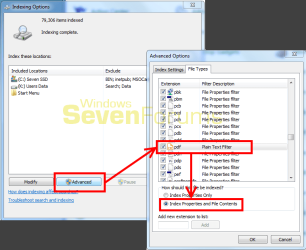
Try changing the Indexing Options. Go to Control Panel\All Control Panel Items\Indexing Options
Click on Advanced, then file types, scroll to .pdf and highlight it and change as shown below.

With the format of xxxxxxx-yyyyyy name.pdf, Windows will see the xxxxxxx-yyyyyy bit as a single word with the included dash.

Index.PNG
 

My Computer My Computer

At a glance

Windows 7 Ultimate X64 SP1Intel i5-2550K, Differing ~4.4-4.8GHz No buil...16GB G.Skill Sniper 1866MHz @ 2133MHz 2x8GBASUS GTX650TIB-DC2OC-2GD5, (650TI Boost)
Computer type
PC/Desktop
Computer Manufacturer/Model Number
Home Built Desktop By DataTech
OS
Windows 7 Ultimate X64 SP1
CPU
Intel i5-2550K, Differing ~4.4-4.8GHz No built in GPU
Motherboard
ASUS P8Z68-V PRO/GEN3
Memory
16GB G.Skill Sniper 1866MHz @ 2133MHz 2x8GB
Graphics Card(s)
ASUS GTX650TIB-DC2OC-2GD5, (650TI Boost)
Sound Card
Onboard Realtek 5-1
Monitor(s) Displays
Samsung P2570HD
Screen Resolution
1920x1080
Hard Drives
Samsung 840 Pro 256GB SSD for OS, 500GB Seagate Constellation (Enterprise drive) for Data
PSU
Corsair HX650W
Case
Inwin Dragon Rider
Cooling
Hyper 212 EVO w/two Noctua fans, push-pull, @1300 RPM
Keyboard
E-Z Eyes, bright yellow keys with large characters
Mouse
steelseries SENSEI Laser Pro Gaming
Internet Speed
48-51Mbs Mbs down, 11 Mbs up Xfinity Cable
Antivirus
Norton Internet Security 2013
Browser
IE 10, Opera, Pale Moon if needed
Other Info
4 case fans, LG BluRay-RE, ASUS DVD-RW, Mr. Fusion power supply, 1.21 gigawatts.
Back
Top