| Windows 7: Windows shuts down when I put the laptop into sleep!!! |
04 Oct 2012
|
#1 | | windows 7 home premium 64 bit |
Windows shuts down when I put the laptop into sleep!!! Hi
I have a samsung rf711 so8 uk running windows 7 home premium 64 bit. For the past 4 months, I could not use it reliably anymore. First, it started to shutdown out of a sudden and I would lose my data, so I sent it to samsung and they fixed the motherboard. But then My computer would shut down when I close the lid (put it to sleep) after a while. and when I start it up, I would need to press the power button and windows would give me the black screen that tells you to start it in safe mode, netweoking or normally, and when it finally boots up (which takes ages! more than 5 minutes, though I have 1TB of hard-disk space and 8GB of ram, nothing much on startup) it tells me it recovered from a shutdown and it will seek a solution. but nothing happens. I tried to deactivate the sleep-hybernate mode, it would tell me that the power options are not accessible, I follow the steps to run a troubleshooter, it would turn out with no errors. I sent it again to samsung, they said they could not find anything wrong with it. and they actually tried to charge me! Now I have this slow powerful machine that can hardly do anything. After this whole issue, I cannot use cisco anyconnect vpn client (v2.5.6005) (which used to work fine), so I cannot log on to any network, this thing is useless now! Can anyone please help me!
Thanks | My System Specs |
| System Manufacturer/Model Number samsung OS windows 7 home premium 64 bit CPU intel core i7-2670 @ 2.2 GHz Memory 8 GB Graphics Card Nvivia optimus |
04 Oct 2012
|
#2 | | Win7 x 6 PC's California, Florida, Boston |
You can try a Repair Install which may solve these problems.
But I would ditch the presintalled Windows 7 to get a perfect Clean Reinstall - Factory OEM Windows 7.
Be sure to make your REcovery disks first and save a Windows 7 backup image in the rare case that some Samsung features cannot be made to work after clean reinstall. See the Special notes in tutorial. | My System Specs | | |
06 Oct 2012
|
#3 | | windows 7 home premium 64 bit |
Hi Gregrocker
Thank you for the advice. I just had the whole device formatted and reinstalled windows from the samsung CD. but unfortunately, I lost all drivers and had to install them manually, now, the touchpad has only basic functions, no scrolling, or smart gestures, eventhough I downloaded the samsung driver, synaptic and downloaded scrybe as well, but nothing seems to work with it. Also, There seems to be a 300GB of HD that are no longer available for me, windows tells me I have only 700GB instead of 1TB.
Aside from that, The device is way faster (though I have virtually no software on it) and so far no problems with the sleep hybernate mode. However, I still cannot disable hybrid sleep mode through power options, it is still telling me that power info are not available, so I cannot change Hybernate or hybrid sleep settings! I am not sure if the problem with shutdown during sleep is still there, I will try it out and get back.
Thank you very much for your help. | My System Specs | | System Manufacturer/Model Number samsung OS windows 7 home premium 64 bit CPU intel core i7-2670 @ 2.2 GHz Memory 8 GB Graphics Card Nvivia optimus |
06 Oct 2012
|
#4 | | Win7 x 6 PC's California, Florida, Boston |
Today I held my breath through two Samsung Clean Reinstalls here since it is the model which has given the most problems getting features to work. This Samsung laptop fiasco thread from last year was the worst one I've ever seen, but today all was resolved in Reinstalled windows 7 on samsung laptop. Lots of things not working. - Windows 7 Forums .
The fact that you were surprised you "lost all drivers" makes me wonder how closely you followed Clean Reinstall - Factory OEM Windows 7 which is quite specific about what to expect and how to handle drivers in Windows 7 based on countless thousands of successful reinstalls seen here.
If you have the touchpad driver delivered by installer or optional Updates then I'd try the driver from Samsung Support Downloads webpage for your model, and leave it running in msconfig at startup. If that isn't enough I'd look for a software package or hotfix for that function there as well.
In the disaster thread, it was the touchpad gesture functions that Nicole could not get to work even with the Samsung software requiring her to fall back to the factory install. We searched quite extensively to no avail at the time for others who had resolved this, something which has been found for many other brands, but that was awhile back so you might try your google fu on this.
Most sleep problems are resolved by updating to the latest display driver. If you installed the Samsung power bloatware I would uninstall it since it defeats the purpose of CLean Reinstall to lard back in the crapware that has better versions built into Windows 7 - as has always been the case with Windows 7 Power Options.
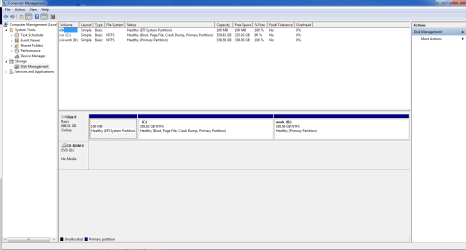
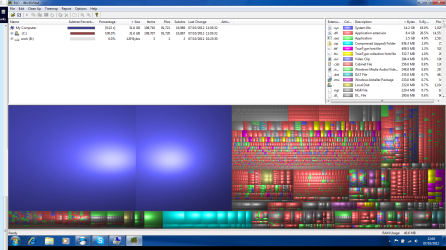
Make sure you booted the installer to do the install or else you may have the entire factory preinstall in a windows.old folder on your C drive taking up the mystery space. If not post back a screenshot of your maximized Disk Mgmt drive map with listings, using Snipping Tool in Start menu for us to look over. You can also install WinDirStat - Download.com to see a graph of your disk usage. | My System Specs | | |
07 Oct 2012
|
#5 | | windows 7 home premium 64 bit |
Hi again,
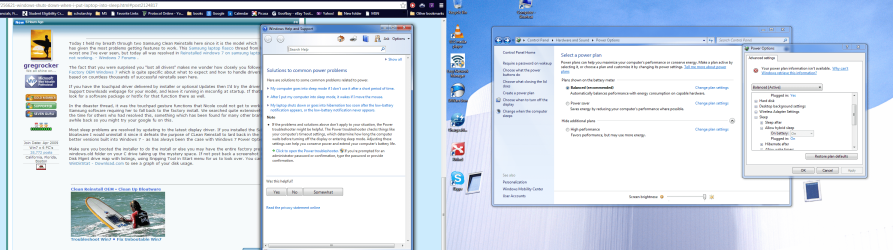
I realized I did not follow the clean install steps 100%, but I can say where I messed up, I downloaded the installer on usb, but windows did not recognize it as a bootable drive, so I had to use the samsung given CD, which I assumed it had driver definitions, but it didnt, so I had to download all the drivers manually, and installed them. I unistalled the samsung power management, I only have windows one now, still it tells me I cannot access nmy power options, I attached a screen shot of that. I would run a troubleshooter for power, but it tells me that there is nothing wrong with the device. I tested it with an overnight sleep it did not shut down , which is good, but still, I want to disable hybrid sleep mode. which is inaccessible for me.
When I was doing the clean install, which I used the samsung CD for, I ran the installer, from the CD, and folllowed the steps, I did delete all the drive partitions I saw, cuz I had many, I know this is wrong but i gave it a shot and now there is 300GB missing. I attached an image for the disk managment, it does not say the disk space is ulallocated, it just cannot see it. not even when I do the cmd way.
Also, I noticed that I did not need to enter any codes for windows activation, could that mean that the install is faulty or sth?
I will worry about the touchpad when I get my space back!
Thank alot | My System Specs | | System Manufacturer/Model Number samsung OS windows 7 home premium 64 bit CPU intel core i7-2670 @ 2.2 GHz Memory 8 GB Graphics Card Nvivia optimus |
07 Oct 2012
|
#6 | | Windows 7 Ultimate SP1 (x64) South Australia |

Quote: Originally Posted by dalhoomist I downloaded the installer on usb, but windows did not recognize it as a bootable drive Did you skip step 2of the tutorial? | My System Specs | | Computer type PC/Desktop System Manufacturer/Model Number Golden Mk. I.3 OS Windows 7 Ultimate SP1 (x64) CPU Intel i7 860 @ 2.80 GHz Motherboard Gigabyte P55A-UD3R Rev.1. Award BIOS F13 Memory 16GB Corsair Vengance DDR3 @ 661 MHz Dual Channel (9-9-9-24) Graphics Card EVGA NVidia GTX 560 1024MB Sound Card Realtek Integrated Monitor(s) Displays Dual Samsung SyncMaster 2494HS Screen Resolution 1920*1080 and 1920*1080 Keyboard Logitech G110 Mouse Logitech MX518 PSU Thermaltake ToughPower QFan 750W Case Thermaltake Element S VK60001W2Z Cooling Corsair H60 Water Cooling, 2*230mm and 2*80mm case fans Hard Drives 1*OCZ Vertex 2 60GB SSD;
2*Samsung F3 SpinPoint 1TB in RAID0;
3*Samsung F1 SpinPoint 1TB in RAID5;
1*Western Digital 500GB External USB 3.0
1*Seagate 500GB External USB 2.0 Internet Speed Not fast enough!!! Antivirus MSE and Malwarebytes Pro Browser Chrome Version 25 Other Info Laptop: ASUS X54C, Intel Core i3-2330M @ 2.0Ghz, 4GB RAM, Intel HD on-board graphics, Windows 7 Professional SP1 (x64), LinuxMint 14 (x64), PepperMint 3 (x86) |
07 Oct 2012
|
#7 | | windows 7 home premium 64 bit |
Yes,
I downloaded the ISO installer on USB, and went thru the next step, then when it asked me to use a directory where it gets the installation info from, it did not recognize the usb drive, that was before doing anything, so I restarted it, logged to windows, played the installer from the CD. | My System Specs | | System Manufacturer/Model Number samsung OS windows 7 home premium 64 bit CPU intel core i7-2670 @ 2.2 GHz Memory 8 GB Graphics Card Nvivia optimus |
07 Oct 2012
|
#8 | | Win7 x 6 PC's California, Florida, Boston |
Golden's point is that you don't download the ISO to flash stick, but it must be written to the flash stick using an image writing tool. The one given in Step 2 of Clean Reinstall - Factory OEM Windows 7 works most times but if not you can use Universal USB Installer with Windows 7 in dropdown menu.
What is the Samsung CD you're referring to? It couldn't be a Windows 7 installer if it's a CD as Windows 7 fits only on a DVD. Is it the drivers disk? Then how did you do your "reinstall?" Were these Recovery Disks?
Your EFI System partition means you have an EFI BIOS which requires special steps to reinstall: UEFI (Unified Extensible Firmware Interface) - Install Windows 7 with - Windows 7 Forums.
You can also change to a normal install to an MBR disk by removing EFI Boot Disk from BIOS Boot Order, enabling any BIOS setting for Legacy BIOS, wiping the HD with Diskpart Clean Command from the booted installer Command Line accessed by pressing Shift + F10 at first screen when booted.
I would personally do a normal install to a wiped MBR disk this time following the steps closely to get a perfect Clean Reinstall - Factory OEM Windows 7. | My System Specs | | |
13 Oct 2012
|
#9 | | windows 7 home premium 64 bit |
Hi Gregrocker,
Sorry for the late reply, was away for a week.
Its a samsung DVD, (system recovery media, Windows 7 home premium sp1), it has no drivers on it, I had to download all the drivers from the samsung website.
Should re-install the EFI bios dirst before repeating the clean-reinstall ? what difference would it make if i switch to MBR bios?
Thanks | My System Specs | | System Manufacturer/Model Number samsung OS windows 7 home premium 64 bit CPU intel core i7-2670 @ 2.2 GHz Memory 8 GB Graphics Card Nvivia optimus |
13 Oct 2012
|
#10 | | Win7 x 6 PC's California, Florida, Boston |
It's less problem to install and repair with an MBR BIOS. You need the special steps I gave you to install with EFI BIOS.
Please read the Clean Reinstall tutorial closely expecially about how to handle drivers which is different in Windows 7 than XP. Do not import any drivers unless they are missing in Device Manager after install and running all Important and Optional Windows Updates after enabling Automatically get recommended drivers and updates for your hardware.
With Samsung if features are missing then try the related driver from the website first, but if the feature still doesn't work correctly look for software or hotfix on the same Downloads webpage for your model. Read the Special Note to Samsung Owners at end of tutorial, and keep us posted on how it progresses and what you find. | My System Specs | | Windows shuts down when I put the laptop into sleep!!! problems? All times are GMT -5. The time now is 07:56 PM. | |