Windows 7 Forums


Windows 7: Duplicating Icons On Taskbar

05 Oct 2012   #1

Windows 7 Home Premium 64bit
 
 
Duplicating Icons On Taskbar

Hi,

I've been searching high and low for a way to do this but I can't seem to find anything. First off, I do NOT want to install or download any program whatsoever. I want to do this with what I have, aka Windows 7.

Let's say I have 2 or more Firefox profiles. I'd like to open them in separate windows. This is easily done with -no-remote, correct? Well, what if I want them to open as two different icons on the taskbar?

Currently, I can open both profiles but they will be grouped in the Firefox icon. I don't want them to be grouped. I could customise my taskbar and choose something other than 'always combine, hide labels'. Unfortunately, I don't want the labels. And I want every other icon to combine. It's only the different Firefox profiles that I want separate.


Is this possible?
My System SpecsSystem Spec

05 Oct 2012   #2

Windows 7 Home Premium 64bit


Bump?
My System SpecsSystem Spec
07 Oct 2012   #3

Windows 7 Home Premium 64bit


Anyone? =/
My System SpecsSystem Spec
.


07 Oct 2012   #4

Windows 7 Home Premium x64


Quote   Quote: Originally Posted by Feathers View Post
Hi,

I've been searching high and low for a way to do this but I can't seem to find anything. First off, I do NOT want to install or download any program whatsoever. I want to do this with what I have, aka Windows 7.

Let's say I have 2 or more Firefox profiles. I'd like to open them in separate windows. This is easily done with -no-remote, correct? Well, what if I want them to open as two different icons on the taskbar?

Currently, I can open both profiles but they will be grouped in the Firefox icon. I don't want them to be grouped. I could customise my taskbar and choose something other than 'always combine, hide labels'. Unfortunately, I don't want the labels. And I want every other icon to combine. It's only the different Firefox profiles that I want separate.

Is this possible?
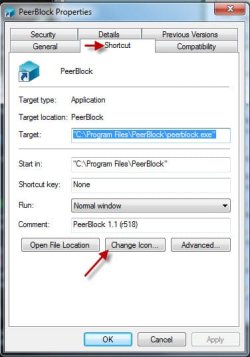
Without trying this myself, I believe you could solve the icon probem by creating a shortcut to Firefox on your desktop and right-click the shortcut and under the Shortcut tab choose "Chang Icon..."

HTH
Attached Thumbnails
Duplicating Icons On Taskbar-change-icon.jpg  

Last edited by Sir George; 07 Oct 2012 at 07:55 AM.. Reason: Add image
My System SpecsSystem Spec
08 Oct 2012   #5

Windows 7 Home Premium 64bit


Quote   Quote: Originally Posted by Sir George View Post
Without trying this myself, I believe you could solve the icon probem by creating a shortcut to Firefox on your desktop and right-click the shortcut and under the Shortcut tab choose "Chang Icon..."

HTH
I tried this myself. Unfortunately, it doesn't work. The new window with the changed icon still comes up as the default FF icon and gets grouped with the other profile...
My System SpecsSystem Spec
08 Oct 2012   #6

Microsoft Windows 7 Home Premium 64-bit 7600
cornwall UK


My System SpecsSystem Spec
09 Oct 2012   #7

Windows 7 Home Premium 64bit


Quote   Quote: Originally Posted by boohbah View Post
Yes, I tried this as well. It still opened Firefox under the same button. I'm not sure how to show you guys what I mean... Maybe pics will make it clearer?

In the first attachment, you can see that there are two firefox windows open. This is what happens whenever I try to do what that article said to do. This also happens when I try changing the icon of the shortcut.

I have tried making the shortcut in desktop, it combined. Tried dragging shortcut to the taskbar, it created a second button for about a minute. Once I clicked the new button, it opens a new window and combines with the original again. I have even tried making a new shortcut directly in the folder where all pinned shortcuts of apps on taskbar is kept. Again, it didn't work.

What I want, is in the second attachment. Two different buttons, both leading to two different profiles. I read somewhere that someone used a firefox normal version and a portable version. Is this possible WITHOUT using a portable version? If not, how limited is the portable version? Does it have all the features a full Firefox has?
Attached Images
  
My System SpecsSystem Spec
09 Oct 2012   #8

Windows 7 Professional 32bit


Quote   Quote: Originally Posted by Feathers View Post
I read somewhere that someone used a firefox normal version and a portable version. Is this possible WITHOUT using a portable version? If not, how limited is the portable version? Does it have all the features a full Firefox has?
Firefox Portable - Wikipedia, the free encyclopedia

Quote:
Firefox Portable retains all of Mozilla Firefox's abilities such as extensions and automatic updating.
My System SpecsSystem Spec
09 Oct 2012   #9

Microsoft Windows 7 Home Premium 64-bit 7600
cornwall UK


im not sure if it can be done, have you considered asking over at the mozilla forum?
My System SpecsSystem Spec
09 Oct 2012   #10

Windows 7 x64 Ultimate
A Finnish immigrant in Leipzig, Germany


Works for me, using Maxthon browser:

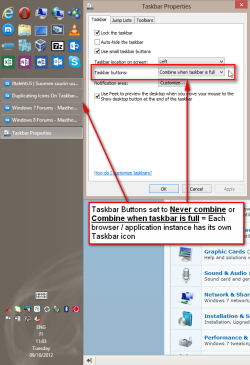
Duplicating Icons On Taskbar-2012-10-09_110753.png

Kari
My System SpecsSystem Spec
Reply

 Duplicating Icons On Taskbar problems?


Thread Tools


Similar help and support threads for: Duplicating Icons On Taskbar
Thread Forum
Win 7 taskbar all icons from start menu on taskbar General Discussion
Solved incorrect icons showing when customising taskbar icons General Discussion
TaskBar Icons Constantly Changing My Icons For Chrome any Help? General Discussion
Taskbar icons with custom lists, or different taskbar "modes"? Customization
Icons duplicating on taskbar - please help General Discussion


All times are GMT -5. The time now is 07:37 AM.


Seven Forums Android App Seven Forums IOS App Follow us on Facebook

Windows 7 Forums is an independent web site and has not been authorized,
sponsored, or otherwise approved by Microsoft Corporation.
"Windows 7" and related materials are trademarks of Microsoft Corp.
© Designer Media Ltd
  

1 2 3 4 5 6 7 8 9 10 11 12 13 14 15 16 17 18 19 20 21 22 23 24 25 26 27 28 29 30 31 32