Windows 7 Forums


Windows 7: Grayed out recent program list in start menu

21 Sep 2009   #1

Windows 7 Ultimate x64 SP1
Sragen, Jawa Tengah
 
 
Grayed out recent program list in start menu

See the attacment.

How to enable it???

Status: Resolved see post bellow for answer

Attached Thumbnails
Grayed out recent program list in start menu-sm1.jpg  

Last edited by christantoan; 21 Sep 2009 at 10:35 AM.. Reason: Updating Status
My System SpecsSystem Spec

21 Sep 2009   #2

64-bit Windows 7 Ultimate SP1 & Windows 8 Enterprise
Texas


Hello Christian, and welcome to Seven Forums.

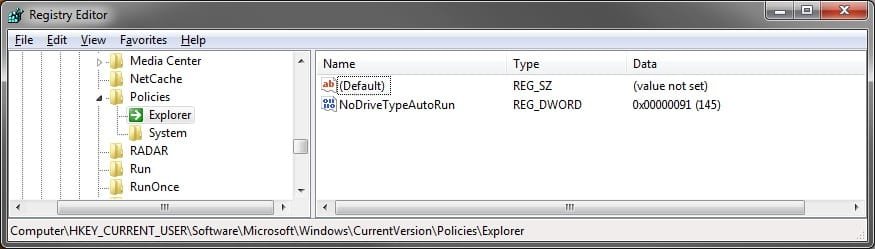
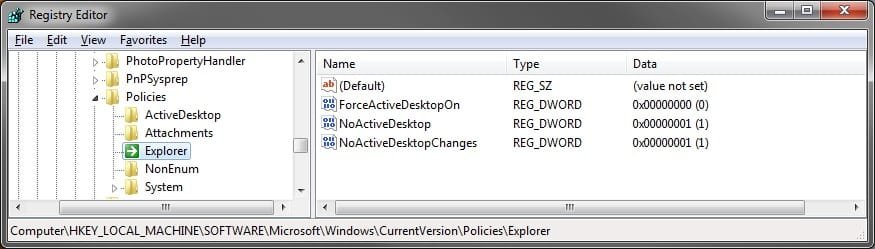
Please post a screenshot of these two regedit locations below to see if you have any other entries in there other than the ones you see below. I'll take a look to see if there's one you will need to delete to restore this back for you.

Grayed out recent program list in start menu-hkcu.jpg

Grayed out recent program list in start menu-hklm.jpg
My System SpecsSystem Spec
21 Sep 2009   #3

Windows 7 Ultimate x64 SP1
Sragen, Jawa Tengah


Here you are

Thanks for replying

EDIT: BTW my username is "christantoan" not "christian" (That's my religion anyway :b)
Attached Thumbnails
Grayed out recent program list in start menu-reg1.jpg   Grayed out recent program list in start menu-reg2.jpg  
My System SpecsSystem Spec
.


21 Sep 2009   #4

64-bit Windows 7 Ultimate SP1 & Windows 8 Enterprise
Texas


Ok,

It's the NoInstrumentation in the HKCU location that is causing it. Right click on it and click on delete, and log off and log on to restore Recent Programs in the Start Menu properties page.

Grayed out recent program list in start menu-noinstrumentation.jpg
My System SpecsSystem Spec
21 Sep 2009   #5

Windows 7 Ultimate x64 SP1
Sragen, Jawa Tengah


RESOLVED

Thank you very much
My System SpecsSystem Spec
21 Sep 2009   #6

64-bit Windows 7 Ultimate SP1 & Windows 8 Enterprise
Texas


You're most welcome Christan.
My System SpecsSystem Spec
22 Nov 2010   #7

Windows 7 Professional


Quote   Quote: Originally Posted by Brink View Post
Ok,

It's the NoInstrumentation in the HKCU location that is causing it. Right click on it and click on delete, and log off and log on to restore Recent Programs in the Start Menu properties page.
Thanks heaps, Brink! I had the same problem. Though, this was because I used - on a trial basis - AVG PC Tune Up 2011 which had a lot of settings which I was experimenting with. The trial was only for a day. It expired and then of course, I started hunting for the solution to this. You were the only one who nailed the problem straightaway.

Thanks, once again.

Last edited by Brink; 22 Nov 2010 at 12:06 PM.. Reason: fixed quote box
My System SpecsSystem Spec
22 Nov 2010   #8

64-bit Windows 7 Ultimate SP1 & Windows 8 Enterprise
Texas


You're most welcome DaCentaur, and welcome to Seven Forums. Thank you.
My System SpecsSystem Spec
27 Jan 2012   #9

Window 7 Pro x64


I understand this post is old however my problem is the same. My reg-edit however is different could be Pro version instead of Ultimate. I have included an attachment of my screen shot.
Attached Thumbnails
Grayed out recent program list in start menu-1-27-2012-11-51-37-am.jpg  
My System SpecsSystem Spec
27 Jan 2012   #10

64-bit Windows 7 Ultimate SP1 & Windows 8 Enterprise
Texas


Hello JW, and welcome to Seven Forums.

See if the REG files in the tutorial below for this may be able to enable it again for you.

Recent Programs - Enable or Disable

Hope this helps,
Shawn
My System SpecsSystem Spec
Reply

 Grayed out recent program list in start menu problems?


Thread Tools


Similar help and support threads for: Grayed out recent program list in start menu
Thread Forum
Solved Unable to remove from Start Menu list, the last installed program General Discussion
Some Programs won't go to Start Menu's Recent Programs List... General Discussion
Recent items in Start Menu General Discussion
Start Menu issues recent programs list General Discussion
Recent Program/Item List constantly Disappearing !!! General Discussion


All times are GMT -5. The time now is 09:18 AM.


Seven Forums Android App Seven Forums IOS App Follow us on Facebook

Windows 7 Forums is an independent web site and has not been authorized,
sponsored, or otherwise approved by Microsoft Corporation.
"Windows 7" and related materials are trademarks of Microsoft Corp.
© Designer Media Ltd
  

1 2 3 4 5 6 7 8 9 10 11 12 13 14 15 16 17 18 19 20 21 22 23 24 25 26 27 28 29 30 31 32