Windows 7 Forums Search
Welcome to Windows 7 Forums. Our forum is dedicated to helping you find solutions with any problems, errors or issues you are experiencing with Windows 7. The Windows 7 forum also covers news and updates and has an extensive Windows 7 tutorial section that covers a wide range of tips and tricks.


Windows 7 - Using an alternative Keyboard layout - HELP!

 
09-21-2009   #1


Windows 7, Ubuntu


Using an alternative Keyboard layout - HELP!

Hey everyone!

I am using an alternative keyboard layout (NEO 2.0) and I would like to know how to change the default keyboard layout so that I don't have to change it each time I open a new window!

Hope s.o. knows something about that!!

My System SpecsSystem Spec
09-21-2009   #2


Win7 Build 7600 x86


Quote   Quote: Originally Posted by luma View Post
Hey everyone!

I am using an alternative keyboard layout (NEO 2.0) and I would like to know how to change the default keyboard layout so that I don't have to change it each time I open a new window!

Hope s.o. knows something about that!!
Don't know what Neo 2.0 is, but keyboard layouts can be added in Configuration -> Country and language

Good luck
My System SpecsSystem Spec
09-21-2009   #3


My System SpecsSystem Spec
.


09-21-2009   #4


Win7 Build 7600 x86


Quote   Quote: Originally Posted by Antman View Post
Thanks Antman.

When the video ends, in the clip bar there is a video saying "so you think you can type fast?".

A must see!
My System SpecsSystem Spec
09-22-2009   #5


Windows 7, Ubuntu


Thanks, but…

Quote:
Don't know what Neo 2.0 is, but keyboard layouts can be added in Configuration -> Country and language

Good luck
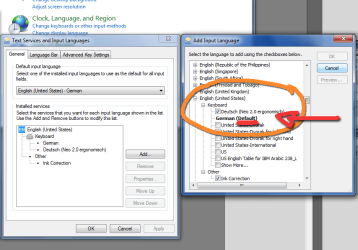
Thanks for the quick responses but the problem is that I cannot choose the DEFAULT keyboard layout!

If anyone had a solution for this I would be really thrilled to hear it!!!
Attached Thumbnails
Using an alternative Keyboard layout - HELP!-neo-keyboard.png  
My System SpecsSystem Spec
09-22-2009   #6


Win7 Build 7600 x86


Quote   Quote: Originally Posted by luma View Post
Quote:
Don't know what Neo 2.0 is, but keyboard layouts can be added in Configuration -> Country and language

Good luck
Thanks for the quick responses but the problem is that I cannot choose the DEFAULT keyboard layout!

If anyone had a solution for this I would be really thrilled to hear it!!!
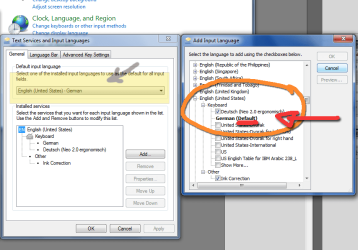
Hi Luma.

I used your screenshot.

I made the part yellow where you can set the default lang/keyboard.

Using an alternative Keyboard layout - HELP!-neo-keyboard.png
My System SpecsSystem Spec
09-23-2009   #7


Windows 7, Ubuntu


omg...


I really cannot say why I‘ve never seen that before!!!

Thank you all very much!!!

Problem solved!
My System SpecsSystem Spec
Reply

 Using an alternative Keyboard layout - HELP! problems?


Thread Tools


Similar Threads for: Using an alternative Keyboard layout - HELP!
Thread Forum
Keyboard Layout Creator 1.4 -- problem with building keyboard Software
Keyboard layout HELP !!! Please Hardware & Devices
Keyboard layout issue General Discussion
Keyboard Layout Help? General Discussion
Keyboard layout General Discussion


All times are GMT -5. The time now is 04:40 AM.


Windows 7 Forums is an independent web site and has not been authorized,
sponsored, or otherwise approved by Microsoft Corporation.
"Windows 7" and related materials are trademarks of Microsoft Corp.
© Designer Media Ltd
  

1 2 3 4 5 6 7 8 9 10 11 12 13 14 15 16 17 18 19 20 21 22 23 24 25 26 27 28 29 30