Windows 7 Forums


Windows 7: "My Documents" folder is locked

12 Oct 2012   #1

Windows 7 Professional 64bit
 
 
"My Documents" folder is locked

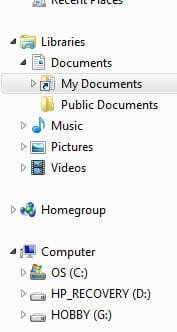
Yesterday I upgraded to WIN 7 Professional after having to do a reformat. Everything was fine after the upgrade, until this afternoon I noticed my "My Documents" folder is locked I am the owner and have full rights but yet can't get in! I am attaching, in order, of the messages I am getting. Any suggestions? I have no idea if I pushed a button I wasn't suppose to or what happened, yesterday was fine! I haven't installed anything after the reformat except for Firefox, PSPX2 and Incredimail. Any help will be appreciated! Thank you so much, debbie

Attached Thumbnails
"My Documents" folder is locked-image1.jpg   "My Documents" folder is locked-image2.jpg   "My Documents" folder is locked-image3.jpg   "My Documents" folder is locked-image4.jpg  
My System SpecsSystem Spec

12 Oct 2012   #2

Windows 7 x64 (SP1)


You are trying to get into the wrong folder. That is a junction!
You need "C:\Users\Debbie Doodles\Documents"
My System SpecsSystem Spec
12 Oct 2012   #3

Windows 7 Professional 64bit


Thank you for your response, but that does not make any sense to me! I have never had to go to the C:\Users\Debbie Doodles\Documents to get to my "My Documents" folder! Never! It has always been under "Libraries", something I did today changed that and locked that folder! I can see my folder by following your path you gave, but I shouldn't have to go through all that to get to it!

This just isn't making sense to me, I'm sorry. Could I move the C:\Users\Debbie Doodles\Documents folder to the Libraries without causing problems?


I do appreciate you taking time to answer my question!
debbie

Last edited by siamoose; 12 Oct 2012 at 10:59 PM.. Reason: Adding a question
My System SpecsSystem Spec
.


12 Oct 2012   #4
ESL

Windows 7 Home Premium x64


Have you installed all necessary Windows Updates? This is a common problem before all updates are installed.
My System SpecsSystem Spec
12 Oct 2012   #5

Windows 7 Professional 64bit


Yes, all updates were done at the time of upgrading, took about 45 minutes, there were 54 of them. Please understand this is NOT the first time I have had Windows 7 Professional, I had to reformat and thus the upgrading last night. I didn't have this problem until today.

Thanks for your suggestion.
debbie
My System SpecsSystem Spec
12 Oct 2012   #6

Windows 7 x64 (SP1)


Right-click on the "Documents" library, properties. Select and remove "My Documents" from the list. Then click on "Include a folder..." use the path I gave you in the address bar. Press "Include folder at the bottom.
Library - Remove a Included Folder

Library - Include a Folder
What you should do is go into Folder Properties and make sure "Hide Protected System files" is checked. If not check it.
Hidden Files and Folders - Show or Hide
My System SpecsSystem Spec
13 Oct 2012   #7

Windows 7 Professional 64bit


Thank you so much for your help! "My Docuements" folder is now where it should be!
I am a tad OCD . Appreciate your help so much!
debbie
My System SpecsSystem Spec
Reply

 "My Documents" folder is locked problems?


Thread Tools


Similar help and support threads for: "My Documents" folder is locked
Thread Forum
How to install "My Documents" folder in 2nd drive Installation & Setup
Lost "My Documents" folder when trying to move it to (D:) partition. General Discussion
Solved Should I move "Documents" or "My Documents" folder to D partition? General Discussion
Solved Deleted "My Documents" folder in Libraries General Discussion
What kind of file is the "My Documents" folder General Discussion


All times are GMT -5. The time now is 03:17 AM.


Seven Forums Android App Seven Forums IOS App Follow us on Facebook

Windows 7 Forums is an independent web site and has not been authorized,
sponsored, or otherwise approved by Microsoft Corporation.
"Windows 7" and related materials are trademarks of Microsoft Corp.
© Designer Media Ltd
  

1 2 3 4 5 6 7 8 9 10 11 12 13 14 15 16 17 18 19 20 21 22 23 24 25 26 27 28 29 30 31 32