Windows 7 Forums


Windows 7: Blank icons/white thumbnails + slow My Computer

22 Oct 2012   #1

Windows 7 Home Premium x64
 
 
Blank icons/white thumbnails + slow My Computer

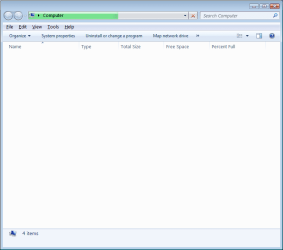
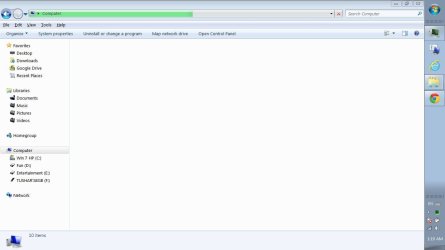
After some time on the computer the icons become blank and My Computer doesn't load.
It all returns to normal after I end the task "dllhost.exe", and after some time the problem comes back again.


I've tried these solutions:
- SFC /scannow
- Recreating IconCache.db

System:
Windows 7 Home Premium x64
Laptop - Toshiba Satellite P775
8GB RAM
Intel HD Graphics 3000
Mobile QuadCore Intel Core i7-2670QM, 2400 MHz

Thanks!
Attached Thumbnails
Blank icons/white thumbnails + slow My Computer-computer.png   Blank icons/white thumbnails + slow My Computer-icons.png  
My System SpecsSystem Spec

22 Oct 2012   #2

Windows 7 Enterprise x64
Austin


Hi,

If this issue started occurring after doing some recent software changes on your computer, then I would suggest you to restore your system back to a date when it was working fine. System Restore will affect Windows system files, programs, and registry settings only.

For System Restore steps, you can refer to the URL mentioned: http://windows.microsoft.com/en-US/windows7/products/features/system-restore


If the issue still persists, try running Hardware Diagnostics on the computer.
My System SpecsSystem Spec
22 Oct 2012   #3

Windows 7 Home Premium x64


Quote   Quote: Originally Posted by Debbie B View Post
Hi,

If this issue started occurring after doing some recent software changes on your computer, then I would suggest you to restore your system back to a date when it was working fine. System Restore will affect Windows system files, programs, and registry settings only.

For System Restore steps, you can refer to the URL mentioned: http://windows.microsoft.com/en-US/windows7/products/features/system-restore


If the issue still persists, try running Hardware Diagnostics on the computer.
It's been going on for over a month so system restore is no option.
What Hardware Diagnostics do you recommend? (I think I've run them all...)
Thanks!
My System SpecsSystem Spec
.


25 Oct 2012   #4

Windows 7 Enterprise x64
Austin


Hi,

I would recommend you to run Hard drive diagnostics. If there are no errors, then I would suggest you to try creating a New User account and then try to log in this New User account in Normal Mode.
If the issue still persists, you can even try restoring system back to factory settings and then check the performance of the system. Ensure backing up your data before reinstalling Operating system or PC restore.

Keep us Posted
My System SpecsSystem Spec
26 Oct 2012   #5

Windows 7 Home Premium x64


Quote   Quote: Originally Posted by Debbie B View Post
Hi,

I would recommend you to run Hard drive diagnostics. If there are no errors, then I would suggest you to try creating a New User account and then try to log in this New User account in Normal Mode.
If the issue still persists, you can even try restoring system back to factory settings and then check the performance of the system. Ensure backing up your data before reinstalling Operating system or PC restore.

Keep us Posted
The problem came up in the new user.

I'll consider restoring to factory settings.
My System SpecsSystem Spec
26 Oct 2012   #6

Windows 7 Home Premium 64 bit. SP-1
Northern Ohio


This could be a infection. Some infections do hide in dll host.
What security programs are you using?
This is a good program to use.

Windows Defender Offline

Here is another one.

Free Online Virus Scanner | ESET
My System SpecsSystem Spec
26 Oct 2012   #7

Windows 7 Home Premium x64


Quote   Quote: Originally Posted by Layback Bear View Post
This could be a infection. Some infections do hide in dll host.
What security programs are you using?
This is a good program to use.

Windows Defender Offline

Here is another one.

Free Online Virus Scanner | ESET
Throughout the years I've always been very careful and strict about that subject - and haven't had infections.
Currently I use ESET Smart Security + Immunizations by Spbot/SpywareBlaster/Advanced SystemCare.
My System SpecsSystem Spec
26 Oct 2012   #8

Windows 7 Home Premium 64 bit. SP-1
Northern Ohio


Okay
Have a nice day.
My System SpecsSystem Spec
30 Oct 2012   #9

Windows 7 Home Premium x64


Quote   Quote: Originally Posted by Guy1 View Post
Quote   Quote: Originally Posted by Debbie B View Post
Hi,

I would recommend you to run Hard drive diagnostics. If there are no errors, then I would suggest you to try creating a New User account and then try to log in this New User account in Normal Mode.
If the issue still persists, you can even try restoring system back to factory settings and then check the performance of the system. Ensure backing up your data before reinstalling Operating system or PC restore.

Keep us Posted
The problem came up in the new user.

I'll consider restoring to factory settings.
As in most cases, formatting solved it (for now).
My System SpecsSystem Spec
10 Nov 2012   #10

Windows 7 Home Premium x64


After some grace period following the format - the problem came back.
So I did a System Restore, the problem disappeared for a few hours, and then came back again.

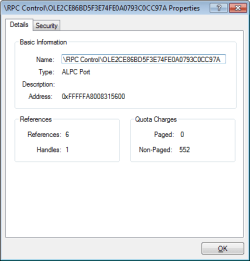
I've managed to pin point what exactly is causing the problem inside the dllhost.exe process with the help of Process Explorer (by Sysinternals) and its listing of Handles inside each process.
When the problem happened I went into the list of Handles inside dllhost.exe and started closing handles one by one to see after which one the problem disappears.
It turns out to be something called "ALPC Port/RPC Control" (Screenshot attached)

I really hope this info will help in figuring out this annoying problem.

Thanks!

---

Apparently it has something to do with codecs installed on the pc - in my case it is K-Lite.
I've uninstalled and things got back to normal - and when I installed the codecs again (I've tried different codec packs) it came back.
Furthermore, now there is another problem of "COM Surrogate has stopped working" with this error event:
"Faulting application name: DllHost.exe, version: 6.1.7600.16385, time stamp: 0x4a5bc6b7
Faulting module name: RPCRT4.dll, version: 6.1.7601.17514, time stamp: 0x4ce7ba59
Exception code: 0xc0020043
Fault offset: 0x0005cd99
Faulting process id: 0x778
Faulting application start time: 0x01cdbf761de92209
Faulting application path: C:\windows\SysWOW64\DllHost.exe
Faulting module path: C:\windows\syswow64\RPCRT4.dll
Report Id: 5cc678d8-2b69-11e2-a5c6-dc0ea12f8458"

And so I've followed these instructions:
http://helpdeskgeek.com/help-desk/fi...-in-windows-7/
And I'm trying to figure out if it helped.
Attached Thumbnails
Blank icons/white thumbnails + slow My Computer-untitled.png  

Last edited by Guy1; 10 Nov 2012 at 02:10 PM..
My System SpecsSystem Spec
Reply

 Blank icons/white thumbnails + slow My Computer problems?


Thread Tools


Similar help and support threads for: Blank icons/white thumbnails + slow My Computer
Thread Forum
Windows and Icons white/blank General Discussion
Blank\White Icons Software
After Login Desktop Icons White/Blank Says Can't Open T General Discussion
MSE slow display of icons and thumbnails System Security
Invisible and Blank Thumbnails/Icons? General Discussion


All times are GMT -5. The time now is 04:03 AM.


Seven Forums Android App Seven Forums IOS App Follow us on Facebook

Windows 7 Forums is an independent web site and has not been authorized,
sponsored, or otherwise approved by Microsoft Corporation.
"Windows 7" and related materials are trademarks of Microsoft Corp.
© Designer Media Ltd
  

1 2 3 4 5 6 7 8 9 10 11 12 13 14 15 16 17 18 19 20 21 22 23 24 25 26 27 28 29 30 31 32