
eurosport360
New member
- Local time
- 5:59 AM
- Messages
- 26
Hello to all
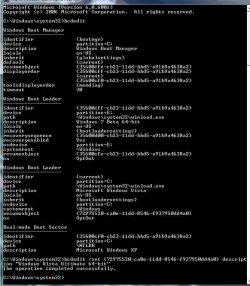
First off, Windows 7 is very cool; I might use it more than vista now that I got internet for it, but that will have to wait for a month or two. My first question is: when I boot up my comp, and I have to pick either vista or W7 (I have W7 on another partition), I usually leave the room while my comp is booting, so after 30 seconds the BIOS picks Windows 7 as the default OS because its first. I would really like to boot up my pc while doing something else, and I would love for the BIOS to pick Vista after 30 seconds instead of W7 because I use Vista for games and such. Is there some way of doing that or do I have to sit around throughout the start up and manually pick Vista?
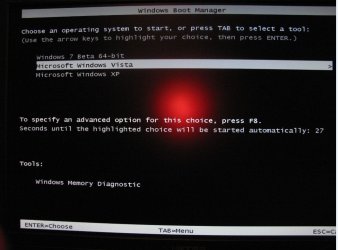
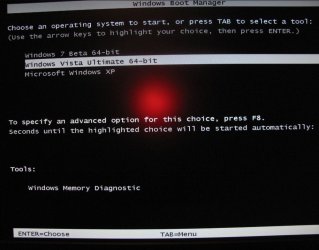
My second question seems a little picky or over the edge, but when I boot up my comp and have to pick an OS, it prints "Windows 7" while underneath it it prints out "Microsoft Windows Vista". Is there some way to add 'Microsoft' in front of Windows 7 when Im picking in the BIOS? It doesn't look as good without the Microsoft.
Thanks
First off, Windows 7 is very cool; I might use it more than vista now that I got internet for it, but that will have to wait for a month or two. My first question is: when I boot up my comp, and I have to pick either vista or W7 (I have W7 on another partition), I usually leave the room while my comp is booting, so after 30 seconds the BIOS picks Windows 7 as the default OS because its first. I would really like to boot up my pc while doing something else, and I would love for the BIOS to pick Vista after 30 seconds instead of W7 because I use Vista for games and such. Is there some way of doing that or do I have to sit around throughout the start up and manually pick Vista?
My second question seems a little picky or over the edge, but when I boot up my comp and have to pick an OS, it prints "Windows 7" while underneath it it prints out "Microsoft Windows Vista". Is there some way to add 'Microsoft' in front of Windows 7 when Im picking in the BIOS? It doesn't look as good without the Microsoft.
Thanks
My Computer
At a glance
Vista x64 | Windows 7 Ultimate x64 build 7000AMD Phenom X4 9850 @ 2500 MHz6144 MB DDR2 (6gigs)NVIDIA Geforce 9800 GT 512 MB
- Computer Manufacturer/Model Number
- HP Pavilion M9350F
- OS
- Vista x64 | Windows 7 Ultimate x64 build 7000
- CPU
- AMD Phenom X4 9850 @ 2500 MHz
- Motherboard
- PEGATRON CORPORATION VIOLA
- Memory
- 6144 MB DDR2 (6gigs)
- Graphics Card(s)
- NVIDIA Geforce 9800 GT 512 MB
- Sound Card
- intergrated
- Monitor(s) Displays
- SONY SDM-HS94P - 19 inches
- Screen Resolution
- 1280x1024
- Hard Drives
- 1x 750GB SATA 7200RPM
- PSU
- at least 450W
- Case
- Stock
- Cooling
- Stock
- Keyboard
- Logitech
- Mouse
- Logitech
- Internet Speed
- 54 Mbps


 Ted
Ted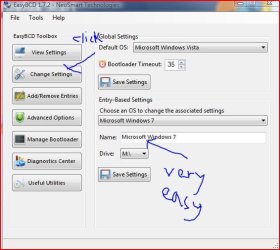


 Ted
Ted


