| Windows 7: Not able to boot. no help from system recovery or restore points |
03 Nov 2012
|
#1 | | |
Not able to boot. no help from system recovery or restore points Ok, so my laptop (a Sager notebook) has Windows 7 Home Premium installed on it. For the past month or so, whenever I shutdown it'll say installing update 1 of 1 and then when I go to reboot, it will say applying updates x out of 35,xxx. Well, it'll always fail and I'll have to do a system recovery. Yesterday, I forgot to plug my pc into the power source and it died in the middle of the updates it does at boot. Now, it'll say updating 2 of 35,xxx and then I have the option of doing system recovery. That doesn't work at all. Neither does trying to use a restore point. They all say failed to extract a file D:\Program Files (x86)\Internet Explorer\en-US\hmmapi.dll.mui from the restore point. I've tried deleting that individual file (not sure if that was a good idea), but it says the file path doesn't exist. I've tried chkdsk on D, but that doesn't fix the problem either. Can't do a sfc /scannow because a system recovery is in process and I'm told to reboot, but that just continues in a cycle. I'm having my mom send me the recovery disk, and I hope that can help. I have no options left except to attempt to use Ubuntu Live, boot from the disc, transfer whatever info I want to keep, and then do a reinstall. Anyone have any helpful suggestions? Not having the best weekend and I'm at my wits end :/ | My System Specs |
| OS Windows 7 Home Premium |
03 Nov 2012
|
#2 | | Windows 7 Home Premium x64 |

Quote: Originally Posted by EmDubYa Ok, so my laptop (a Sager notebook) has Windows 7 Home Premium installed on it. For the past month or so, whenever I shutdown it'll say installing update 1 of 1 and then when I go to reboot, it will say applying updates x out of 35,xxx. Well, it'll always fail and I'll have to do a system recovery. Yesterday, I forgot to plug my pc into the power source and it died in the middle of the updates it does at boot. Now, it'll say updating 2 of 35,xxx and then I have the option of doing system recovery. That doesn't work at all. Neither does trying to use a restore point. They all say failed to extract a file D:\Program Files (x86)\Internet Explorer\en-US\hmmapi.dll.mui from the restore point. I've tried deleting that individual file (not sure if that was a good idea), but it says the file path doesn't exist. I've tried chkdsk on D, but that doesn't fix the problem either. Can't do a sfc /scannow because a system recovery is in process and I'm told to reboot, but that just continues in a cycle. I'm having my mom send me the recovery disk, and I hope that can help. I have no options left except to attempt to use Ubuntu Live, boot from the disc, transfer whatever info I want to keep, and then do a reinstall. Anyone have any helpful suggestions? Not having the best weekend and I'm at my wits end :/ For clarification, are you stating there are over 35,000 updates? | My System Specs | | System Manufacturer/Model Number Custom Built OS Windows 7 Home Premium x64 CPU Intel i5 quad processor Motherboard DP67BG Memory 16 GB Graphics Card Radeon HD 5770 Sound Card Realtek High Definition Audio Monitor(s) Displays Samsung SyncMaster Screen Resolution 1920X1080 Keyboard MS Wireless Mouse MS Optical Wired PSU Corsair GS800 Case Tower (Generic) Cooling 3 Internal Fans Hard Drives WD 2TB (SATA Internal)
WD 1TB (USB External) Internet Speed 19.4 Mbps |
03 Nov 2012
|
#3 | | |
When the Windows is starting image comes up, yes. | My System Specs | | OS Windows 7 Home Premium |
03 Nov 2012
|
#4 | | Microsoft Windows 7 Home Premium 64-bits 7601 Multiprocessor Free Service Pack 1 SecretCity |
How did you delete D:\Program Files (x86)\Internet Explorer\en-US\hmmapi.dll.mui ? form linux, or just from Windows 7 recovery environment? Deleting a file is useless btw... the more you delete ... the more it has to restore.
In recovery environment your Windows 7 partition is called D I see.
Is C called "system reserved"? And is that the active boot partition? sfc/scannow is surely the wrong syntax... it checks the recovery environment itself! Code: sfc /scannow /offbootdir=c:\ /offwindir=d:\windows if not working try Code: sfc /scannow /offbootdir=d:\ /offwindir=d:\windows | My System Specs | | Computer type Laptop System Manufacturer/Model Number ACER ASPIRE 5742G OS Microsoft Windows 7 Home Premium 64-bits 7601 Multiprocessor Free Service Pack 1 CPU Intel(R) Core(TM) i3 CPU M 370 @ 2.40GHz Motherboard Acer Aspire 5742G Memory 4,00 GB Graphics Card ATI Mobility Radeon HD 5400 Series Sound Card (1) AMD High Definition Audio Device (2) Realtek High Defi Screen Resolution 1366 x 768 x 32 bits (4294967296 colors) @ 60 Hz Hard Drives WDC WD5000BEVT-22ZAT0 |
03 Nov 2012
|
#5 | | Microsoft Windows 7 Home Premium 64-bits 7601 Multiprocessor Free Service Pack 1 SecretCity |
try to do system restore from Windows 7 install dvd or recovery dvd! of course do first:
chkdsk/f d: | My System Specs | | Computer type Laptop System Manufacturer/Model Number ACER ASPIRE 5742G OS Microsoft Windows 7 Home Premium 64-bits 7601 Multiprocessor Free Service Pack 1 CPU Intel(R) Core(TM) i3 CPU M 370 @ 2.40GHz Motherboard Acer Aspire 5742G Memory 4,00 GB Graphics Card ATI Mobility Radeon HD 5400 Series Sound Card (1) AMD High Definition Audio Device (2) Realtek High Defi Screen Resolution 1366 x 768 x 32 bits (4294967296 colors) @ 60 Hz Hard Drives WDC WD5000BEVT-22ZAT0 |
03 Nov 2012
|
#6 | | Windows 7 Ultimate 32bit SP1 |
hmmapi.dll.mui belongs to IE8 .... Did you install IE9, or not? A few more details involving IE and what you've done with it might help us to help you. | My System Specs | | System Manufacturer/Model Number Bruce ... somewhere in his 40's OS Windows 7 Ultimate 32bit SP1 CPU Intel(R) Core(TM)2 Quad CPU @ 2.40GHz, 2400 MHz Motherboard INTEL/D975XBX2 Memory 4 GB Graphics Card ATI Radeon HD 2600 Pro Monitor(s) Displays Samsung SyncMaster 914v Screen Resolution 1280 x 1024 Keyboard Standard PS/2 Keyboard Mouse Microsoft PS/2 Mouse PSU Rocketfish 700 W Case G.Skill Gigabyte Chassis Hard Drives 2/500GB each ... ST3500630AS ATA Device.
One is not connected Internet Speed DSL Antivirus Avira Internet Security Browser IE 9 Other Info ATI HDMI Audio |
03 Nov 2012
|
#7 | | Win7 x 6 PC's California, Florida, Boston |
Boot into the Windows 7 DVD's System Recovery Options or System Repair Disk to run Startup Repair. It should offer to run System Restore, but if not run it from the Recovery Tools list to restore to a point when it worked correctly.
If this fails you might need to rescue your files then get a perfect Clean Reinstall - Factory OEM Windows 7
- everything you need is in the blue link. Once it's setup save a Windows 7 backup image externally so you never have to reinstall again - just reimage with DVD and stored image in 20 minutes. | My System Specs | | |
03 Nov 2012
|
#8 | | |
@Tak - I typed that into command prompt as you suggested, but it it still says that I need a reboot because a system recovery is in process :/ also, I mention that I tried deleting the specified file but couldnt, not that I did. Thanks for helping though!
@Jace - I hate IE. I'm a chrome or Firefox girl myself so I've never bothered with it lol.
I'll just have to wait until the recovery disc arrives in the mail to try using that. I'll update this thread once it does. Thanks everyone! | My System Specs | | OS Windows 7 Home Premium |
03 Nov 2012
|
#9 | | |
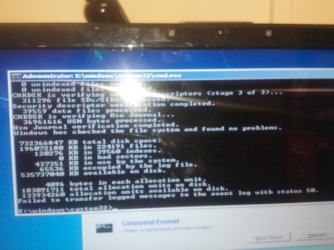
Also, this is what I got after running what you suggested kak. | My System Specs | | OS Windows 7 Home Premium |
03 Nov 2012
|
#10 | | Win7 x 6 PC's California, Florida, Boston |
A Recovery disk only restores the PC to factory Condition, but offers none of the System Recovery Options you may still be able to trigger via the F8 Advanced Boot Options or from the Windows 7 DVD or System Repair Disk.
The Windows 7 DVD is available in the Clean Reinstall tutorial I linked which you would know if you'd read it.
You can make a Repair CD on any Windows 7 PC of your same 32- or 64-bit version.
So you can try repairs using one of those methods now. Every possible repair is listed in Troubleshooting Windows 7 Failure to Start so these are no mystery,.
If faced with running Recovery disks to reinstall all of the corrupting factory bloatware, I'd instead follow the steps to get a perfect clean reinstall. It is a specialty of these forums so we will help you as much as needed, both with the repairs or the reinstall. Note you can also rescue your files doing either. | My System Specs | | Not able to boot. no help from system recovery or restore points problems? All times are GMT -5. The time now is 11:23 AM. | |