| Windows 7: Forgot Admin Password Please Help! |
04 Nov 2012
|
#1 | | Windows 7 Home Premium 64bit |
Forgot Admin Password Please Help! I forgot the password to my admin user account and cant log in. I tried windows password key, konboot, and trinity rescue kit and none of them booted from disc. Then i went into bios and put the internal optical disk drive first and internal hard disk drive second. Still doesnt boot from disc . Does anyone know how to fix this problem?
Im using the Sony Vaio S series home premium 64bit vpcsc41fm | My System Specs |
| OS Windows 7 Home Premium 64bit |
04 Nov 2012
|
#2 | | Windows 8 64-bit (6.2, Build 9200) (9200.win8_rtm.120725-1247) Mars Hill, NC |
Trinity rescue disk can fix this. | My System Specs | | System Manufacturer/Model Number HP C2N70UA#ABA Laptop OS Windows 8 64-bit (6.2, Build 9200) (9200.win8_rtm.120725-1247) CPU AMD Quad-Core A10-4600M APU 2.3Ghz Turbo to 3.4 Memory 8GB DDR3 Graphics Card AMD Radeon HD 7660G Sound Card Altec Lansing with SRS Premium Sound Monitor(s) Displays 17" Laptop HD Display (720p) Screen Resolution 1600*900 Keyboard Island Style Mouse Logitech 625 Wireless Cooling HP Cool Sense Hard Drives 750GB (5400 RPM), with smart protect
Western Digital 1TB Passport Internet Speed 30MBps |
04 Nov 2012
|
#3 | | Windows 7 Home Premium 64bit |
The software is not the problem man. All the software that i put up can fix the problem. My problem though is just getting my Vaio S series to boot the CD from the optical disc. | My System Specs | | OS Windows 7 Home Premium 64bit |
04 Nov 2012
|
#4 | | Windows 7 Ultimate 64-bit SP1 New Jersey |
How in the world do you FORGET your password.
Are those discs retail ? Did you make them yourself ? | My System Specs | | Computer type PC/Desktop System Manufacturer/Model Number Custom Built by Me ! OS Windows 7 Ultimate 64-bit SP1 CPU Intel Core i5 3570k @ 4.0 GHz Motherboard MSI Z77A-G45 Memory 16GB Corsair Vengeance @ 1600 MHz 10-10-10-27 Graphics Card MSI GTX660 Twin Frozr3 OC Sound Card Realtek HD Monitor(s) Displays Dell 19" HP 23" Sony Bravia 40" Screen Resolution 1920 x 1080 Keyboard Fellowes KWD 855 Mouse Microsoft Wireless PSU Corsair HX750 80+Gold Case Corsair Vengeance Series C70 Gun Metal Black Cooling Cooler Master Hyper N520, Arctic Alumina Thermal Compound Hard Drives OCZ Vertex 4 119GB SSD,
WD Black 500, Blue 500, Caviar SE 320 x 2 Internet Speed Download 25.81 Mbps Upload 5.07 Mbps Antivirus MSE MBAM Browser Chromium Other Info Boston BA745 2.1 Speaker System, Lightscribe Dual Layer DVD Burner |
04 Nov 2012
|
#5 | | Win 7 Pro 64-bit 7601 Italy |
did you save the setting after you changed it? the last BIOS tab should offer a "exit and save changes" option.
Another way is try placing the iso on a bootable usb stick and boot from that ( YUMI is a good program to do that) | My System Specs | | Computer type PC/Desktop System Manufacturer/Model Number custom built OS Win 7 Pro 64-bit 7601 CPU AMD Phenom 9650 QuadCore, revision DR-B3 Motherboard ASUS M4A78 Memory 4,00 GB Graphics Card NVIDIA GeForce 9800 GT Sound Card Realtek High Definition Audio Monitor(s) Displays Fujitsu Siemens P19-3P Screen Resolution 1280 x 1024 x 32 bits @ 60 Hz Oh yeah, 4:3 rocks! Keyboard Microsoft, whatever. Mouse Optical, logitec. PSU whatever, around 450w Case Scavenged from old company PC, 10+ years old Cooling CPU fan, GPU fan, case fan, nothing fancy Hard Drives (1) MAXTOR S TM3320613AS SATA Disk Device (2) STM35004 18AS SATA Disk Device (3) TOSHIBA USB 2.5"-HDD Internet Speed effective max speeds: 70-ish kB/s down 30-ish kB/s up Antivirus Avira, free endition. Browser Firefox with FXChrome to make it look like Google Chrome Other Info Was discarded by previous owner due to "horrible performance".
Was running Win Xp from a IDE drive. Yeah. Was a pain.
SATA II drive and Win7 and it zips away! Yay! |
04 Nov 2012
|
#6 | | Windows 7 Home Premium 64bit |

Quote: Originally Posted by bobafetthotmail did you save the setting after you changed it? the last BIOS tab should offer a "exit and save changes" option.
Another way is try placing the iso on a bootable usb stick and boot from that ( YUMI is a good program to do that) Yeah i did save the setting in bios. I tried booting from usb as well but i used a program called ISO to USB to no avail. In bios i also put the external device as the first device above internal hard disk and still nothing. Ive ban at it for 2 days with no solution | My System Specs | | OS Windows 7 Home Premium 64bit |
04 Nov 2012
|
#7 | | Windows 7 Home Premium 64bit |

Quote: Originally Posted by AddRAM How in the world do you FORGET your password.
Are those discs retail ? Did you make them yourself ? I made it two days before shutting off my computer so when i turned it on i was surprised by the password my self. And no i created those discs myself in order to get rid of the password. | My System Specs | | OS Windows 7 Home Premium 64bit |
04 Nov 2012
|
#8 | | Win 7 Pro 64-bit 7601 Italy |
try having the network boot in the first spot, then the removable device, then the cd reader, possibly leaving the hdd out of boot order.
I had some dumb bios that didn't boot anything from USB if network boot wasn't first, never had issues with cds, but it's worth a try.
I'd also try the "reset factory/optimal settings" or similar bios option. Also check if there are settings that prevent it from booting USBs or CDs (but you'll probably have already looked for this). | My System Specs | | Computer type PC/Desktop System Manufacturer/Model Number custom built OS Win 7 Pro 64-bit 7601 CPU AMD Phenom 9650 QuadCore, revision DR-B3 Motherboard ASUS M4A78 Memory 4,00 GB Graphics Card NVIDIA GeForce 9800 GT Sound Card Realtek High Definition Audio Monitor(s) Displays Fujitsu Siemens P19-3P Screen Resolution 1280 x 1024 x 32 bits @ 60 Hz Oh yeah, 4:3 rocks! Keyboard Microsoft, whatever. Mouse Optical, logitec. PSU whatever, around 450w Case Scavenged from old company PC, 10+ years old Cooling CPU fan, GPU fan, case fan, nothing fancy Hard Drives (1) MAXTOR S TM3320613AS SATA Disk Device (2) STM35004 18AS SATA Disk Device (3) TOSHIBA USB 2.5"-HDD Internet Speed effective max speeds: 70-ish kB/s down 30-ish kB/s up Antivirus Avira, free endition. Browser Firefox with FXChrome to make it look like Google Chrome Other Info Was discarded by previous owner due to "horrible performance".
Was running Win Xp from a IDE drive. Yeah. Was a pain.
SATA II drive and Win7 and it zips away! Yay! |
04 Nov 2012
|
#9 | | Windows 7 Ultimate 64-bit SP1 New Jersey |
Made what 2 days b4 ?
Discs could have not been prepared properly.
Drop in an install disc, restart, bring up the boot menu by pressing the proper Fkey, shown on boot screen.
Boot from the dvd drive.
See if the install disc will boot. | My System Specs | | Computer type PC/Desktop System Manufacturer/Model Number Custom Built by Me ! OS Windows 7 Ultimate 64-bit SP1 CPU Intel Core i5 3570k @ 4.0 GHz Motherboard MSI Z77A-G45 Memory 16GB Corsair Vengeance @ 1600 MHz 10-10-10-27 Graphics Card MSI GTX660 Twin Frozr3 OC Sound Card Realtek HD Monitor(s) Displays Dell 19" HP 23" Sony Bravia 40" Screen Resolution 1920 x 1080 Keyboard Fellowes KWD 855 Mouse Microsoft Wireless PSU Corsair HX750 80+Gold Case Corsair Vengeance Series C70 Gun Metal Black Cooling Cooler Master Hyper N520, Arctic Alumina Thermal Compound Hard Drives OCZ Vertex 4 119GB SSD,
WD Black 500, Blue 500, Caviar SE 320 x 2 Internet Speed Download 25.81 Mbps Upload 5.07 Mbps Antivirus MSE MBAM Browser Chromium Other Info Boston BA745 2.1 Speaker System, Lightscribe Dual Layer DVD Burner |
04 Nov 2012
|
#10 | | Windows 7 Home Premium 64bit |

Quote: Originally Posted by bobafetthotmail try having the network boot in the first spot, then the removable device, then the cd reader, possibly leaving the hdd out of boot order.
I had some dumb bios that didn't boot anything from USB if network boot wasn't first, never had issues with cds, but it's worth a try.
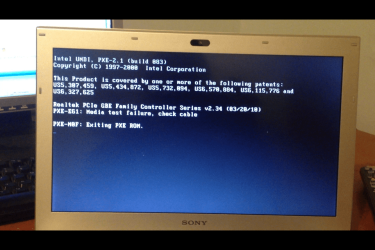
I'd also try the "reset factory/optimal settings" or similar bios option. Also check if there are settings that prevent it from booting USBs or CDs (but you'll probably have already looked for this). Yeah i did look into that. Anyways i put network boot as first and the result was a bit a different but at least we're getting somewhere for once. This is what came up after i followed your steps... | My System Specs | | OS Windows 7 Home Premium 64bit Forgot Admin Password Please Help! problems? All times are GMT -5. The time now is 03:50 PM. | |