| Windows 7: Advice on upgrading to Windows 8. |
05 Nov 2012
|
#1 | | Windows 8 64-bit (6.2, Build 9200) (9200.win8_rtm.120725-1247) Mars Hill, NC |
Advice on upgrading to Windows 8. I was thinking of taking the plunge to getting the discounted windows 8 upgrade for my computer. I meet the requirements by far, and at $39.99 for digital copy, I am thinking of taking the upgrade.
I was curious if anyone could shed some light on whether or not this would be worth it? This sales goes on until sometimes in Feb 2013. The Windows 8 Compatibility tool comes back with 100% compatible review of my computer.
I ran the public preview of Windows 8, and I liked it alot, and would like feedback from the Windows 7 community. | My System Specs |
| System Manufacturer/Model Number HP C2N70UA#ABA Laptop OS Windows 8 64-bit (6.2, Build 9200) (9200.win8_rtm.120725-1247) CPU AMD Quad-Core A10-4600M APU 2.3Ghz Turbo to 3.4 Memory 8GB DDR3 Graphics Card AMD Radeon HD 7660G Sound Card Altec Lansing with SRS Premium Sound Monitor(s) Displays 17" Laptop HD Display (720p) Screen Resolution 1600*900 Keyboard Island Style Mouse Logitech 625 Wireless Cooling HP Cool Sense Hard Drives 750GB (5400 RPM), with smart protect
Western Digital 1TB Passport Internet Speed 30MBps |
05 Nov 2012
|
#2 | | |

Quote: Originally Posted by tlarseth I was thinking of taking the plunge to getting the discounted windows 8 upgrade for my computer. I meet the requirements by far, and at $39.99 for digital copy, I am thinking of taking the upgrade.
I was curious if anyone could shed some light on whether or not this would be worth it? This sales goes on until sometimes in Feb 2013. The Windows 8 Compatibility tool comes back with 100% compatible review of my computer.
I ran the public preview of Windows 8, and I liked it alot, and would like feedback from the Windows 7 community. To tell you the truth, maybe you don't know but the windows 7 u have has much more potential and is much better (thats my view currently), but if u are not bothered by tech things then u should probably go for it. Can't really say though, W8 is less "hackable" if u are in these sort of things. But using a mouse and metro just don't seem to get along, unless u have touchscreen. I'm personally staying away from wp8 unless microsoft comes out with something really strong to make me shift.
The new W8 will shift towards cloud computing mostly and i don't like it cause it feels like im insecure in the new windows, though the security in terms of malware protection should go up.
Do note that upgrading instead of installing a fresh copy often is a hassle.
The final choice is yours, if u feel you like it, then go for it. | My System Specs | | System Manufacturer/Model Number HP Compaq dx1000 microtower (aka outdated pc) OS Windows 7 Home Basic OEM CPU Intel E5300 dual core 2.6ghz Motherboard MSI 2A78h Memory 4 gb Dual channel Corsair :) Finally! (but 32bit meh...) Graphics Card AMD Radeon HD 6570 Monitor(s) Displays Zenware Screen Resolution 1680x1050 Keyboard Dragon war Mouse Hp compaq PSU 350w Case Ordinary HP case Cooling 2 airfans for Cpu and 1 for Gpu Hard Drives Samsung 300Gb Internet Speed 1mbps download, even less upload (just don't pay attention:) Other Info Next plan is to get a Core2Duo for it XD |
05 Nov 2012
|
#3 | | Windows 7 x64 x86 North Western Indianapolis |

Quote: Originally Posted by tlarseth I was thinking of taking the plunge to getting the discounted windows 8 upgrade for my computer. I meet the requirements by far, and at $39.99 for digital copy, I am thinking of taking the upgrade.
I was curious if anyone could shed some light on whether or not this would be worth it? This sales goes on until sometimes in Feb 2013. The Windows 8 Compatibility tool comes back with 100% compatible review of my computer.
I ran the public preview of Windows 8, and I liked it alot, and would like feedback from the Windows 7 community. If you personally LIKED the preview and tested it thoroughly then YOU should upgrade if YOU feel it will be worthwhile. It is relatively inexpensive. I personally can't stand 8 but that is my opinion. As you are well aware Windows 7 is stable and 8 has some so called under the hood improvements and the "Interface formally known as Metro" I am a little concerned that the old key to your old operating system could be invalidated should you change your mind. I would check into that.
If you can live with 8 and you like it, that is all that matters. | My System Specs | | Computer type PC/Desktop System Manufacturer/Model Number Bluethunder OS Windows 7 x64 x86 CPU AMD Phenom II X6 1050T Motherboard ASUS M4A77T/USB3 (AM3) Memory G Skill F3-12800CL9-4GBXL 16gb Graphics Card Gigabyte Silent GeForce 9800 GT Sound Card Creative SB Audigy 2 ZS Monitor(s) Displays LG L227WTG Screen Resolution 1680 x 1050 Keyboard IBM Mouse Logitech Laser LED PSU ENERMAX Liberty ELT620AWT 620W ATX12V SLI Case Rocketfish Full Tower Cooling COOLER MASTER Hyper 212 Plus with push pull fans Hard Drives ST31000528AS ATA Device
ST3250410AS ATA Device
ST3160212SCE ATA Device
ST31000528AS ATA Device
ST3320620A ATA Device
ST3320620A ATA Device Internet Speed Never fast enough Antivirus Avast and MSE on certian Virtual Machines Browser Firefox Other Info My other machine (Indianatone)
http://speccy.piriform.com/results/1UK7LitZUqfPUBDlPZSg7Hv
This machine (Bluethunder)
http://speccy.piriform.com/results/HOHBCzQyUsv3j6PVu3Qf2Fj
Chat Machine (Shadow)
http://speccy.piriform.com/results/FWdeKU0m2B3yyyG6RBZAXUD
All three of the machines are fed to three LG L227WTG @ 1680 x 1050 16:10 monitors.
Using Mouse Without Borders (Google it) |
05 Nov 2012
|
#4 | | Windows 8 64-bit (6.2, Build 9200) (9200.win8_rtm.120725-1247) Mars Hill, NC |
With the upgrade you are given a choice, you can back up the documents folder only, backup documents and settings, or do a fresh install (which is what I would do), they also have it for $15 more you can get the upgrade on a disk. They say upgrade, but this is really an upgrade/new install DVD/Digital Download.
I was thinking of maybe just buying it on DVD and holding on to it for when I decide to install it, it is cheap, and goes up to full price after Feb 2013. | My System Specs | | System Manufacturer/Model Number HP C2N70UA#ABA Laptop OS Windows 8 64-bit (6.2, Build 9200) (9200.win8_rtm.120725-1247) CPU AMD Quad-Core A10-4600M APU 2.3Ghz Turbo to 3.4 Memory 8GB DDR3 Graphics Card AMD Radeon HD 7660G Sound Card Altec Lansing with SRS Premium Sound Monitor(s) Displays 17" Laptop HD Display (720p) Screen Resolution 1600*900 Keyboard Island Style Mouse Logitech 625 Wireless Cooling HP Cool Sense Hard Drives 750GB (5400 RPM), with smart protect
Western Digital 1TB Passport Internet Speed 30MBps |
05 Nov 2012
|
#5 | | Windows 8 64-bit (6.2, Build 9200) (9200.win8_rtm.120725-1247) Mars Hill, NC |

Quote: Originally Posted by Indianatone 
Quote: Originally Posted by tlarseth I was thinking of taking the plunge to getting the discounted windows 8 upgrade for my computer. I meet the requirements by far, and at $39.99 for digital copy, I am thinking of taking the upgrade.
I was curious if anyone could shed some light on whether or not this would be worth it? This sales goes on until sometimes in Feb 2013. The Windows 8 Compatibility tool comes back with 100% compatible review of my computer.
I ran the public preview of Windows 8, and I liked it alot, and would like feedback from the Windows 7 community. If you personally LIKED the preview and tested it thoroughly then YOU should upgrade if YOU feel it will be worthwhile. It is relatively inexpensive. I personally can't stand 8 but that is my opinion. As you are well aware Windows 7 is stable and 8 has some so called under the hood improvements and the "Interface formally known as Metro" I am a little concerned that the old key to your old operating system could be invalidated should you change your mind. I would check into that.
If you can live with 8 and you like it, that is all that matters.  If you get the DVD copy it doesn't do anything with your current key, the digital does, it has to be installed within I think 72 hours according to the EULA for it.
Not to mention Metro can be turned off, that is what I did during the preview. I also had less overheating issues on my laptop with the win8 preview, which is another factor that I am considering. | My System Specs | | System Manufacturer/Model Number HP C2N70UA#ABA Laptop OS Windows 8 64-bit (6.2, Build 9200) (9200.win8_rtm.120725-1247) CPU AMD Quad-Core A10-4600M APU 2.3Ghz Turbo to 3.4 Memory 8GB DDR3 Graphics Card AMD Radeon HD 7660G Sound Card Altec Lansing with SRS Premium Sound Monitor(s) Displays 17" Laptop HD Display (720p) Screen Resolution 1600*900 Keyboard Island Style Mouse Logitech 625 Wireless Cooling HP Cool Sense Hard Drives 750GB (5400 RPM), with smart protect
Western Digital 1TB Passport Internet Speed 30MBps |
05 Nov 2012
|
#6 | | |
Which preview were you running - and how exactly did you "turn off" metro. ?
MS have been progressively spreading metro like an unpleasant disease to try and prevent people removing/turning it off.
I think the previous poster had the general idea : Quote: W8 is less "hackable" if u are in these sort of thing...The new W8 will shift towards cloud computing mostly and i don't like it If you really want to buy the thing in spite of all that, you can just get the $39.99 deal - download the files , and it will knock up an iso for you.
You can install from that at any time.
When you install from the iso , it will check you have a qualifying version of windows on the machine you are pointing it at. Quote: If you get the DVD copy it doesn't do anything with your current key, the digital does What do you think it does - and where did you get that idea from? | My System Specs | | OS Vista x64 / 7 X64 CPU E8400 Motherboard ASRock 1333 GLAN R2.0 Memory 2x1 gb 800mhz Graphics Card 9500gt 1gb Case Coolermaster Cooling Winpower 500w Hard Drives Maxtor 160gb-2mb cache |
05 Nov 2012
|
#7 | | Windows 8 64-bit (6.2, Build 9200) (9200.win8_rtm.120725-1247) Mars Hill, NC |

Quote: Originally Posted by SIW2 Which preview were you running - and how exactly did you "turn off" metro. ?
MS have been progressively spreading metro like an unpleasant disease to try and prevent people removing/turning it off.
I think the previous poster had the general idea : Quote: W8 is less "hackable" if u are in these sort of thing...The new W8 will shift towards cloud computing mostly and i don't like it If you really want to buy the thing in spite of all that, you can just get the $39.99 deal - download the files , and it will knock up an iso for you.
You can install from that at any time.
When you install from the iso , it will check you have a qualifying version of windows on the machine you are pointing it at. Quote: If you get the DVD copy it doesn't do anything with your current key, the digital does What do you think it does - and where did you get that idea from? 
Quote: Originally Posted by http://techmell.com/how-to/disable-metro-ui-windows-8/ Steps To Disable Metro UI in Windows 8
1. First, press the Start + R buttons, to open the Run menu.
2. In the Run window, type “regedit” and hit Enter.
3. Now scroll on the top of the list and double click on “HKEY_LOCAL_MACHINE”. This will expand the folder.
4. Do the same for “SOFTWARE “.
5. In the list, search for “Microsoft” and open it.
6. Now using the same procedure, navigate to Windows->CurrentVersion->Explorer and some registry entries will appear in the right side of the screen.
7. Click on the one called “RPenabled” and change its value from “1″ to “0″.
This will cause the metro UI to be replaced with a familiar looking Windows 7 start menu. To revert this all you need to do it to change the value of RPenabled back to 1. It is possible to disable the Metro GUI. From what I understand you aren't given the option to create a disk from the digital copy until after you install it.
A friend of mine had an OEM install on his desktop, and was successful in calling Microsoft and getting them to reactivate the Windows 7 key on his daughters desktop that was running XP, now she has Windows 7 using his old key, and he has Windows 8 on his computer. He had ordered the DVD disk, but from what I understand they told him that if he used the Digital Copy he couldn't have done that. | My System Specs | | System Manufacturer/Model Number HP C2N70UA#ABA Laptop OS Windows 8 64-bit (6.2, Build 9200) (9200.win8_rtm.120725-1247) CPU AMD Quad-Core A10-4600M APU 2.3Ghz Turbo to 3.4 Memory 8GB DDR3 Graphics Card AMD Radeon HD 7660G Sound Card Altec Lansing with SRS Premium Sound Monitor(s) Displays 17" Laptop HD Display (720p) Screen Resolution 1600*900 Keyboard Island Style Mouse Logitech 625 Wireless Cooling HP Cool Sense Hard Drives 750GB (5400 RPM), with smart protect
Western Digital 1TB Passport Internet Speed 30MBps |
05 Nov 2012
|
#8 | | |
1.That reg tweak is for the very early Developer Preview release only.
It does not work now.
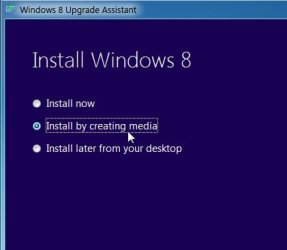
2. You are given the opportunity to either install now - OR make an iso for later.
You can burn that to dvd - or you can get it to put the media on a flash drive.
You can use that any time you like - or never - up to you. Windows 8 Upgrade Assistant - Download and Run
Last edited by Brink; 06 Nov 2012 at 12:26 AM..
Reason: added tutorial link for more info
| My System Specs | | OS Vista x64 / 7 X64 CPU E8400 Motherboard ASRock 1333 GLAN R2.0 Memory 2x1 gb 800mhz Graphics Card 9500gt 1gb Case Coolermaster Cooling Winpower 500w Hard Drives Maxtor 160gb-2mb cache Advice on upgrading to Windows 8. problems? All times are GMT -5. The time now is 07:34 AM. | |