Windows 7 Forums Search
Welcome to Windows 7 Forums. Our forum is dedicated to helping you find solutions with any problems, errors or issues you are experiencing with Windows 7. The Windows 7 forum also covers news and updates and has an extensive Windows 7 tutorial section that covers a wide range of tips and tricks.


Windows 7 - Can't extend my W7 Partition(I Looked at the tutorial)

 
09-10-2009   #31


Great tool for moving system files blocking shrinkage

There is a great tool (free 30 day trial) to move system files that are way over to the right on Disk Defrag map (I use Auslogics), thus blocking safest shrinkage through Disk Management. Use PerfectDisk10 trial, right click on drive, and choose System files to consolidate all system files. This should free up the extra space to allow shrinkage.

This operation has always worked for me, whereas using any shrinking utility besides the built-in DIsk Management is risky at best.

My System SpecsSystem Spec
09-13-2009   #32


Windows 7 Ult x64 - SP1/ Windows 8 CP x64


Quote   Quote: Originally Posted by derekimo View Post
I was having almost the exact same problem above, but with the heads up about partition wizard and all the people here it's now exactly how I wanted it. just wanted to let you know you're helping someone else, Thanks to ALL of you. derekimo
Glad to hear you got some use from the information.

Your welcome

Last edited by Dave76; 09-13-2009 at 07:14 AM..
My System SpecsSystem Spec
09-19-2009   #33


Windows 7 x64


did anybody try to use Acronis Disk Directory 10 in Windows 7 x64?
My System SpecsSystem Spec
.


09-20-2009   #34


Vista x64 / 7 X64


Quote   Quote: Originally Posted by j3rk0 View Post
did anybody try to use Acronis Disk Directory 10 in Windows 7 x64?
There are a number of posts where people have tried.

If you want a free one , you might look at MT Partition Wizard.


Quote   Quote: Originally Posted by gregrocker View Post

I have Paragon Partition Pro 10 here and it will not let me move free space to the other side of an active partitition...


I have no trouble moving anything with it.

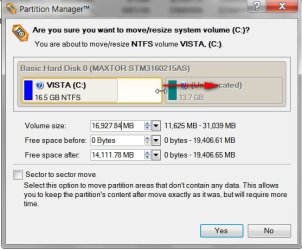
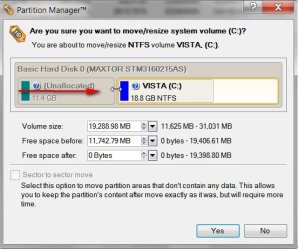
TO move Unallocated space to the lower address spaces with Paragon:

1. Extend the partition to include unallocated space on the right - ( drag it to the right)- click Yes and leave it in the virtual queue.

Can't extend my W7 Partition(I Looked at the tutorial)-paragon-move-1-2009-09-20_061211.jpg

2. Shrink it from the left (drag it from the left) - click Yes, Click Apply.

Can't extend my W7 Partition(I Looked at the tutorial)-paragon-move-2-2009-09-20_061351.jpg

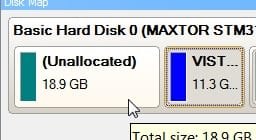
Result the Unallocated space is on the left of the system partition:

Name:  PARAGON-MOVE -3-2009-09-20_061449.jpg
Views: 775
Size:  33.8 KB
My System SpecsSystem Spec
09-22-2009   #35


Ubuntu 10.10 64bit, Windows 7 Ultimate 64bit


Here's what I used on mine, since I also use linux. I used Diskpart from my ubuntu 9.04 disc. worked wonders. Of course when you reboot, it'll want to check your hard disk for consistency.
My System SpecsSystem Spec
Closed Thread

 Can't extend my W7 Partition(I Looked at the tutorial) problems?


Thread Tools


Similar Threads for: Can't extend my W7 Partition(I Looked at the tutorial)
Thread Forum
Extend a partition ? Hardware & Devices
Why i cant extend C partition?? Performance & Maintenance
How can i extend my primary partition? General Discussion
Extend a partition Software
Cannot Extend C: Partition General Discussion


All times are GMT -5. The time now is 04:44 AM.


Windows 7 Forums is an independent web site and has not been authorized,
sponsored, or otherwise approved by Microsoft Corporation.
"Windows 7" and related materials are trademarks of Microsoft Corp.
© Designer Media Ltd
  

1 2 3 4 5 6 7 8 9 10 11 12 13 14 15 16 17 18 19 20 21 22 23 24 25 26 27 28 29 30