
eurosport360
New member
Hello to all,
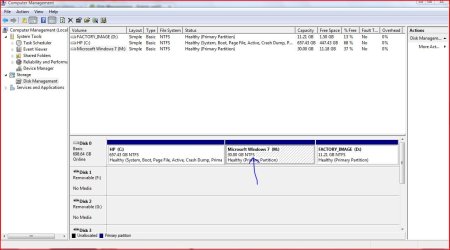
So I have 30Gigs on my W7 Partition, which was fine for a while, but I want to use W7 more extensively now so I wanted to extend my partition. I have looked at the tutorial posted in the tutorials, and its as simple as right-clicking the partition and clicking 'Extend Volume'. Well the problem is that no matter what I try, this option is always grayed out. Whenever I right-click any of my partitions, all of the options are available except for 'Extend Volume'. Am I missing a step here, or am I not doing something right?
Thanks
So I have 30Gigs on my W7 Partition, which was fine for a while, but I want to use W7 more extensively now so I wanted to extend my partition. I have looked at the tutorial posted in the tutorials, and its as simple as right-clicking the partition and clicking 'Extend Volume'. Well the problem is that no matter what I try, this option is always grayed out. Whenever I right-click any of my partitions, all of the options are available except for 'Extend Volume'. Am I missing a step here, or am I not doing something right?
Thanks
My Computer
- Computer Manufacturer/Model Number
- HP Pavilion M9350F
- OS
- Vista x64 | Windows 7 Ultimate x64 build 7000
- CPU
- AMD Phenom X4 9850 @ 2500 MHz
- Motherboard
- PEGATRON CORPORATION VIOLA
- Memory
- 6144 MB DDR2 (6gigs)
- Graphics Card(s)
- NVIDIA Geforce 9800 GT 512 MB
- Sound Card
- intergrated
- Monitor(s) Displays
- SONY SDM-HS94P - 19 inches
- Screen Resolution
- 1280x1024
- Hard Drives
- 1x 750GB SATA 7200RPM
- PSU
- at least 450W
- Case
- Stock
- Cooling
- Stock
- Keyboard
- Logitech
- Mouse
- Logitech
- Internet Speed
- 54 Mbps

 I should of told you to use Redistribute Free Space not Format Partition. Formatting wipes your partition clean.


 Argh. It didn't do anything, still unresized. Now, i first closed all programs that were on E: partition from task manager (i looked up every one of the programs folder), but still it said same error message.
