
martinjh99
New member
- Local time
- 10:31 PM
- Messages
- 4
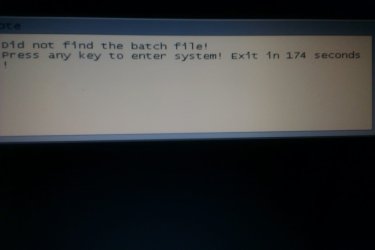
How do I get rid of the attached dialog on a Windows 7 boot up?
Its a remnant of a boot mode disc partition resize - Everything went according to plan but the message kept on coming back. I managed to find out what file I needed to delete to get back into windows which I can now do but the dislog still comes up every time I boot the laptop. I do not need to press a key everytime to get into windows!
Its a remnant of a boot mode disc partition resize - Everything went according to plan but the message kept on coming back. I managed to find out what file I needed to delete to get back into windows which I can now do but the dislog still comes up every time I boot the laptop. I do not need to press a key everytime to get into windows!
Attachments
My Computer
At a glance
WIndows 7 Home Premium 64BitAMD A Series Quad Core6GBAMD Fusion
- Computer Manufacturer/Model Number
- HP DV6 Laptop
- OS
- WIndows 7 Home Premium 64Bit
- CPU
- AMD A Series Quad Core
- Memory
- 6GB
- Graphics Card(s)
- AMD Fusion
- Hard Drives
- 1TB


