| Windows 7: Evasive Cookies folder |
09 Dec 2012
|
#1 | | Vista, Windows7, Mint Mate, Zorin, Windows 8 Florida in winter, Black Forest/Germany |
Evasive Cookies folder When you look into the Properties of the cookies folder, it is supposed to be at this location: C:\Users\YourName\AppData\Roaming\Microsoft\Windows\Cookies
Problem is, there is no cookies folder at this location. So I went back to the folder Properties > Location tab and moved it to a defined folder in My Documents. It did the move, but when I looked, my defined folder had also disappeared.
It gets better - when I want to move the folder back with the default button, it says that a folder of that name already exists at that location.
Now all of that is not really a problem. But it is a strange phenomenon that I don't understand. Anybody have a clue. | My System Specs |
| System Manufacturer/Model Number HP, Dell, Gateway, Toshiba - 4 laptops and 2 desktops OS Vista, Windows7, Mint Mate, Zorin, Windows 8 CPU from 1.6GHz Duo to i7 Monitor(s) Displays 2x HP w2207 Keyboard with trackball - no mices Mouse Trackball mice Hard Drives 5x HDD, 7x SSD, 12x Externals Internet Speed DSL 6000 |
09 Dec 2012
|
#2 | | Windows 7 Pro X64 Space Coast of Florida |
It's a Hidden, System Folder. | My System Specs | | System Manufacturer/Model Number Dell Precision 370 OS Windows 7 Pro X64 CPU Intel Pentium 4 Dual LP 3.4Ghz Memory 4GB DDR PC2-5200 ECC Graphics Card NVIDIA Quadro FX 3400/4400 Sound Card SoundMAX Integrated Digital Audio Monitor(s) Displays HP 22" w2207 LCD Screen Resolution 1680 x 1050 Hard Drives 300GB Maxtor 6L300RD PATA
128GB Kingston SV200S3128G SSD (boot)
1.5TB Seagate ST3150041AS SATA Internet Speed Cable via Road Runner 2MB Upload, 20MB Download |
09 Dec 2012
|
#3 | | Windows 7 x64 Ultimate A Finnish immigrant in Leipzig, Germany |
Code: EDIT: Rich was faster :):
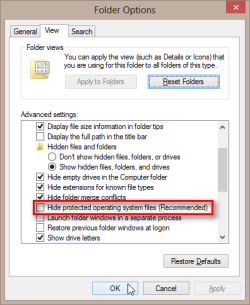
Cookies folder is a "protected operating system folder", so showing hidden files and folders is not enough. To see Cookies folder you need to unselect Hide protected operating system files in Folder Options:
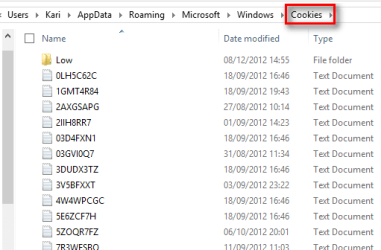
Now you can see Cookies:
Kari | My System Specs | | Computer type Laptop System Manufacturer/Model Number HP ENVY 17-1150eg OS Windows 7 x64 Ultimate CPU 1.6 GHz Intel Core i7-720QM Processor Memory 6 GB Graphics Card ATI Mobility Radeon HD 5850 Graphics Sound Card Beats sound system with integrated subwoofer Monitor(s) Displays 17" laptop display, 22" LCD and 32" Full HD TV through HDMI Screen Resolution 1600*900, 1680*1050 and 1920*1080 Keyboard Logitech diNovo Media Desktop Laser (bluetooth) Mouse Logitech MX1000 Laser (Bluetooth) Hard Drives Internal: 2 x 500 GB SATA Hard Disk Drive 7200 rpm
External: 2TB for backups, 3TB USB3 network drive for media Internet Speed 50/10 Mbps VDSL Antivirus MSE, Windows Defender Browser Maxthon 3.5.2. Other Info Windows 7 Ultimate Retail Full in English, additional Guest-user accounts in Finnish, German and Swedish (Working languages English & Swedish, Family language German, my own language, mother tongue, Finnish. I really need Ultimate to get to use Language Packs!) |
09 Dec 2012
|
#4 | | |
Yes it is a hidden Sys folder. I have the system set to show those folder and I have it exactly where you said it was. | My System Specs | | |
09 Dec 2012
|
#5 | | Vista, Windows7, Mint Mate, Zorin, Windows 8 Florida in winter, Black Forest/Germany |
Aha, that clarifies it. Thanks guys. | My System Specs | | System Manufacturer/Model Number HP, Dell, Gateway, Toshiba - 4 laptops and 2 desktops OS Vista, Windows7, Mint Mate, Zorin, Windows 8 CPU from 1.6GHz Duo to i7 Monitor(s) Displays 2x HP w2207 Keyboard with trackball - no mices Mouse Trackball mice Hard Drives 5x HDD, 7x SSD, 12x Externals Internet Speed DSL 6000 |
09 Dec 2012
|
#6 | | 64-bit Windows 7 Ultimate SP1 & Windows 8 Enterprise Texas |
Just for more info. Cookies - Delete | My System Specs | | Computer type PC/Desktop System Manufacturer/Model Number Self built custom OS 64-bit Windows 7 Ultimate SP1 & Windows 8 Enterprise CPU Intel i7-3930K 3.2 Ghz (O/C 4 Ghz) Motherboard ASRock X79 Extreme11 Memory 32 GB (8GBx4) G.SKILL DDR3 Quad PC3-19200 2400MHz Graphics Card Sapphire HD5870 Eyefinity 6 2GB Sound Card SB Recon 3Di Integrated Chip Monitor(s) Displays 3x 27" Asus VE278Q Screen Resolution 1920x1080 Keyboard Logitech Cordless Desktop MX 5500 Revolution Mouse Logitech Cordless Desktop MX 5500 Revolution PSU OCZ Series Gold OCZZ1000M 1000W Case Thermaltake Level 10 GT Snow Edition Cooling Corsair Hydro H100 Hard Drives 256GB OCZ Vector
160GB OCZ RevoDrive X2
2 x 1TB Samsung HDD HD154UI SATA Internet Speed 50 Mb/s Download and 2 Mb/s Upload Other Info Microsoft LifeCam Cinema
Lite-On iHBS212 12x BD Writer
Samsung CLX-3175FW Printer
Netgear WNDR3800 Router
Motorola SBG6580 Cable Modem
2x APC Back-UPS XS 1500 |
09 Dec 2012
|
#7 | | Vista, Windows7, Mint Mate, Zorin, Windows 8 Florida in winter, Black Forest/Germany |
I just delete them in the folder itself. Then I can choose to keep the login cookies. | My System Specs | | System Manufacturer/Model Number HP, Dell, Gateway, Toshiba - 4 laptops and 2 desktops OS Vista, Windows7, Mint Mate, Zorin, Windows 8 CPU from 1.6GHz Duo to i7 Monitor(s) Displays 2x HP w2207 Keyboard with trackball - no mices Mouse Trackball mice Hard Drives 5x HDD, 7x SSD, 12x Externals Internet Speed DSL 6000 Evasive Cookies folder problems? All times are GMT -5. The time now is 07:48 PM. | |