Windows 7 Forums Search
Welcome to Windows 7 Forums. Our forum is dedicated to helping you find solutions with any problems, errors or issues you are experiencing with Windows 7. The Windows 7 forum also covers news and updates and has an extensive Windows 7 tutorial section that covers a wide range of tips and tricks.


Windows 7 - Administrative tools on Start Menu root


01-22-2009   #1


Windows 7 RC 7100 32bit/64bit


Administrative tools on Start Menu root

I was searching the registry to help someone in the forum, when I found that you can have an Administrative Tools menu on the start menu root!


Did it ever exist in Vista?

Anyways, here's the reg entry:

1. Open Regedit

2. Navigate to HKEY_CURRENT_USER\Software\Microsoft\Windows\CurrentVersion\Explorer\Advanced

3. Change DWORD Value Start_AdminToolsRoot from 0 to 1

4. Log off and on to see changes

My System SpecsSystem Spec
01-22-2009   #2


W 7 64-bit Ultimate


Hello limneos.


Good find; though it's in both Vista and Windows 7.......Sorry!

One day I may learn to use the registry as you do; I keep working on it.

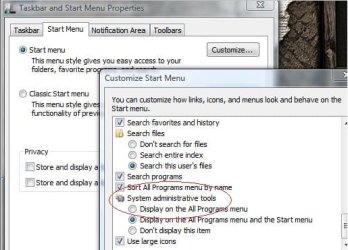
Administrative tools on Start Menu root-admin-tools2.jpg


Later Ted
My System SpecsSystem Spec
01-22-2009   #3


Windows 7 RC 7100 32bit/64bit


damn I'm such a noob!

I thought I was on to something here

Good to know , though.
My System SpecsSystem Spec
.


01-22-2009   #4


windows 7 6.1 build 7068x64


Quote   Quote: Originally Posted by Bare Foot Kid View Post
Hello limneos.


Good find; though it's in both Vista and Windows 7.......Sorry!

One day I may learn to use the registry as you do; I keep working on it.

Attachment 3462


Later Ted
Darn you beat me to it..You can just go and right click on start bar and choose properties..then choose the start menu..Then choose customize
than scroll down to the bottom and check mark the administrative tools option..Click ok and than choose apply on the next screen...
My System SpecsSystem Spec
01-22-2009   #5


Windows 7 RC 7100 32bit/64bit


Yup, found it too later....I did check at first to see if it was there, but I missed it, so I thought it was a secret revealed.
My System SpecsSystem Spec
01-22-2009   #6


W 7 64-bit Ultimate


Quote   Quote: Originally Posted by limneos View Post
damn I'm such a noob!

I thought I was on to something here

Good to know , though.

You a noob; I don't think so, I should be such a noob!...


Later Ted
My System SpecsSystem Spec
01-22-2009   #7


Windows 7 RC 7100 32bit/64bit


No I doubt that too...

btw, speaking of noobity , how do these labels under our names change?

I mean the "SevenPro" etc, cause I have made more posts here and got more rep than in Vista forums , but I still remain "skilled" here, but I'm "power user" in Vistax64 forums...

I want me purple here too !
My System SpecsSystem Spec
01-22-2009   #8


W 7 64-bit Ultimate


Hello limneos.


Unless someone is advanced (promoted) by z3r010, these are the guide lines.


Forum Rules - Vista Forums - Only with Seven in place of Vista.


Later Ted
My System SpecsSystem Spec
01-22-2009   #9


Windows 7 RC 7100 32bit/64bit


Thanks! That ranking system I was looking for!
My System SpecsSystem Spec
01-22-2009   #10


Vista Ult 64bit - Windows 7 Ult 7264 64bit


Also was in XP too...
My System SpecsSystem Spec
Reply

Administrative tools on Start Menu root problems?


Thread Tools


Similar Threads for: Administrative tools on Start Menu root
Thread Forum
Administrative Tools - Add or Remove from Start Menu Tutorials
Administrative Tools - Cascading Desktop Context Menu Tutorials
Administrative Tools from Start button is slow response Performance & Maintenance
Administrative Tools Shortcut on Start menu General Discussion


All times are GMT -5. The time now is 06:17 AM.


Windows 7 Forums is an independent web site and has not been authorized,
sponsored, or otherwise approved by Microsoft Corporation.
"Windows 7" and related materials are trademarks of Microsoft Corp.
© Designer Media Ltd
  

1 2 3 4 5 6 7 8 9 10 11 12 13 14 15 16 17 18 19 20 21 22 23 24 25 26 27 28 29 30