
rcrgs
New member
question - batch file only works with "unofficial" directory name
Hello...
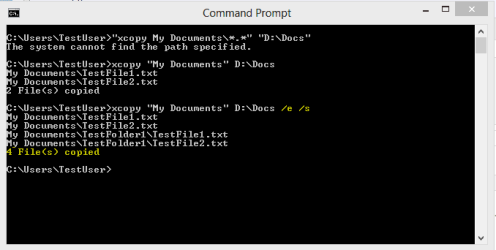
I'm using a command line batch file to backup files from my W7 Pro x64 machine to an external USB HD. Basically, "xcopy c:\......\my documents\*.*" "external HD". I couldn't get this to work until I truncated the source directory to "documents" instead of "my documents" [the name that the W7 installer specified]. While the batch file now runs and does what it's suppose to do, I'm mystified as to why the source directory needs to have a truncated name in the batch file rather that the one it has "officially." Any insight into this is appreciated.
...robert
Hello...
I'm using a command line batch file to backup files from my W7 Pro x64 machine to an external USB HD. Basically, "xcopy c:\......\my documents\*.*" "external HD". I couldn't get this to work until I truncated the source directory to "documents" instead of "my documents" [the name that the W7 installer specified]. While the batch file now runs and does what it's suppose to do, I'm mystified as to why the source directory needs to have a truncated name in the batch file rather that the one it has "officially." Any insight into this is appreciated.
...robert
My Computer
At a glance
Win7 professional 64bitIntel i5-660016 GbZotac Gforce 1850 super
- Computer type
- PC/Desktop
- Computer Manufacturer/Model Number
- DIY
- OS
- Win7 professional 64bit
- CPU
- Intel i5-6600
- Motherboard
- MSI Z170 A M7
- Memory
- 16 Gb
- Graphics Card(s)
- Zotac Gforce 1850 super
- Sound Card
- motherboard sound
- Monitor(s) Displays
- HP 24in
- Screen Resolution
- 1920 x 1080
- Hard Drives
- WD 250 Gig
Samsung 250 Gig SSD
- PSU
- 700w
- Case
- Antec Sonata
- Cooling
- Intel generic
- Keyboard
- Vortex 8200
- Mouse
- Logitech M525
- Internet Speed
- DSL 3.5 MBytes down
- Antivirus
- Windows 7 firewall
- Browser
- Mozilla Firefox
- Other Info
- This is a DIY machine I built several years ago. Runs fine in all respects. OS loaded clean at that time. Since then, OS reloaded several times, not recently.




 .
.