| Windows 7: Album Art Screensaver on x64 system, fix it? Or any alternatives? |
21 Jan 2013
|
#1 | | |
Album Art Screensaver on x64 system, fix it? Or any alternatives? Hello,
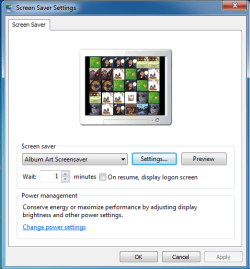
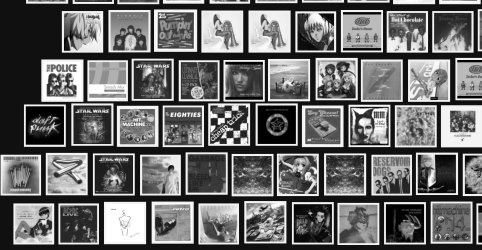
As part of all the (little) annoyance/incompatibility that comes with x64 windows, there's this one : the great app "Album Art Screensaver" that act just like the iTunes screensaver on Mac, doesn't work on Windows 7 x64...
It install fine, when you go in screensaver settins it appear, you can configure it BUT windows doesn't "remember it" still showing NO SCREEN SAVER on the display setting page...
So this is clearly cause the file wasn't supposed to be in the SysWOW64 folder, and i think (maybe i'm wrong) that it's not hard to fix that, if you have little knowledge...
So just let me know, if you know about that, of if you got some alternatives... Thanks in advance! | My System Specs |
| |
21 Jan 2013
|
#2 | | Microsoft Windows 7 Home Premium 64-bit 7600 cornwall UK |
if you right click a blank area of your desktop and select personalize, click the screen saver tab and see if it can be selected from there. | My System Specs | | System Manufacturer/Model Number Hewlett packard/p6512uk OS Microsoft Windows 7 Home Premium 64-bit 7600 CPU IIx4 amd athelon 635 processor Motherboard FOXCONN 2AA9 Memory 2x2gb Graphics Card ati radeon HD 5450 Sound Card (1) Realtek High Definition Audio (2) AMD High Definition Monitor(s) Displays samsung lcd tv 32" Screen Resolution 1360x 768 Keyboard wireless hp Mouse wireless Hp,optical PSU ? Cooling air! Hard Drives (1) WDC WD10 01FAES-60Z2A0 SATA Disk Device (2) Maxtor OneTouch USB Device (3) ST310003 33AS USB Device (4) WD My Book 1111 USB Device Internet Speed 1.10mb/s Antivirus MSE Browser Firefox |
21 Jan 2013
|
#3 | | Win 7 Pro x64 Council Bluffs, Iowa |
Did it install in the SysWOW64 folder?
It should've installed in C:\Program Files (x86) I just downloaded it and installed it on a 64-bit system in VMware and it installed just fine and works just fine.
Jerry | My System Specs | | Computer type Laptop System Manufacturer/Model Number Sager NP9170 OS Win 7 Pro x64 CPU Intel(R) Core(TM) i7-3630QM CPU @ 2.40GHz Motherboard CLEVO P170EM Memory 12 GB Graphics Card (1) Intel(R) HD Graphics 4000 (2) NVIDIA GeForce GTX 675M Sound Card (1) Realtek High Definition Audio (2) Intel(R) Display Aud Monitor(s) Displays 17.3 Screen Resolution 1920x1080 Keyboard Backlite Hard Drives (1) M4-CT256M4SSD2 ATA Device 256 GB (2) ST9500424AS ATA Device 500 GB Antivirus MSE, Malwarebytes Pro Browser Firefox |
21 Jan 2013
|
#4 | | |
Quote: It install fine, when you go in screensaver settins it appear, you can configure it BUT windows doesn't "remember it" still showing NO SCREEN SAVER on the display setting page... You both didn't (fully) read my message... The app was of course installed in the x86 program files BUT the screen saver file is in SysWOW64 which is normal. Bongo, after you selected it and pressed ok, check the display setting windows at bottom right, screen saver shows NONE and wait 1minute : NOTHING WILL HAPPEN. | My System Specs | | |
21 Jan 2013
|
#5 | | Windows 7 Ultimate SP1 (64 bit), Windows XP SP3, Linux Mint 14 MATE (64 bit) Adelaide |
Built-in Slideshow? You could do this: - Duplicate your album art
- Store it in a single folder
- Use the built-in Windows 7 "Photo" slideshow
| My System Specs | | System Manufacturer/Model Number n/a OS Windows 7 Ultimate SP1 (64 bit), Windows XP SP3, Linux Mint 14 MATE (64 bit) CPU AMD Phenom II x6 1055T, 2.8 GHz Motherboard ASRock 880GMH-LE/USB3 Memory 8GB DDR3 1333 G-Skill Ares F3-1333C9D-8GAO (4GB x 2) Graphics Card ATI Radeon HD6450 Sound Card Realtek? Monitor(s) Displays Samsung S23B350 Screen Resolution 1920x1080 Mouse Wired Optical Case Tower Hard Drives Western Digital 1 TB (SATA), Western Digital 1.5 TB (SATA), Western Digital 2 TB (SATA) Internet Speed DSL Other Info Ubuntu 10.04 (64 bit) replaced with Linux Mint 14 MATE (64 bit) - 2013-01-14
RAM & Graphics Card Upgraded - 2013-01-13
Monitor Upgraded - 2012-04-20
System Upgraded - 2011-05-21, 2010-07-14
HDD Upgraded - 2010-08-11, 2011-08-24 |
21 Jan 2013
|
#6 | | |
Seriously..? I mean, do you realise you're telling me to display tiny album art one by one as screen saver instead of the super iTunes typed screensaver (which i guess you've never seen)? Well sorry but NO i will certainly never do that even under torture  I'm searching for ways to make the mentionned app works on x64, since there are no alternatives so far. I've got some idea but "take ownership" didn't work here so i can't try for now... Thanks for the help though. It just made me realise how poor the Windows 7 slideshow is! | My System Specs | | |
22 Jan 2013
|
#7 | | Windows 7 Ultimate SP1 (64 bit), Windows XP SP3, Linux Mint 14 MATE (64 bit) Adelaide |
You asked ... 
Quote: Originally Posted by goja Seriously..? I mean, do you realise you're telling me to display tiny album art one by one as screen saver instead of the super iTunes typed screensaver (which i guess you've never seen)? Well sorry but NO i will certainly never do that even under torture  I'm searching for ways to make the mentionned app works on x64, since there are no alternatives so far. I've got some idea but "take ownership" didn't work here so i can't try for now... Thanks for the help though. It just made me realise how poor the Windows 7 slideshow is!  You are correct, I do not have iTunes.
Why would I need it?
I've seen multiple posts on SevenForums about iTunes breaking Windows.
You asked for alternatives:
" Album Art Screensaver on x64 system, fix it? Or any alternatives?"
Sorry, but it's not my fault that you have tiny album art.
Most of mine is 700px x 700px or 1400px x 1400px. | My System Specs | | System Manufacturer/Model Number n/a OS Windows 7 Ultimate SP1 (64 bit), Windows XP SP3, Linux Mint 14 MATE (64 bit) CPU AMD Phenom II x6 1055T, 2.8 GHz Motherboard ASRock 880GMH-LE/USB3 Memory 8GB DDR3 1333 G-Skill Ares F3-1333C9D-8GAO (4GB x 2) Graphics Card ATI Radeon HD6450 Sound Card Realtek? Monitor(s) Displays Samsung S23B350 Screen Resolution 1920x1080 Mouse Wired Optical Case Tower Hard Drives Western Digital 1 TB (SATA), Western Digital 1.5 TB (SATA), Western Digital 2 TB (SATA) Internet Speed DSL Other Info Ubuntu 10.04 (64 bit) replaced with Linux Mint 14 MATE (64 bit) - 2013-01-14
RAM & Graphics Card Upgraded - 2013-01-13
Monitor Upgraded - 2012-04-20
System Upgraded - 2011-05-21, 2010-07-14
HDD Upgraded - 2010-08-11, 2011-08-24 |
22 Jan 2013
|
#8 | | |
I agree that iTunes is crap (on Windows especially) but the iTunes screensaver, what i'm talking about, on Mac, is a great thing, and this app did the same thing WITHOUT iTunes
Tiny or not it's not comparable, please check on youtube "Itunes screensaver" you'll see why i felt kind of irritated by your suggestion, this is A.R.T ... | My System Specs | | |
22 Jan 2013
|
#9 | | Windows 7 Ultimate SP1 (64 bit), Windows XP SP3, Linux Mint 14 MATE (64 bit) Adelaide |
Aha OK, so it's not actually a screensaver, it's a media player.
The closest built-in Windows feature is in WMC.
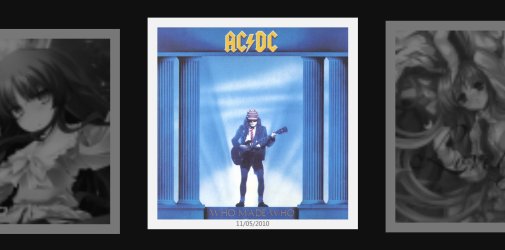
When you access the Music section, you can click on "Play Pictures" and WMC plays a zooming mosaic picture slideshow.
It continues if you leave it in the Music section (you don't have to be playing music). 
When it zooms in, the centred picture regains its colour. 
I don't use WMC myself.
I don't like: - How many services it starts
- Its messy GUI
Looks like you are SOOL, until you can fix the problem with that iTunes "screensaver". | My System Specs | | System Manufacturer/Model Number n/a OS Windows 7 Ultimate SP1 (64 bit), Windows XP SP3, Linux Mint 14 MATE (64 bit) CPU AMD Phenom II x6 1055T, 2.8 GHz Motherboard ASRock 880GMH-LE/USB3 Memory 8GB DDR3 1333 G-Skill Ares F3-1333C9D-8GAO (4GB x 2) Graphics Card ATI Radeon HD6450 Sound Card Realtek? Monitor(s) Displays Samsung S23B350 Screen Resolution 1920x1080 Mouse Wired Optical Case Tower Hard Drives Western Digital 1 TB (SATA), Western Digital 1.5 TB (SATA), Western Digital 2 TB (SATA) Internet Speed DSL Other Info Ubuntu 10.04 (64 bit) replaced with Linux Mint 14 MATE (64 bit) - 2013-01-14
RAM & Graphics Card Upgraded - 2013-01-13
Monitor Upgraded - 2012-04-20
System Upgraded - 2011-05-21, 2010-07-14
HDD Upgraded - 2010-08-11, 2011-08-24 |
22 Jan 2013
|
#10 | | Win 7 Pro x64 Council Bluffs, Iowa |

Quote: Originally Posted by goja Quote: It install fine, when you go in screensaver settins it appear, you can configure it BUT windows doesn't "remember it" still showing NO SCREEN SAVER on the display setting page... You both didn't (fully) read my message... The app was of course installed in the x86 program files BUT the screen saver file is in SysWOW64 which is normal. Bongo, after you selected it and pressed ok, check the display setting windows at bottom right, screen saver shows NONE and wait 1minute : NOTHING WILL HAPPEN. I will have you know I did read everything you wrote. We are all volunteering here trying to help others there is no reason to get upset.
Post some screenshots of how you are trying to set it up.
Use these tutorials for posting screenshots. Screenshot with Paint How to Use the Snipping Tool in Vista - Vista Forums Screenshots and Files - Upload and Post in Seven Forums
Like I said above it works for me I have it set on 1 min.
Jerry | My System Specs | | Computer type Laptop System Manufacturer/Model Number Sager NP9170 OS Win 7 Pro x64 CPU Intel(R) Core(TM) i7-3630QM CPU @ 2.40GHz Motherboard CLEVO P170EM Memory 12 GB Graphics Card (1) Intel(R) HD Graphics 4000 (2) NVIDIA GeForce GTX 675M Sound Card (1) Realtek High Definition Audio (2) Intel(R) Display Aud Monitor(s) Displays 17.3 Screen Resolution 1920x1080 Keyboard Backlite Hard Drives (1) M4-CT256M4SSD2 ATA Device 256 GB (2) ST9500424AS ATA Device 500 GB Antivirus MSE, Malwarebytes Pro Browser Firefox Album Art Screensaver on x64 system, fix it? Or any alternatives? problems? All times are GMT -5. The time now is 02:13 PM. | |