| Windows 7: Reinstalled Windows 7 Multi-Partition Drive (Basic Disk now Dynamic) |
26 Jan 2013
|
| | |
Reinstalled Windows 7 Multi-Partition Drive (Basic Disk now Dynamic) Hi everyone,
I have a multi-partitioned hard drive. 4 Partitions in total (C: OS, D: Programs, E: docs, F: docs). After 2 years Windows 7 began having shut down problems, so I decided to reinstall the OS. Booted from the Windows 7 DVD and picked the first partition and formatted it and then installed the OS instead of just installing the OS over the old OS. I did this because in my mind I figured if I didn't format the C: drive, I would have left over files on the C: drive (Not sure if that is true or not). All other partitions were fine mind you.
Anyways the install went fine. I then went and booted off the Acronis Media Rescue CD to make a full backup of the install. Acronis would not see the disc because it was now dynamic.
This is where I noticed that Windows had converted the disc from basic to dynamic.
Now I am trying to figure out why would Windows 7 convert the disk to dynamic just because I deleted the first partition? | My System Specs |
| OS Windows XP CPU Q9550 Motherboard Gigabyte UD3P Memory 8GB Graphics Card ATI 3850 Sound Card Audigy |
26 Jan 2013
|
| | Windows 7 Ultimate 64-bit SP1 3,650 posts New Jersey |
When windows converts 3 primarys to 4, it turns the disk dynamic. Don`t know how it happened in your case, as you didn`t add any more. Strange  Are you on this pc ? can you post a shot of disk management ? Convert a Dynamic Disk to a Basic Disk | My System Specs | | Computer type PC/Desktop System Manufacturer/Model Number Custom Built by Me ! OS Windows 7 Ultimate 64-bit SP1 CPU Intel Core i5 3570k @ 4.2 GHz Motherboard MSI Z77A-G45 Memory 16GB Corsair Vengeance @ 1600 MHz 10-10-10-27 Graphics Card MSI GTX660 Twin Frozr3 2GB/OC Sound Card Realtek HD Monitor(s) Displays Dell 19" HP 23" Sony Bravia 40" Screen Resolution 1920 x 1080 Keyboard Fellowes KWD 855 Mouse Microsoft Wireless PSU Corsair HX750 80+Gold Case Corsair Vengeance Series C70 Gun Metal Black Cooling Cooler Master Hyper N520, Arctic Alumina Thermal Compound Hard Drives OCZ Vertex 4 119GB SSD
WD Black 500, Blue 500, Caviar SE 320 x2 Internet Speed Download 25.81 Mbps Upload 5.24 Mbps Antivirus MSE MBAM Browser Chromium, IE10 Other Info Boston BA745 2.1 Speaker System, Lightscribe Dual Layer DVD Burner |
26 Jan 2013
|
| | Windows 7 Ultimate X64 SP1 13,823 posts Mt. Crumpit/Whoville |
The installer probably added the 100MB system partition. | My System Specs | | Computer type PC/Desktop System Manufacturer/Model Number Home Built Desktop By DataTech OS Windows 7 Ultimate X64 SP1 CPU Intel i5-2550K, Differing ~4.4-4.8GHz No built in GPU Motherboard ASUS P8Z68-V PRO/GEN3 Memory 16GB G.Skill Sniper 2133MHz 4x4GB Graphics Card ASUS ENGTX460 DirectCU/2DI/1GD5 GeForce GTX 460 Sound Card Onboard Realtek 5-1 Monitor(s) Displays Samsung P2570HD Screen Resolution 1920x1080 Keyboard Old, beat-up Dell USB From 10 yrs Ago Mouse Gigabyte m6900 wired PSU Corsair HX650W Case Inwin Dragon Rider Cooling Hyper 212 EVO w/two Noctua fans, push-pull, @1300 RPM Hard Drives Crucial M4 128GB for OS, 750GB Seagate MomentusXT for data, 500GB Seagate Constellation for storage Internet Speed 8-19 Mbs down, 3-4 Mbs up Comcast Cable Antivirus Norton Internet Security Browser IE 9, Opera when needed Other Info 4 case fans, LG BluRay-RE, ASUS DVD-RW, Mr. Fusion power generator with flux capacitor, 1.21 gigawatts. |
26 Jan 2013
|
| | Windows 7 Ultimate 64-bit SP1 3,650 posts New Jersey |
It shouldn`t have, as he said he only formatted, not deleted. But you could be right. | My System Specs | | Computer type PC/Desktop System Manufacturer/Model Number Custom Built by Me ! OS Windows 7 Ultimate 64-bit SP1 CPU Intel Core i5 3570k @ 4.2 GHz Motherboard MSI Z77A-G45 Memory 16GB Corsair Vengeance @ 1600 MHz 10-10-10-27 Graphics Card MSI GTX660 Twin Frozr3 2GB/OC Sound Card Realtek HD Monitor(s) Displays Dell 19" HP 23" Sony Bravia 40" Screen Resolution 1920 x 1080 Keyboard Fellowes KWD 855 Mouse Microsoft Wireless PSU Corsair HX750 80+Gold Case Corsair Vengeance Series C70 Gun Metal Black Cooling Cooler Master Hyper N520, Arctic Alumina Thermal Compound Hard Drives OCZ Vertex 4 119GB SSD
WD Black 500, Blue 500, Caviar SE 320 x2 Internet Speed Download 25.81 Mbps Upload 5.24 Mbps Antivirus MSE MBAM Browser Chromium, IE10 Other Info Boston BA745 2.1 Speaker System, Lightscribe Dual Layer DVD Burner |
26 Jan 2013
|
| | Windows 7 Ultimate X64 SP1 13,823 posts Mt. Crumpit/Whoville |
| My System Specs | | Computer type PC/Desktop System Manufacturer/Model Number Home Built Desktop By DataTech OS Windows 7 Ultimate X64 SP1 CPU Intel i5-2550K, Differing ~4.4-4.8GHz No built in GPU Motherboard ASUS P8Z68-V PRO/GEN3 Memory 16GB G.Skill Sniper 2133MHz 4x4GB Graphics Card ASUS ENGTX460 DirectCU/2DI/1GD5 GeForce GTX 460 Sound Card Onboard Realtek 5-1 Monitor(s) Displays Samsung P2570HD Screen Resolution 1920x1080 Keyboard Old, beat-up Dell USB From 10 yrs Ago Mouse Gigabyte m6900 wired PSU Corsair HX650W Case Inwin Dragon Rider Cooling Hyper 212 EVO w/two Noctua fans, push-pull, @1300 RPM Hard Drives Crucial M4 128GB for OS, 750GB Seagate MomentusXT for data, 500GB Seagate Constellation for storage Internet Speed 8-19 Mbs down, 3-4 Mbs up Comcast Cable Antivirus Norton Internet Security Browser IE 9, Opera when needed Other Info 4 case fans, LG BluRay-RE, ASUS DVD-RW, Mr. Fusion power generator with flux capacitor, 1.21 gigawatts. |
26 Jan 2013
|
| | Win7 x 6 PC's 36,547 posts California, Florida, Boston |
The problem is that you converted your HD to Dynamic which is only meant to be used to span a partition across multiple HD's. Apparently you didn't see the warning message.
The solution to solve this non-destructively is to boot free Partition Wizard CD version 4.2 which is the last one which offers this as a free feature: pw422.zip ISO - Windows Live.
Download the ISO, rightclick to burn it to CD using Windows Image Burner, or use ImgBurn.
Boot CD. You will need to delete the extra partition(s) you created which tipped it to convert to Dynamic before it will convert back to Basic.
Then follow these video steps: How to convert dynamic disk to basic disk with Partition Wizard?
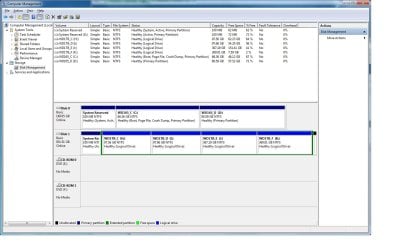
After conversion if you want help adding a partition post back a screenshot of your maximized Disk Mgmt drive map with listings, using the Snipping Tool in Start Menu, attached using paper clip in Reply Box. | My System Specs | | |
26 Jan 2013
|
| | |
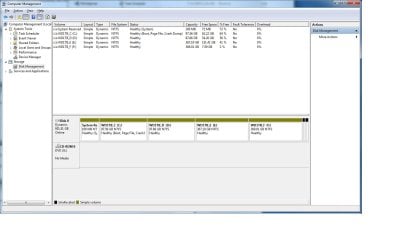
Thanks for the reply guys. Here is the screen cap.
Didn't see any warning. Again booted from windows 7 picked new install and then it took me to my hard drive with 4 partitions showing. Then i hit format on C. Looking at the Disk Management I am seeing 2 little black sections on the drive. I am going to try to delete them and then convert to basic. Well that didn't work. I guess its unallocated space and can't be deleted.
In the screen cap I see 2 black little unalocated blocks showing. Originally they were not there.
PS I tried Partition Wizard 4.2 Free and rebooted to use it. The convert to "Basic" gave me an error. I then went with EaseUS Partition Master Home Edition inside Windows and it gave me an error.
Poorly stated but the error reads "Find some partition error, continue this operation might cause boot failure and data loss, are you sure to proceed?" | My System Specs | | OS Windows XP CPU Q9550 Motherboard Gigabyte UD3P Memory 8GB Graphics Card ATI 3850 Sound Card Audigy |
26 Jan 2013
|
| | Windows 7 Ultimate 64-bit SP1 3,650 posts New Jersey |
Well, it turns out Britton was right, and windows created the system reserve partition. You must have deleted the last partition down to unallocated space. Then when you did the install on that space it made the sys res partition and the install partition , for a total of 5 partitions which were turned Dynanic.
You needed to simply format your install partition.
Get rid of the system reserved partition, then get windows booting by running a stsrtup repair with you windows 7 disc up to 3X
You can then use the methods given to change it back to basic.
Last edited by AddRAM; 26 Jan 2013 at 09:48 PM..
| My System Specs | | Computer type PC/Desktop System Manufacturer/Model Number Custom Built by Me ! OS Windows 7 Ultimate 64-bit SP1 CPU Intel Core i5 3570k @ 4.2 GHz Motherboard MSI Z77A-G45 Memory 16GB Corsair Vengeance @ 1600 MHz 10-10-10-27 Graphics Card MSI GTX660 Twin Frozr3 2GB/OC Sound Card Realtek HD Monitor(s) Displays Dell 19" HP 23" Sony Bravia 40" Screen Resolution 1920 x 1080 Keyboard Fellowes KWD 855 Mouse Microsoft Wireless PSU Corsair HX750 80+Gold Case Corsair Vengeance Series C70 Gun Metal Black Cooling Cooler Master Hyper N520, Arctic Alumina Thermal Compound Hard Drives OCZ Vertex 4 119GB SSD
WD Black 500, Blue 500, Caviar SE 320 x2 Internet Speed Download 25.81 Mbps Upload 5.24 Mbps Antivirus MSE MBAM Browser Chromium, IE10 Other Info Boston BA745 2.1 Speaker System, Lightscribe Dual Layer DVD Burner |
26 Jan 2013
|
| | Win7 x 6 PC's 36,547 posts California, Florida, Boston |
I'd be surprised if the Windows 7 installer allowed it to convert to Dynamic. I've seen these weekly since Windows 7 release and never seen it happen other than when the warning is ignored during a partitioning operation.
You up for another simulation Brian? | My System Specs | | Reinstalled Windows 7 Multi-Partition Drive (Basic Disk now Dynamic) problems? All times are GMT -5. The time now is 06:26 AM. | |