| Windows 7: Programs unrespond, keyboard acts up, random shut downs and blue scree |
06 Feb 2013
|
#1 | | Windows 7 Home Premium 64bit |
Programs unrespond, keyboard acts up, random shut downs and blue scree I have had my HP Pavilion g6 Notebook PC (with Windows 7 Home Premium 64-bit Service Pack 1) for less than a year and I am encountering a ton of problems. - Whenever I go to open a program, it unresponds for a short while before I can continue to use it.
- Sometimes my keyboard acts up, for e.g. if I were to press T whilst in an internet browser, it would open a new tab, as if I was pressing the CTRL button when I'm not.
- Sometimes my laptop shuts down - sometimes there is a blue screen error message before, other times it just shuts down without one.
I have Trend Micro Tiatanium anti-virus protection and have done scans and nothing has showed up.
Does anyone have any ideas as to what is causing this and what I can do to fix it? | My System Specs |
| OS Windows 7 Home Premium 64bit |
06 Feb 2013
|
#2 | | Windows 7 Home Premium 64bit Windsor |
| My System Specs | | System Manufacturer/Model Number Cranky's Rig OS Windows 7 Home Premium 64bit CPU Intel Core 2 Quad Q9550 (3329.0 MHz) Motherboard Asus P5Q Pro Memory Kingston Hyper X 1066Mhz (8GB) Graphics Card XFX R7870 Black Edition OC Sound Card Asus Xonar DX Monitor(s) Displays Dell 2407WFP (24") Screen Resolution 1920x1200 Keyboard Razer Black Widow Mouse Cyborg RAT 7 PSU Antec True Power Quattro 850W Case AZZA Cooling Arctic Cooling Freezer 7 Pro Hard Drives OCZ Vertex 2 SSD (150GB) Internet Speed 30mbs Other Info Logitech Z-680 5.1 speakers
Logitech G13 Gamepad |
06 Feb 2013
|
#3 | | Windows 7 Home Premium 64bit |
Hi, I'm not sure as it's hardly on the screen for long before it shuts down. | My System Specs | | OS Windows 7 Home Premium 64bit |
06 Feb 2013
|
#4 | | Windows 7 Home Premium 64bit Windsor |
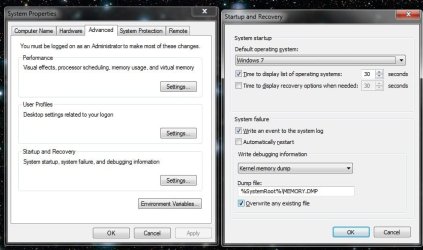
Go here and untick "automatic restart" this way the BSOD will stay on the screen | My System Specs | | System Manufacturer/Model Number Cranky's Rig OS Windows 7 Home Premium 64bit CPU Intel Core 2 Quad Q9550 (3329.0 MHz) Motherboard Asus P5Q Pro Memory Kingston Hyper X 1066Mhz (8GB) Graphics Card XFX R7870 Black Edition OC Sound Card Asus Xonar DX Monitor(s) Displays Dell 2407WFP (24") Screen Resolution 1920x1200 Keyboard Razer Black Widow Mouse Cyborg RAT 7 PSU Antec True Power Quattro 850W Case AZZA Cooling Arctic Cooling Freezer 7 Pro Hard Drives OCZ Vertex 2 SSD (150GB) Internet Speed 30mbs Other Info Logitech Z-680 5.1 speakers
Logitech G13 Gamepad |
06 Feb 2013
|
#5 | | Windows 7 enterprise 64 bit, Windows 7 Pro 64 bit ,Windows 8 64bit USA, Vermont |
| My System Specs | | System Manufacturer/Model Number Lenovo ThinkCenter, Custom Built PC, Acer Aspire V3-771G-9809 OS Windows 7 enterprise 64 bit, Windows 7 Pro 64 bit ,Windows 8 64bit CPU Core i5-2400, Athlon 64 X2 6400+ ,Core i7-3632QM Motherboard ASUS M4A79 Deluxe Memory 4GB, 4gb g.skill ddr2, 8gb Graphics Card Radeon HD 4550 sgb, Radeon HD 4870, NVIDIA Geforce GT 650m Monitor(s) Displays dual samsung 22" monitors Mouse Razar Death adder Case Antec Twelve Hundred V3 Black Steel ATX Full Tower Cooling ASUS Silent Square Pro Hard Drives 500GB, Western Digital WD Blue WD6400AAKS 640GB 7200 RPM 16MB Cache SATA 3.0Gb/s, 1TB Internet Speed 20 mbps |
06 Feb 2013
|
#6 | | Windows 7 Home Premium 64bit |

Quote: Originally Posted by Cranky69 Go here and untick "automatic restart" this way the BSOD will stay on the screen Attachment 253978 Thank you. I will post details of the BSOD when it next happens. | My System Specs | | OS Windows 7 Home Premium 64bit |
06 Feb 2013
|
#7 | | Windows 7 enterprise 64 bit, Windows 7 Pro 64 bit ,Windows 8 64bit USA, Vermont |
Please see post # 5. You will not need to wait if you follow the instructions in the link from that post. | My System Specs | | System Manufacturer/Model Number Lenovo ThinkCenter, Custom Built PC, Acer Aspire V3-771G-9809 OS Windows 7 enterprise 64 bit, Windows 7 Pro 64 bit ,Windows 8 64bit CPU Core i5-2400, Athlon 64 X2 6400+ ,Core i7-3632QM Motherboard ASUS M4A79 Deluxe Memory 4GB, 4gb g.skill ddr2, 8gb Graphics Card Radeon HD 4550 sgb, Radeon HD 4870, NVIDIA Geforce GT 650m Monitor(s) Displays dual samsung 22" monitors Mouse Razar Death adder Case Antec Twelve Hundred V3 Black Steel ATX Full Tower Cooling ASUS Silent Square Pro Hard Drives 500GB, Western Digital WD Blue WD6400AAKS 640GB 7200 RPM 16MB Cache SATA 3.0Gb/s, 1TB Internet Speed 20 mbps |
06 Feb 2013
|
#8 | | Windows 7 Home Premium 64bit |

Quote: Originally Posted by Dsprague Please see post # 5. You will not need to wait if you follow the instructions in the link from that post. Oh I'm sorry, I didn't see that post as my email just linked me directly to the other!
I've made the zip file, should I post it in this thread or in the Crashes and Debugging forum? | My System Specs | | OS Windows 7 Home Premium 64bit |
06 Feb 2013
|
#9 | | Windows 7 enterprise 64 bit, Windows 7 Pro 64 bit ,Windows 8 64bit USA, Vermont |
| My System Specs | | System Manufacturer/Model Number Lenovo ThinkCenter, Custom Built PC, Acer Aspire V3-771G-9809 OS Windows 7 enterprise 64 bit, Windows 7 Pro 64 bit ,Windows 8 64bit CPU Core i5-2400, Athlon 64 X2 6400+ ,Core i7-3632QM Motherboard ASUS M4A79 Deluxe Memory 4GB, 4gb g.skill ddr2, 8gb Graphics Card Radeon HD 4550 sgb, Radeon HD 4870, NVIDIA Geforce GT 650m Monitor(s) Displays dual samsung 22" monitors Mouse Razar Death adder Case Antec Twelve Hundred V3 Black Steel ATX Full Tower Cooling ASUS Silent Square Pro Hard Drives 500GB, Western Digital WD Blue WD6400AAKS 640GB 7200 RPM 16MB Cache SATA 3.0Gb/s, 1TB Internet Speed 20 mbps |
06 Feb 2013
|
#10 | | Windows 7 Home Premium 64bit |
| My System Specs | | OS Windows 7 Home Premium 64bit Programs unrespond, keyboard acts up, random shut downs and blue scree problems? All times are GMT -5. The time now is 04:35 PM. | |