I'm currently using Windows 7 RC1 (7100) and waiting for 22nd October
I did some test about multi-tasking in this build (7100) and after opened ~80 explorer windows - my windows couldn't open new windows it looks like a very big lag, explorer.exe in Windows Task Manager reach ~350MB RAM usage.
It looks very similiar to this video:
[ame="http://www.youtube.com/watch?v=X4slDVbgVos"]YouTube - Windows 7 sucks at simple multi tasking[/ame]
So I have a question to you - Did you observe the same results/behavior on yours machines? In RC or better RTM version of Windows 7?
Computer type PC/Desktop System Manufacturer/Model Number Self Built OS Windows 7 Home Premium x32 SP1 CPU x2 2.6 GHz Motherboard Asus Memory A-Data 2GB DDR2-800 Graphics Card ATI X1250 Sound Card SB 5.1 Live!
Keyboard BTC 6300 Mouse Logitech VX Nano PSU Tagan TG-480-U01 Hard Drives WD and Seagate FAP Antivirus None
System Manufacturer/Model Number ASUSTeK Computer INC. CM5675 OS Windows 7 Ultimate CPU Core(TM) i5 CPU 650 @ 3.20GHz Motherboard ASUSTeK Computer INC. CM5675 Memory 6.00 GB Graphics Card Intel(R) HD Graphics Sound Card Intel HD integtrated Monitor(s) Displays Samsung 24' Screen Resolution 1900/1020
Hard Drives (1) INTEL SSD SA2M120G2GC ATA Device (2) ST31000528AS ATA Device Internet Speed 30mb
Computer type PC/Desktop System Manufacturer/Model Number Self Built OS Windows 7 Home Premium x32 SP1 CPU x2 2.6 GHz Motherboard Asus Memory A-Data 2GB DDR2-800 Graphics Card ATI X1250 Sound Card SB 5.1 Live!
Keyboard BTC 6300 Mouse Logitech VX Nano PSU Tagan TG-480-U01 Hard Drives WD and Seagate FAP Antivirus None
There is going to be a limit reached some where. While the RAM usage and the CPU seem low, when you are opening and moving new windows that adds to the processing for GDI. Now a single explorer window can have about 200+ GDI Objects times that for every window...Then factor in the overhead the CPU has to make to pull the GDI objects from the video memory, instead of RAM.
But having 80 windows open is a nightmare of multitasking...
Computer type PC/Desktop System Manufacturer/Model Number Alienware Aurora ALX R4 OS Windows 7 x64 (SP1) CPU Intel Core i7-3930K (3.2GHz, Turbo 4GHz) Motherboard Alienware Aurora-R4 x79 Memory 4x Samsung 4GB PC3-12800 DDR3 (16GB 1600MHz) Graphics Card Nvidia Geforce GTX 690 (Stock) Sound Card RealTek Integrated Audio Monitor(s) Displays Dell UltraSharp U3011 Screen Resolution 2560x1600
PSU 875W Some Dell PSU <.< Hard Drives Samsung P830 256 GB, WD Raptor 150GB, 2x 1TB HDDs Other Info Dell Inspiron Mini 10v (Intel Atom N270 1.6 GHz; 1GB; Windows 7 Ultimate)
I have not really powerful graphic card built-in Radeon x1250 with shared 128MB RAM. Maybe this is the reason of my results, I don't know. I wonder does Windows can be -on this multitasking field- like Mac OSX from YT video, that guy opens maybe about 100 finder windows without any lags for his machine.
Computer type PC/Desktop System Manufacturer/Model Number Self Built OS Windows 7 Home Premium x32 SP1 CPU x2 2.6 GHz Motherboard Asus Memory A-Data 2GB DDR2-800 Graphics Card ATI X1250 Sound Card SB 5.1 Live!
Keyboard BTC 6300 Mouse Logitech VX Nano PSU Tagan TG-480-U01 Hard Drives WD and Seagate FAP Antivirus None
There is other things to consider too like explorer settings, I have my computer set to open explorer windows in seperate process.
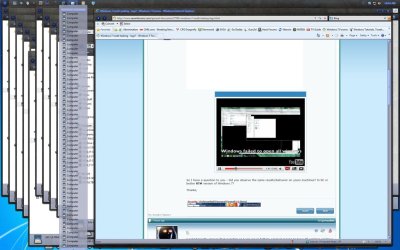
Now my computer has a bit more resources than you do and I am running RTM version but here is a screenshot where I opened the 80 windows while watching your video in this page, I even took the screenshot, saved it in paint and then reopened it in PS to scale it down some and my computer never missed a beat, in fact all them windows are still open.
I really know nothing about Mac so I ask is 100 'Finder' windows the same as a fully functional explorer window in Win 7?
System Manufacturer/Model Number I Build My Own OS Windows 7 Ultimate x64 CPU Intel i7-980X Extreme Edition Motherboard eVga x58 Classified 3 Memory Corsair Dominator GT PC3-16000 12 Gig Graphics Card eVga GTX 570 x3 OC Threeway SLI Sound Card Creative X-Fi Platinum Champion Series Monitor(s) Displays Dell Ultra Sharp U2711 27 - inch Widescreen Flat Panel Screen Resolution 2560 x 1440 (WQHD) resolution
Keyboard MS Sidewinder Mouse RAZER Naga Molten PSU Corsair 1200 Case Corsair 800D Cooling Liquid using Heatkiller Blocks and Koolance control Hard Drives Crucial RealSSD C300 128GB SATA III MLC
2 WD VelociRaptor 300g in Raid 0 Internet Speed 25 Meg FIOS
There is other things to consider too like explorer settings, I have my computer set to open explorer windows in seperate process.
Now my computer has a bit more resources than you do and I am running RTM version but here is a screenshot where I opened the 80 windows while watching your video in this page, I even took the screenshot, saved it in paint and then reopened it in PS to scale it down some and my computer never missed a beat, in fact all them windows are still open.
I really know nothing about Mac so I ask is 100 'Finder' windows the same as a fully functional explorer window in Win 7?
Thanks for the info. You have pretty strong PC.
I'm glad to see that RTM Windows 7 multitasking works as should be.
I always set to open explorer windows as a one process, later I will try change this and then test again, but... probably this issue which I mentioned earlier is because my graphic card
Computer type PC/Desktop System Manufacturer/Model Number Self Built OS Windows 7 Home Premium x32 SP1 CPU x2 2.6 GHz Motherboard Asus Memory A-Data 2GB DDR2-800 Graphics Card ATI X1250 Sound Card SB 5.1 Live!
Keyboard BTC 6300 Mouse Logitech VX Nano PSU Tagan TG-480-U01 Hard Drives WD and Seagate FAP Antivirus None