| Windows 7: Screen Saver start - hotkey or mouse |
10 Oct 2009
|
#1 | | |
Screen Saver start - hotkey or mouse Is there a way to start a screen saver with a hot-key or a mouse gesture (or perhaps by putting the mouse into a certain corner for a certain amount of seconds)?
I would like the ability to start the screen saver on command without going to the display option and clicking the preview button. For example, when surfing the web or watching a video, I would like to push alt-s or something similar, or perhaps move the mouse to a corner, and the screen saver starts automatically, right away, then acts normally as if it started by itself (meaning, it is "on" until I move the mouse or push a key).
Any way to do this?
Win7U64 | My System Specs |
| OS Windows 7 Ultimate 64bit CPU AMD Opteron 165 Motherboard DFI Ultra-D Memory OCZ 3GB Graphics Card ATI Radeon HD3870 Sound Card Onboard Monitor(s) Displays 2 x Dell 2405fpw Keyboard Logitech Navigator & Gyration Ultra Mouse MX1000 & Gyration Ultra PSU OCZ Powerstream 520 Case Antec P180 Cooling 2 x 120mm intake, 2 x 120mm exhaust Hard Drives WD Raptor 150GB OS Drive *
WD 1TB Storage Drive *
Seagate 640GB Backup Drive Internet Speed 8Mbit down / 1Mbit up |
10 Oct 2009
|
#2 | | Win7 RTM, XP Pro, Arch Linux, Puppy (Quad boot) Hotlanta, Loondon, AbuDabby |
You could create a shortcut to toggle the screensaver on and off and assign a key combo to activate that shortcut via "shortcut properties > shortcut > shortcut key". Something like this maybe? Windows Tips: Toggle Your Screen Saver With a Single Click - PC World | My System Specs | | System Manufacturer/Model Number Self Assembled OS Win7 RTM, XP Pro, Arch Linux, Puppy (Quad boot) CPU Core i7 920 (OCed @ 3.8Ghz) Motherboard ASUS P6T Dlx Memory OCZ Gold 6GB DDR3-1600 Graphics Card Sapphire Radeon HD 5870 1GB (OCed @ 935/1300) Sound Card On-board Monitor(s) Displays Samsung 24" PSU Corsair HX620W Case Antec 1200 Cooling Noctua U12P Hard Drives WD Caviar Black 1TB, WD Velociraptor 300GB, Maxtor 250GB |
10 Oct 2009
|
#3 | | |
Hmm, that is interesting but its not what I'm looking for. That article explains how to toggle the screen saver OFF and ON with two shortcuts. This is actually usable, but its not what I need.
I need a shortcut, hotkey, or mouse gesture that will actually start the screensaver, instead of waiting the assigned number of minutes (either/or). | My System Specs | | OS Windows 7 Ultimate 64bit CPU AMD Opteron 165 Motherboard DFI Ultra-D Memory OCZ 3GB Graphics Card ATI Radeon HD3870 Sound Card Onboard Monitor(s) Displays 2 x Dell 2405fpw Keyboard Logitech Navigator & Gyration Ultra Mouse MX1000 & Gyration Ultra PSU OCZ Powerstream 520 Case Antec P180 Cooling 2 x 120mm intake, 2 x 120mm exhaust Hard Drives WD Raptor 150GB OS Drive *
WD 1TB Storage Drive *
Seagate 640GB Backup Drive Internet Speed 8Mbit down / 1Mbit up |
10 Oct 2009
|
#4 | | |
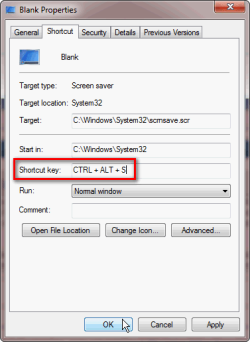
Same thing - create a shortcut to C:\Windows\System32\SCREENSAVERFILE.scr
Assign hotkey
go. | My System Specs | | |
10 Oct 2009
|
#5 | | Win7 RTM, XP Pro, Arch Linux, Puppy (Quad boot) Hotlanta, Loondon, AbuDabby |

Quote: Originally Posted by salvinorum I need a shortcut, hotkey, or mouse gesture that will actually start the screensaver, instead of waiting the assigned number of minutes (either/or). 
Quote: Originally Posted by gforce23 You could create a shortcut to toggle the screensaver on and off and assign a key combo to activate that shortcut via "shortcut properties > shortcut > shortcut key". Well... | My System Specs | | System Manufacturer/Model Number Self Assembled OS Win7 RTM, XP Pro, Arch Linux, Puppy (Quad boot) CPU Core i7 920 (OCed @ 3.8Ghz) Motherboard ASUS P6T Dlx Memory OCZ Gold 6GB DDR3-1600 Graphics Card Sapphire Radeon HD 5870 1GB (OCed @ 935/1300) Sound Card On-board Monitor(s) Displays Samsung 24" PSU Corsair HX620W Case Antec 1200 Cooling Noctua U12P Hard Drives WD Caviar Black 1TB, WD Velociraptor 300GB, Maxtor 250GB |
11 Oct 2009
|
#6 | | |
Quote: Same thing - create a shortcut to C:\Windows\System32\SCREENSAVERFILE.scr
Assign hotkey
go. Oh yeah, of course, how simple, why in the world didn't I think of that, duh!
Thanx for the reminder! So simple.
Oh, one more thing. Should I use the .scr files in syswow64 directory or the system32 directory? | My System Specs | | OS Windows 7 Ultimate 64bit CPU AMD Opteron 165 Motherboard DFI Ultra-D Memory OCZ 3GB Graphics Card ATI Radeon HD3870 Sound Card Onboard Monitor(s) Displays 2 x Dell 2405fpw Keyboard Logitech Navigator & Gyration Ultra Mouse MX1000 & Gyration Ultra PSU OCZ Powerstream 520 Case Antec P180 Cooling 2 x 120mm intake, 2 x 120mm exhaust Hard Drives WD Raptor 150GB OS Drive *
WD 1TB Storage Drive *
Seagate 640GB Backup Drive Internet Speed 8Mbit down / 1Mbit up |
14 Dec 2010
|
#8 | | |
Resurrecting b/c of a easier way...
...download below zip, unzip and move shortcuts to desktop. Attachment 123445
Whats cool is you can choose any of the 4 ms default screensavers and it Won't change your default in themes!
Don't want to wait for SS to start,
...Just click and the screensaver shortcut will start and run for the pre-determined time.
Should be good for ALL Flavors of Windows 7 & 32/64bit. Attachment 123446
Last edited by OEM; 01 Jan 2011 at 06:43 PM..
| My System Specs | | System Manufacturer/Model Number POS OS OS3.5 CPU celery Motherboard Good Question ...Unknown Memory memory never forgets Graphics Card OB Sound Card OB Monitor(s) Displays HUGE Screen Resolution 168000000x105000000 Keyboard OB Mouse mouse PSU OEM 65watt Case N/A Cooling OB Hard Drives full Internet Speed 1 Trillion MBps Other Info Still An Awesome Forum! |
23 Jan 2011
|
#9 | | |
Screensaver Shortcut I have Windows7 64bit OS. The screensaver executable on my system is C:\Windows\System32\scrnsave.scr and not C:\Windows\System32\SCREENSAVERFILE.scr . Others might be in a similar boat. Just an FYI. | My System Specs | | |
23 Jan 2011
|
#10 | | Windows 7 x64 Ultimate A Finnish immigrant in Leipzig, Germany |
| My System Specs | | Computer type Laptop System Manufacturer/Model Number HP ENVY 17-1150eg OS Windows 7 x64 Ultimate CPU 1.6 GHz Intel Core i7-720QM Processor Memory 6 GB Graphics Card ATI Mobility Radeon HD 5850 Graphics Sound Card Beats sound system with integrated subwoofer Monitor(s) Displays 17" laptop display, 22" LCD and 32" Full HD TV through HDMI Screen Resolution 1600*900, 1680*1050 and 1920*1080 Keyboard Logitech diNovo Media Desktop Laser (bluetooth) Mouse Logitech MX1000 Laser (Bluetooth) Hard Drives Internal: 2 x 500 GB SATA Hard Disk Drive 7200 rpm
External: 2TB for backups, 3TB USB3 network drive for media Internet Speed 50/10 Mbps VDSL Antivirus MSE, Windows Defender Browser Maxthon 3.5.2. Other Info Windows 7 Ultimate Retail Full in English, additional Guest-user accounts in Finnish, German and Swedish (Working languages English & Swedish, Family language German, my own language, mother tongue, Finnish. I really need Ultimate to get to use Language Packs!) Screen Saver start - hotkey or mouse problems? All times are GMT -5. The time now is 01:19 PM. | |