
How to lump the 100MB system reserved partition as part of C Drive?

cheesum

New member
Member
Local time
12:14 PM
Messages
61
Hi all;
Please kindly advice how can i hide this 100MB system reserved partition as part of the Windows OS C Drive? I do not mind re-installing (clean installation) of Windows 7 again. But then, can anyone teach me how to hide this 100MB system reserved partition and lump it as part of the Windows OS C Drive?

Disk management.png
 

My Computer My Computer

At a glance

Windows 7 Home Premium 64Bit
Computer type
Laptop
Computer Manufacturer/Model Number
Lenovo Ideapad Y580
OS
Windows 7 Home Premium 64Bit

My Computer My Computer

At a glance

Win 10 Pro x64Intel I5-2500K @3.3GHz16GB G.Skill Ripjaws X (4x4GB)EVGA GeForce 750 Ti SC 2GB
Computer type
PC/Desktop
Computer Manufacturer/Model Number
Self Built
OS
Win 10 Pro x64
CPU
Intel I5-2500K @3.3GHz
Motherboard
Asrock P67 Extreme4
Memory
16GB G.Skill Ripjaws X (4x4GB)
Graphics Card(s)
EVGA GeForce 750 Ti SC 2GB
Sound Card
ASUS Xonar DG 5.1 Channels 24-bit 96KHz PCI Interface Sound
Monitor(s) Displays
auria eq2367
Screen Resolution
1920 x 1080
Hard Drives
250GB Samsung 850 EVO SSD
1TB WD Blue
1TB Hitachi
PSU
SeaSonic X 650W 80 Plus Gold
Case
Corsair Obsidian 750D
Cooling
Corsair H60, Three 140mm case fans
Keyboard
Logitech Wireless Keyboard K520
Mouse
Logitech Wireless Mouse M310
Internet Speed
Wave Broadband ~ 100 dn 5 up
Antivirus
Windows Defender, Malwarebytes Premium
Browser
Edge, IE11, Chrome
Other Info
Laptop specs: HP g7-1365dx /
CPU: AMD A6-3420M APU with Radeon(tm) HD Graphics /
RAM: Crucial 8Gb (2x4Gb) /
SSD: Crucial M4-CT128M4SSD2 ATA Device/ FW 000F /
GFX: AMD Radeon HD 6520G /
OS: Windows 10 Pro x64
If you create a partition to install windows on, you will never get the 100 MB System Reserved partition. But, it`s nothing to worry about.
 
Last edited:

My Computer My Computer

At a glance

Windows 10 Pro x64Intel Core i7 6700KGSkill TridentZ RGB 16GB 3600 16-16-16-36EVGA GTX 980 Ti SC x2
Computer type
PC/Desktop
Computer Manufacturer/Model Number
Skylake Special #666
OS
Windows 10 Pro x64
CPU
Intel Core i7 6700K
Motherboard
Asus Sabertooth Z170 Mark 1
Memory
GSkill TridentZ RGB 16GB 3600 16-16-16-36
Graphics Card(s)
EVGA GTX 980 Ti SC x2
Sound Card
Realtek High Definition
Monitor(s) Displays
AOC G2460PG
Screen Resolution
1920 x 1080 144Hz
Hard Drives
Samsung 860 Pro 256GB, Seagate Barracuda 4TB x2
PSU
EVGA 1000 P2, EVGA White Custom Braided Cables
Case
Corsair Vengeance C70 Gunmetal Black
Cooling
Corsair H100i v2, Corsair ML120 x2, Thermal Grizzly Kryonaut
Keyboard
Logitech G910 Orion Spectrum
Mouse
Logitech G700s
Internet Speed
Verizon Fios Quantum Gateway 75/75
Antivirus
Windows Defender, Malwarebytes Free 3.8.3
Browser
Chrome
Other Info
Corsair SP120 x4, LG Blu-ray Drive, Durabrand HT-395 100 Watt Dolby Digital Amp, Corsair H2100 Wireless 7.1 Headset
Why do you want to do this? System Reserved should never have a Drive Letter but that's as hidden as it gets. Can you just ignore it?

Deleting it is quite involved. But we can help you do it if you want.
 
It's usually where Windows 7 hides it's Grub files. If you have a dual boot Windows 7-8 the system will not create this, but every initial install of Windows 7 I have ever done on a fresh hard drive has had that 100 meg partition. Be careful because if you just delete it, and expand the drive out to full size, you may not be able to boot. Thats what I did when I first noticed these partitions, and my Windows 7 would not boot unless I used Hiren's Boot disk to force it. I had to use Partition Wizard version 7 to "Fix MBR" - When I did that, it re-created that 100 MB partition, after I ran the Boot Repair from the Windows 7 install disk.
 

My Computer My Computer

At a glance

Windows 10/Windows 7 (My Idea- Virtual PC)Intel(R) Core(TM) i5-3470 CPU @ 3.20GHz16 GBnVidia GeForce GTX 750 Ti (2GB)
Computer type
PC/Desktop
Computer Manufacturer/Model Number
Lenovo Thinkcenter M92p
OS
Windows 10/Windows 7 (My Idea- Virtual PC)
CPU
Intel(R) Core(TM) i5-3470 CPU @ 3.20GHz
Motherboard
Lenovo MahoBay
Memory
16 GB
Graphics Card(s)
nVidia GeForce GTX 750 Ti (2GB)
Sound Card
nVidia HD Audio
Monitor(s) Displays
RCA 4KTV 50"
Screen Resolution
3840p x 2160p
Hard Drives
Onboard:
Seagate ST500DM009-2F110A 500GB
WDC WD4000FYYZ-01UL1B1 (WD-WCC131910831) [3726 GB]

USB 3.0
My Book 1140 (WCAZAD122454) [1862 GB]
Apple MDT MD10EAVS-00D7B0 (0000AB123473) [931 GB]

External:
WD Blue Innostar/Matsunichi (465 GB)
WD
PSU
Stock Thinkcenter M92p
Case
Stock Thinkcenter M92p
Cooling
Active
Keyboard
BYTEC BY-GA-KT-100-AC
Mouse
BYTEC
Internet Speed
1 GHz Down, 40 Mbps Up
Antivirus
Windows Defender
Browser
EDGE
Other Info
Old Other Info:
I finally have an Intel machine that has more than 8GB of Ram.
My ASUS M2N-SE AMD Windows 7 machine is back to Windows 7. Replaced the AMD 4400+ CPU and maxed out the RAM (4GB).
My Core Duo machine is only 2GB of Ram and it is locked to Windows XP in order to run Pro Tools 6.4, which I have been using since 2004.
I have one other Dell OptiPlex 980 tower, Identical to this one,
If you create a partition to install windows on, you will never get the 100 MB System Reserved partition. But, it`s nothing to worry about.

Hi - thanks for the fast reply.
Please correct me if i am wrong here. Do you mean if we create 2x primary partitions (C & D drive) and install Windows to C Drive, hence Windows will automatically install the 100MB System Reserved partition to C Drive. Is this correct?

Also, please educate me on creating 2x partitions for C & D where C partition is primarily used for Windows + Drivers. WHat is the use of D partition then? What is the logic behind having 2 partitions? Also, what is the ideal size for both C & D partition? Mine is an Intel SSD 120GB.

Thanks for the help.

PS:
Yesterday, when doing a clean installation of Windows 7 SP1 (without updates) + Drivers + all the software, it took about approximately 35GB.
 

My Computer My Computer

At a glance

Windows 7 Home Premium 64Bit
Computer type
Laptop
Computer Manufacturer/Model Number
Lenovo Ideapad Y580
OS
Windows 7 Home Premium 64Bit

My Computer My Computer

At a glance

Win 10 Pro x64Intel I5-2500K @3.3GHz16GB G.Skill Ripjaws X (4x4GB)EVGA GeForce 750 Ti SC 2GB
Computer type
PC/Desktop
Computer Manufacturer/Model Number
Self Built
OS
Win 10 Pro x64
CPU
Intel I5-2500K @3.3GHz
Motherboard
Asrock P67 Extreme4
Memory
16GB G.Skill Ripjaws X (4x4GB)
Graphics Card(s)
EVGA GeForce 750 Ti SC 2GB
Sound Card
ASUS Xonar DG 5.1 Channels 24-bit 96KHz PCI Interface Sound
Monitor(s) Displays
auria eq2367
Screen Resolution
1920 x 1080
Hard Drives
250GB Samsung 850 EVO SSD
1TB WD Blue
1TB Hitachi
PSU
SeaSonic X 650W 80 Plus Gold
Case
Corsair Obsidian 750D
Cooling
Corsair H60, Three 140mm case fans
Keyboard
Logitech Wireless Keyboard K520
Mouse
Logitech Wireless Mouse M310
Internet Speed
Wave Broadband ~ 100 dn 5 up
Antivirus
Windows Defender, Malwarebytes Premium
Browser
Edge, IE11, Chrome
Other Info
Laptop specs: HP g7-1365dx /
CPU: AMD A6-3420M APU with Radeon(tm) HD Graphics /
RAM: Crucial 8Gb (2x4Gb) /
SSD: Crucial M4-CT128M4SSD2 ATA Device/ FW 000F /
GFX: AMD Radeon HD 6520G /
OS: Windows 10 Pro x64
Just so there is some history here, you should mention your other thread about creating a one key recovery,

http://www.sevenforums.com/software/293059-how-convert-rar-iso-file-lenovo-okr7-0-engineering-3.html

Or have you abandoned that?

Hahaha :) ...well, i never really abandon the OKR7.0. Managed to get it to work...sort off :) It managed to create OEM_PARTITION. But then, for some reason, i cannot get OKR7.0 to create the recovery image of the C drive in the OEM_PARTITION.
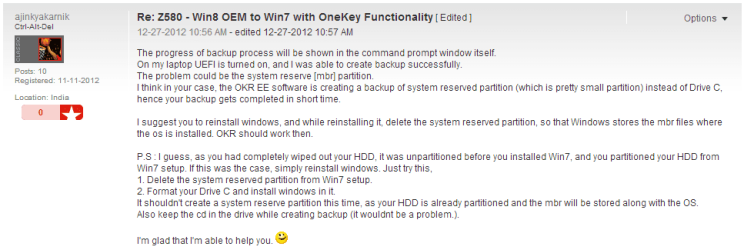
After searching through the Lenovo forum, this thread shows one possible reason why this might happen. This maybe due to the 100MB MBR. Here, OKR7.0 might have indeed create the recovery image of the 100MB MBR instead of the C Drive. The thread goes on to suggest creating two partitions - one for the OS in C Drive. This way, Windows 7 can lump the 100MB MBR into C Drive.
Z580 - Win8 OEM to Win7 with OneKey Functionality - Lenovo Community

2013-06-19 12_10_03-Z580 - Win8 OEM to Win7 with OneKey Functionality - Lenovo Community.png

This may explain why nothing is created in the OEM_partition.
2013-06-19 12_12_36-273146-how-lump-100mb-system-reserved-partition-part-c-drive-disk-management.png

Furthermore, on another thread, it seems there is a correlation between creating two partitions (C and D) to actually have OKR7.0 to work ~ i.e.; create the recovery image in the OEM_PARTITION.
http://forums.lenovo.com/t5/Lenovo-...and-OneKey-Recovery-Feature/td-p/8036/page/38

Hence, my problem maybe due to having only 1 partition being C. But then, think about it. Why create 2 partitions (C & D) on a 120GB SSD????

I don't know whether creating two partitions will make the OKR7.0 to work...but then, having come so far....there is nothing to lose.
 

My Computer My Computer

At a glance

Windows 7 Home Premium 64Bit
Computer type
Laptop
Computer Manufacturer/Model Number
Lenovo Ideapad Y580
OS
Windows 7 Home Premium 64Bit
One Key Recover is to recover to factory condition which is a corrupt install to begin with, the worst possible install of Win7 one can have. So instead of investing time trying to rearrange the deck chairs on the Titanic on a cruise no tech enthusiast would take, why not get the best possible install one can have of Win7 following the steps to Clean Reinstall - Factory OEM Windows 7.

During reinstall I would delete all partitions to create new as you please, preferably one large partition (ignoring the System Reserved) unless you want data on another partition to keep C smaller for imaging purposes.
 
Hi - on a separate matter, if i want to create 2x partitions on my 120GB INtel SSD (usable space is 112GB) what is the magic number for the size of each partition? What is the best size split btw. partition C & D ????

Just a rough idea...please advice....
Partition C: Windows + Windows update + Drivers (about 40GB)
Partition D: Software...(52GB)
Unallocated partition: 20GB
What you guys think of the size split?

Hence, when doing a fresh installation of Win#7, i just need to create 2x partitions. Here, Windows 7 will load the 100MB MBR into partition C. Am i correct?

Thanks.
 

My Computer My Computer

At a glance

Windows 7 Home Premium 64Bit
Computer type
Laptop
Computer Manufacturer/Model Number
Lenovo Ideapad Y580
OS
Windows 7 Home Premium 64Bit
If you create a partition to install windows on, you will never get the 100 MB System Reserved partition. But, it`s nothing to worry about.


Hi there
Not quite true - but almost.

The only time you can avoid creating this partition is if you allocate the WHOLE HDD / SSD to "C" before installing Windows -- if you have any other partitions then Windows will always create the 100 MB partition.

After you've created your Windows system you can then use something like Partition Wizard (Free) to re-size the "C" partition if you've installed on to a large HDD.

It's not necessary to avoid creating the windows system partition - but I can understand why some people might want to do it -- then they just have to backup the "C" image instead of the system partition too.

On restore also when you restore the system Partition it must be the ACTIVE partition or your system won't boot. Set the "C" partition to PRIMARY.

I can see people just preferring to have a single partition so they don't have to worry about any of this on backup / restore of their images.

Remember also with things like GPT disks etc other considerations will apply in future.

Cheers
jimbo
 

My Computer My Computer

At a glance

Linux CENTOS 7 / various Windows OS'es and se...Intel i7 Intel i58GB, 16GBOn Motherboard
Computer type
PC/Desktop
Computer Manufacturer/Model Number
Custom built, several laptops HP/ASUS
OS
Linux CENTOS 7 / various Windows OS'es and servers
CPU
Intel i7 Intel i5
Memory
8GB, 16GB
Graphics Card(s)
On Motherboard
Sound Card
Realtek HD audio
Monitor(s) Displays
Apple Cinema display, Samsung LCD
Screen Resolution
1920 X 1080
Hard Drives
4 X 1TB SATA
Mouse
Toshiba wireless laser
Internet Speed
> 20MB up

My Computer My Computer

At a glance

Windows 10 Pro x64 ; Xubuntu x64Intel i7 860 @ 2.80 GHz O/C'ed to 4.0GHz16GB Corsair Vengance DDR3 @ 661 MHz Dual Cha...EVGA NVidia GTX 560 1024MB
Computer type
PC/Desktop
Computer Manufacturer/Model Number
Golden Mk. I.4
OS
Windows 10 Pro x64 ; Xubuntu x64
CPU
Intel i7 860 @ 2.80 GHz O/C'ed to 4.0GHz
Motherboard
Gigabyte P55A-UD3R Rev.1. Award BIOS F13
Memory
16GB Corsair Vengance DDR3 @ 661 MHz Dual Channel (9-9-9-24)
Graphics Card(s)
EVGA NVidia GTX 560 1024MB
Sound Card
Realtek Integrated
Monitor(s) Displays
Dual Samsung SyncMaster 2494HS
Screen Resolution
1920*1080 and 1920*1080
Hard Drives
1*Samsung 840 EVO 120GB SSD;
1*OCZ Vertex 2 60GB SSD;
2*Samsung F3 SpinPoint 1TB in RAID0;
1*Samsung F1 SpinPoint 1TB;
2*Western Digital 1TB External USB 3.0
1*Western Digital 500GB External USB 3.0
1*Seagate 500GB External USB 2.0
PSU
Thermaltake ToughPower QFan 750W
Case
Thermaltake Element S VK60001W2Z
Cooling
Corsair H60 Water Cooling, 2*230mm and 2*80mm case fans
Keyboard
Logitech G110
Mouse
Logitech MX518
If you create a partition to install windows on, you will never get the 100 MB System Reserved partition. But, it`s nothing to worry about.

The only time you can avoid creating this partition is if you allocate the WHOLE HDD / SSD to "C" before installing Windows -- if you have any other partitions then Windows will always create the 100 MB partition.
I "pre partiton" a HD with multiple partitions before installing the OS.
I've never had Windows create the 100MB System Reserved partition, when multiple partitions already exist.
 

My Computer My Computer

At a glance

Multi-Boot W7_Pro_x64 W8.1_Pro_x64 W10_Pro_x6...AMD Athlon II x4 6206GB GSkill DDR2 800AMD 4670 GPU + AMD 4200 IGP
Computer type
PC/Desktop
Computer Manufacturer/Model Number
home built
OS
Multi-Boot W7_Pro_x64 W8.1_Pro_x64 W10_Pro_x64 +Linux_VMs +Chromium_VM
CPU
AMD Athlon II x4 620
Motherboard
Gigabyte GA-MA785G-UD3H
Memory
6GB GSkill DDR2 800
Graphics Card(s)
AMD 4670 GPU + AMD 4200 IGP
Sound Card
on board Realtek ALC889A
Monitor(s) Displays
RCA 40" LCD TV, Insignia 32" LCD TV, HP 15" LCD monitor
Screen Resolution
1680 x 1050
Hard Drives
OCZ Vertex 3 120GB,
Samsung F3 1TB (3),
Several others - WD, Seagate, Hitachi, ...
PSU
Corsair 500 W
Case
Rosewill mid tower
Cooling
CM 90mm rifle
Keyboard
Gyration wireless, Logitech wireless, Dell USB wired
Mouse
Gyration wireless, Logitech wireless, V7 USB wired
Internet Speed
Spectrum - 100Mbps D / 10Mbps U
Antivirus
Avast, MBAM3, EMET, WinPatrol
Browser
Pale Moon, Firefox, IE
Other Info
2 multi-boot PC's
Mainly HTPC/Office/Gen purpose (no gaming).
Trendnet USB KVM.
LG DVD burner/Blue Ray Player.
Tray system for removable SATA backup drives.

Not currently OCd, under-volted.
I use Hybrid sleep, rarely re-boot or shutdown.

Hauppauge HD-PVR, Avermedia PCIe TV Tuner, Hauppauge PCI TV Tuner.

My Computer My Computer

At a glance

Windows 10/Windows 7 (My Idea- Virtual PC)Intel(R) Core(TM) i5-3470 CPU @ 3.20GHz16 GBnVidia GeForce GTX 750 Ti (2GB)
Computer type
PC/Desktop
Computer Manufacturer/Model Number
Lenovo Thinkcenter M92p
OS
Windows 10/Windows 7 (My Idea- Virtual PC)
CPU
Intel(R) Core(TM) i5-3470 CPU @ 3.20GHz
Motherboard
Lenovo MahoBay
Memory
16 GB
Graphics Card(s)
nVidia GeForce GTX 750 Ti (2GB)
Sound Card
nVidia HD Audio
Monitor(s) Displays
RCA 4KTV 50"
Screen Resolution
3840p x 2160p
Hard Drives
Onboard:
Seagate ST500DM009-2F110A 500GB
WDC WD4000FYYZ-01UL1B1 (WD-WCC131910831) [3726 GB]

USB 3.0
My Book 1140 (WCAZAD122454) [1862 GB]
Apple MDT MD10EAVS-00D7B0 (0000AB123473) [931 GB]

External:
WD Blue Innostar/Matsunichi (465 GB)
WD
PSU
Stock Thinkcenter M92p
Case
Stock Thinkcenter M92p
Cooling
Active
Keyboard
BYTEC BY-GA-KT-100-AC
Mouse
BYTEC
Internet Speed
1 GHz Down, 40 Mbps Up
Antivirus
Windows Defender
Browser
EDGE
Other Info
Old Other Info:
I finally have an Intel machine that has more than 8GB of Ram.
My ASUS M2N-SE AMD Windows 7 machine is back to Windows 7. Replaced the AMD 4400+ CPU and maxed out the RAM (4GB).
My Core Duo machine is only 2GB of Ram and it is locked to Windows XP in order to run Pro Tools 6.4, which I have been using since 2004.
I have one other Dell OptiPlex 980 tower, Identical to this one,
Just so there is some history here, you should mention your other thread about creating a one key recovery,

http://www.sevenforums.com/software/293059-how-convert-rar-iso-file-lenovo-okr7-0-engineering-3.html

Or have you abandoned that?

Actually, just re-name the RAR file as an ISO file. Or the reverse. I've done this a million times, they are practically identical, and ISO is an uncompressed RAR file, or, a compressed one, if the ISO image has been compressed to make a Gigabyte of space fit onto a CD image.

that way you can just burn whatever RAR you have after changing the RAR to ISO.
 

My Computer My Computer

At a glance

Windows 10/Windows 7 (My Idea- Virtual PC)Intel(R) Core(TM) i5-3470 CPU @ 3.20GHz16 GBnVidia GeForce GTX 750 Ti (2GB)
Computer type
PC/Desktop
Computer Manufacturer/Model Number
Lenovo Thinkcenter M92p
OS
Windows 10/Windows 7 (My Idea- Virtual PC)
CPU
Intel(R) Core(TM) i5-3470 CPU @ 3.20GHz
Motherboard
Lenovo MahoBay
Memory
16 GB
Graphics Card(s)
nVidia GeForce GTX 750 Ti (2GB)
Sound Card
nVidia HD Audio
Monitor(s) Displays
RCA 4KTV 50"
Screen Resolution
3840p x 2160p
Hard Drives
Onboard:
Seagate ST500DM009-2F110A 500GB
WDC WD4000FYYZ-01UL1B1 (WD-WCC131910831) [3726 GB]

USB 3.0
My Book 1140 (WCAZAD122454) [1862 GB]
Apple MDT MD10EAVS-00D7B0 (0000AB123473) [931 GB]

External:
WD Blue Innostar/Matsunichi (465 GB)
WD
PSU
Stock Thinkcenter M92p
Case
Stock Thinkcenter M92p
Cooling
Active
Keyboard
BYTEC BY-GA-KT-100-AC
Mouse
BYTEC
Internet Speed
1 GHz Down, 40 Mbps Up
Antivirus
Windows Defender
Browser
EDGE
Other Info
Old Other Info:
I finally have an Intel machine that has more than 8GB of Ram.
My ASUS M2N-SE AMD Windows 7 machine is back to Windows 7. Replaced the AMD 4400+ CPU and maxed out the RAM (4GB).
My Core Duo machine is only 2GB of Ram and it is locked to Windows XP in order to run Pro Tools 6.4, which I have been using since 2004.
I have one other Dell OptiPlex 980 tower, Identical to this one,
Hi - on a separate matter, if i want to create 2x partitions on my 120GB INtel SSD (usable space is 112GB) what is the magic number for the size of each partition? What is the best size split btw. partition C & D ????

Just a rough idea...please advice....
Partition C: Windows + Windows update + Drivers (about 40GB)
Partition D: Software...(52GB)
Unallocated partition: 20GB
What you guys think of the size split?

Hence, when doing a fresh installation of Win#7, i just need to create 2x partitions. Here, Windows 7 will load the 100MB MBR into partition C. Am i correct?

Thanks.

Hi - any feedback on the magic number for the best partition size for both C and D on a 120GB SSD?
 

My Computer My Computer

At a glance

Windows 7 Home Premium 64Bit
Computer type
Laptop
Computer Manufacturer/Model Number
Lenovo Ideapad Y580
OS
Windows 7 Home Premium 64Bit
Weird

If you create a partition to install windows on, you will never get the 100 MB System Reserved partition. But, it`s nothing to worry about.
The only time you can avoid creating this partition is if you allocate the WHOLE HDD / SSD to "C" before installing Windows -- if you have any other partitions then Windows will always create the 100 MB partition.

That 's not my experience.
In fact my experience is the exact opposite (i.e. just like DavidW7ncus's).

If my drive is empty (i.e. not partitioned and formatted) I always get the 100 MB partition.
My VMs all have that 100 MB partition (since pre-partitioning VHDs is a pain, I just let Windows install to the entire VHD as it sees fit).

I always pre-partition and format my physical HDDs, before installing any operating systems.
I never get that 100 MB partition on any HDDs I've pre-partitioned and formatted.
 

My Computer My Computer

At a glance

W7 Ultimate SP1, LM19.2 MATE, W10 Home 1703, ...AMD Phenom II x6 1100T, 3.3 GHz12GB DDR3 1333 G-Skill (4GB x 2), G-Skill (2G...NVIDIA GeForce GTX 660
Computer type
PC/Desktop
Computer Manufacturer/Model Number
n/a
OS
W7 Ultimate SP1, LM19.2 MATE, W10 Home 1703, W10 Pro 1703 VM, #All 64 bit
CPU
AMD Phenom II x6 1100T, 3.3 GHz
Motherboard
ASUS M4A88T-M/USB3 (AM3)
Memory
12GB DDR3 1333 G-Skill (4GB x 2), G-Skill (2GB x 2)
Graphics Card(s)
NVIDIA GeForce GTX 660
Sound Card
Realtek?
Monitor(s) Displays
Samsung S23B350
Screen Resolution
1920x1080
Hard Drives
WD Green 2TB (SATA), WD Green 3TB (SATA), WD Blue 4TB (SATA), WD Blue 6TB (SATA)
PSU
Cooler Master
Case
Antec GX300 Tower
Cooling
3x Antec TRICOOL 120mm Fans
Mouse
Wired Optical
Internet Speed
DSL
Antivirus
Avast
Browser
Pale Moon (64 bit)
Other Info
2018-12-27 Upgraded HDDs
2015-12-10 Upgraded case, graphics card, storage
2015-08-15 Upgraded motherboard & RAM
2015-07-15 Upgraded LM17.1 to LM17.2
Deleting the System Reserved partition is straightforward - just delete it and merge the unallocated space to C: using your favourite partitioning tool..........but only after you have copied over the bootmanger to C: using these very simple steps:

http://www.sevenforums.com/tutorials/209885-bootmgr-move-c-easybcd.html

Golden, that's right, I only figured that out a little while ago. I use Windows 7 Manager to move the boot manager over to C.

I would not use 3rd party tools or line commands to move the boot files because these do not complete the job.

Since before Win7 was released the procedure developed here is to Mark Partition C Active (converting first to Primary if it's Logical so it will accept the Active flag) and then run Startup Repair - Run up to 3 Separate Times.

Anything less will not complete the job. The OS may boot from C but it will lose the Repair console link on F8 Advanced Boot Options which is not a Best Practice and sloppy work.
 
Please correct me if i am wrong here. Do you mean if we create 2x primary partitions (C & D drive) and install Windows to C Drive, hence Windows will automatically install the 100MB System Reserved partition to C Drive. Is this correct?
This is not quite correct:

1. Your predefined C partition must also be active. Simple primary alone will not do.
2. Windows will not install the 100MB partition on C. It will install the bootmgr on C - thus the 100MB partition is no more needed and will not be generated.

But if you have an installation with the 100MB partition, you can just move the bootmgr to C ( http://www.sevenforums.com/tutorials/209885-bootmgr-move-c-easybcd.html ). Then the 100MB partition becomes irrelevant and you can do with it what you want.
 

My Computer My Computer

At a glance

Vista, Windows7, Mint Mate, Zorin, Windows 8from 1.6GHz Duo to i7
Computer Manufacturer/Model Number
HP, Dell, Gateway, Toshiba - 4 laptops and 2 desktops
OS
Vista, Windows7, Mint Mate, Zorin, Windows 8
CPU
from 1.6GHz Duo to i7
Monitor(s) Displays
2x HP w2207
Hard Drives
5x HDD, 7x SSD, 12x Externals
Keyboard
with trackball - no mices
Mouse
Trackball mice
Internet Speed
DSL 6000
Back
Top
