Windows 7 Forums Search
Welcome to Windows 7 Forums. Our forum is dedicated to helping you find solutions with any problems, errors or issues you are experiencing with Windows 7. The Windows 7 forum also covers news and updates and has an extensive Windows 7 tutorial section that covers a wide range of tips and tricks.


Windows 7 - Strange .doc icons and context menu issue. Please help!

 
10-25-2009   #1


Windows 7


Strange .doc icons and context menu issue. Please help!

I've just installed Windows 7, and right afterwards Office 2003. I've noticed, that while .rtf documents had the normal Word icons, the .doc documents were still associated with Wordpad. Manually, using the "Open with" menu I've re-associated .doc files by default with Word. When I double click on them Word opens them, however the icons of the .doc files are different from those of the .rtf files. (Now their appearance refer to Word, but they are not the "original" Word icons. It looks like as if I associated an alien extension with Word, for example .jpg or .pdf. It seems as if Word wouldn't really like to recognize .doc files as its own.)
Moreover, when on the desktop I do a right-click and select "New" I can create every file types of the installed Office applications (.xml, .ppt, .mdb) except a .doc file, there is no possibility to create any Word documents that way at all.

So according to the mentioned problems I think Word has some problems with managing its own file extension. I repaired and also re-installed Office, but that didn't help.
Until now I used the RC version of Windows 7 but I didn't have this problem.

If you could help me solving this issue I'd be very grateful!

My System SpecsSystem Spec
12-23-2009   #2


Windows 7 Home Edition


Windows 7 does not recognize DOC files!

I have Windows 7 and both MS Word 2000, Office/Word 2003, and Word 2007. I also have Adobe Acrobat Reader 9. Windows 7 does not allow a file association for anything other than Wordpad (useless). I know how to force an association - it does not work. If I open the program, I can go looking for the document, but if I double-click on the DOC or PDF icon, nothing happens (except in the case of the DOC icon, it offers Wordpad). This is extremely frustrating! You would think that the makers of Windows 7 would have built-in functionality for 2 of the most prolific word processors (Word & Reader). Very strange. I have hired a computer geek to work on it - so far he is stumped too!
My System SpecsSystem Spec
12-23-2009   #3


Vista Ult64, Win7600


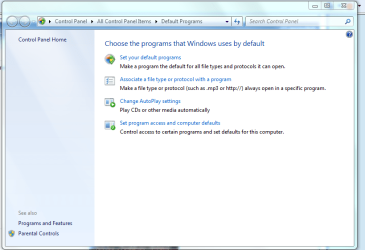
Hi, have you tried to associate a file to a particular program. Default Programs.


Strange .doc icons and context menu issue. Please help!-file.png
My System SpecsSystem Spec
.


12-23-2009   #4


Windows 7 Pro & Vista Home Premium


You might want to download this great app.

It's called FileTypesMan 1.56.

However word documents are totally different than standard icons They get the association from the CL]windows\installer folder.
My System SpecsSystem Spec
Reply

 Strange .doc icons and context menu issue. Please help! problems?


Thread Tools


Similar Threads for: Strange .doc icons and context menu issue. Please help!
Thread Forum
New Context Menu - Remove & Restore Default Menu Items Tutorials
Solved Unable to remove MagicISO context menu from right click menu in Win 7 Customization
Context Menu - Add Shortcuts with Icons Tutorials
Can't click between icons to get context menu. Customization
Windows 7 Explorer Context Menu Icons Customization


All times are GMT -5. The time now is 04:55 AM.


Windows 7 Forums is an independent web site and has not been authorized,
sponsored, or otherwise approved by Microsoft Corporation.
"Windows 7" and related materials are trademarks of Microsoft Corp.
© Designer Media Ltd
  

1 2 3 4 5 6 7 8 9 10 11 12 13 14 15 16 17 18 19 20 21 22 23 24 25 26 27 28 29 30