
Windows 7 Forums Search
Welcome to Windows 7 Forums. Our forum is dedicated to helping you find solutions with any problems, errors or issues you are experiencing with Windows 7. The Windows 7 forum also covers news and updates and has an extensive Windows 7 tutorial section that covers a wide range of tips and tricks.


Windows 7 - Remove lock from folders and files


10-30-2009   #1


Win 7 Professional 32-bit


Remove lock from folders and files

I am copying over documents and media backup from my old hard drive (Win XP SP3) to my new Win 7 install. I have read about the permissions issue. I followed these instructions and added the registry key to add take full control and permissions to the context menu. After taking ownership and permissions, every file and folder has a lock icon. This is visually unappealing. How can I remove the lock icon, but retain access to my files? Thank you!

Take and Grant Full Control Permissions and Ownership in Windows 7 or Vista Right Click Menu My Digital Life

My System SpecsSystem Spec
10-30-2009   #2


Windows 7 Ultimate x64


Hi nabilalk.
I had a headache with this not long ago.
For example, if you have a padlock icon on files in C:\SF\nabilalk
First you will need to set sufficient privileges in the ACL for C:\SF and include permissions to inherit from parent dir (C and to replace child objects (C:\SF\nabilalk).
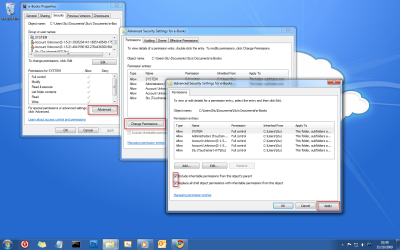
then in the ACL for C:\SF\nabilalk set permissions to inherit and replace also.
This worked a treat for me.
See this screeny for a better idea of what i mean. (ignore folder names!)

Remove lock from folders and files-12.png

Ownership doesn't seem to alter anything.

If you need to me to clarify anything, please ask.
My System SpecsSystem Spec
11-28-2009   #3


Windows 7 Ultimate x86


Hi, rsvr85.
Can I open file with padlock icon at another PC?
I had some file's with this icon, and I'm afraid if I can't open these file's at another PC
My System SpecsSystem Spec
.


11-29-2009   #4


Windows 7 Ultimate x64


Hi mkharisecario & welcome That depends on your folder permissions, refer to the ACL of the folder to confirm whether another user account/computer can access the files.

Let us know if you need any more help
My System SpecsSystem Spec
11-30-2009   #5


Windows 7 Ultimate x86


actually, it's happen when I upgrade my 7 pro to Ultimate
All files that come from old installed 7 is no padlock icon, and some file (like picture that I download with "save picture as") is not have padlock icon.
Still, when I download picture with download manager, downloaded picture become have padlock icon.
Why this happen?

also, when I read some other post, it says that I can share it to anyone, but when I right click and choose share with, I cant find anyone. Just nobody (with padlock icon), homegroup (read), and homegroup(read/write)

I'm still little confused with this
My System SpecsSystem Spec
11-30-2009   #6


Windows 7 Ultimate x64


Maybe this will shed some light?
How to remove lock icon from folders?
My System SpecsSystem Spec
Reply

Remove lock from folders and files problems?


Thread Tools


Similar Threads for: Remove lock from folders and files
Thread Forum
Solved can't remove some folders and files General Discussion
lock or protect files and folders Music, Pictures & Video
How to remove lock icon from folders? General Discussion
Why have some of my folders got a lock! General Discussion


All times are GMT -5. The time now is 05:13 AM.


Windows 7 Forums is an independent web site and has not been authorized,
sponsored, or otherwise approved by Microsoft Corporation.
"Windows 7" and related materials are trademarks of Microsoft Corp.
© Designer Media Ltd
  

1 2 3 4 5 6 7 8 9 10 11 12 13 14 15 16 17 18 19 20 21 22 23 24 25 26 27 28 29 30