Welcome to Windows 7 Forums. Our forum is dedicated to helping you find solutions with any problems, errors or issues you are experiencing with Windows 7. The Windows 7 forum also covers news and updates and has an extensive Windows 7 tutorial section that covers a wide range of tips and tricks.
Losing disk space after each fresh windows install!
Hey guys,
I like to wipe my HDD and run a clean OS install every once in a while after my computer has had a few months use. Its a 250 GB hard drive, with 233 GB reserved for the OS and related files. I ended up having to reinstall Windows 7 twice yesterday (wiping the hard drive twice) but noticed that after the second reinstall, Windows 7 had used up more of my HDD than it had on the first install. After the first install, I had 197 GB left (after deleting windows.old). On the second time, I only had 191 GB left (again after deleting windows.old). So out of morbid curiousity I redid the install twice more, getting 188 GB remaining, and then 186 GB remaining. Why is Windows 7 taking up more and more HDD space after each new install? Shouldn't it take up the same amount of space each time? Or are there a bunch of old windows files piling up somewhere that I dont know about?
System Manufacturer/Model Number Custom Build OS W7 RTM Ultimate x64 CPU Intel Q8400 @ 2.66GHZ Motherboard Gigabyte GA-EG45M-UD2H Memory 4GB DDR2-800 Graphics Card Gainward GTS 450 GLH 1GB Edition Sound Card Integrated 8 Channel Monitor(s) Displays AOC 23.6 Inch Widescreen LCD Screen Resolution 1920x1080
Keyboard HP SK-2960 Multimedia Keyboard Mouse Logitech M350 Wireless Gaming Mouse PSU Apevia Java Power 500W Case Cooler Master HAF 922 Black Cooling Stock Intel CPU Fan Hard Drives Seagate 500GB Internal
Western Digital 1TB Internal
Hitachi 1TB External Internet Speed 1.5MB
System Manufacturer/Model Number Bruce ... somewhere in his 40's OS Windows 7 Ultimate 32bit SP1 CPU Intel(R) Core(TM)2 Quad CPU @ 2.40GHz, 2400 MHz Motherboard INTEL/D975XBX2 Memory 4 GB Graphics Card ATI Radeon HD 2600 Pro Monitor(s) Displays Samsung SyncMaster 914v Screen Resolution 1280 x 1024
Keyboard Standard PS/2 Keyboard Mouse Microsoft PS/2 Mouse PSU Rocketfish 700 W Case G.Skill Gigabyte Chassis Hard Drives 2/500GB each ... ST3500630AS ATA Device.
One is not connected Internet Speed DSL Other Info ATI HDMI Audio
@ Philf: That is something I have never done before, is there a recomended method to it?
Also, is it normal for a computer to lose disk space like this after each new Windows install? I tried googling the problem but couldnt find anything relaated to my issue.
System Manufacturer/Model Number Custom Build OS W7 RTM Ultimate x64 CPU Intel Q8400 @ 2.66GHZ Motherboard Gigabyte GA-EG45M-UD2H Memory 4GB DDR2-800 Graphics Card Gainward GTS 450 GLH 1GB Edition Sound Card Integrated 8 Channel Monitor(s) Displays AOC 23.6 Inch Widescreen LCD Screen Resolution 1920x1080
Keyboard HP SK-2960 Multimedia Keyboard Mouse Logitech M350 Wireless Gaming Mouse PSU Apevia Java Power 500W Case Cooler Master HAF 922 Black Cooling Stock Intel CPU Fan Hard Drives Seagate 500GB Internal
Western Digital 1TB Internal
Hitachi 1TB External Internet Speed 1.5MB
Hi there
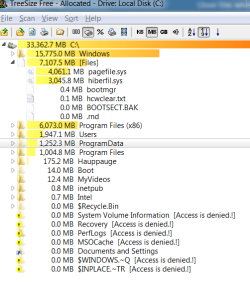
another decent program to use TreeSize Free
I've uploaded the file and displayed what the output looks like.
If you do a clean install on a clean partition the size shouldn't change until you start adding applications -- there aren't many initial install options.
System Manufacturer/Model Number Custom built OS W7 X-64 RTM,SUSE 11.1, XP PRO SP3 as a VM, VMware ESXi CPU Q9400 QUAD Motherboard P5QL-CM Memory 8GB Graphics Card On Motherborad Sound Card Realtek HD audio Monitor(s) Displays Apple Cinema display
Mouse Toshiba wireless laser Hard Drives 4 X 1TB SATA Internet Speed > 20MB up
Hi Seijun
Try the one I've attached
You can see what the files are and how big they are
save the output to a file,
then if you re-install windows again compare the windows C size with the previous install.
(Separate User data from your OS -- have say a 50 - 60 GB partition for your Windows install partitiion and use the rest of the disk for user data).
System Manufacturer/Model Number Custom built OS W7 X-64 RTM,SUSE 11.1, XP PRO SP3 as a VM, VMware ESXi CPU Q9400 QUAD Motherboard P5QL-CM Memory 8GB Graphics Card On Motherborad Sound Card Realtek HD audio Monitor(s) Displays Apple Cinema display
Mouse Toshiba wireless laser Hard Drives 4 X 1TB SATA Internet Speed > 20MB up
System Manufacturer/Model Number Custom OS Windows 7 Ultimate RTM (Technet) CPU 3.00 gigahertz Intel Core2 Duo E8400 Motherboard ASUSTeK Computer INC. P5K/EPU Rev 1.xx Memory 4GB Graphics Card ATI Radeon X1950 Pro Sound Card Built in HD Audio Monitor(s) Displays 22" Gateway LCD Screen Resolution 1920 x 1200
Hey guys, it worked! Now Im back up to 213 GB remaining-yay! The ONLY thing that confused me is that based on the tutotial, I thught I would need to reinstall all my drivers myself, but after checking device manager there was only one thing with a yellow mark next to it (which dissapeared after about 5 seconds) and only a few drivers needed updating, which microsoft update solved. Did I do something wrong or did drivers only need to be reinstalled with Windows 7 beta?