Windows 7 Forums Search
Welcome to Windows 7 Forums. Our forum is dedicated to helping you find solutions with any problems, errors or issues you are experiencing with Windows 7. The Windows 7 forum also covers news and updates and has an extensive Windows 7 tutorial section that covers a wide range of tips and tricks.


Windows 7 - sort icons in control panel

 
11-01-2009   #1


Windows 7


sort icons in control panel

is there any way to sort icons in control panel in alphabetical order??

My System SpecsSystem Spec
11-01-2009   #2


Windows 7 Ultimate x64 + x86 + Windows 8 x64


Not with the category view, but the large or small icons view are alphabetically arranged by default
My System SpecsSystem Spec
11-01-2009   #3


Windows 7


Quote   Quote: Originally Posted by Barman58 View Post
Not with the category view, but the large or small icons view are alphabetically arranged by default
not for me there not.
My System SpecsSystem Spec
.


11-01-2009   #4


Windows 7 Ultimate x64 SP1


Hello BruceLee, and welcome to Seven Forums.

Strange, could you post a screenshot of this to help see what may be happening?

You might also click on View (menu bar) and double check to make sure that Auto Arrange is checked.

Hope this helps for now,
Shawn
My System SpecsSystem Spec
11-02-2009   #5


Windows 7


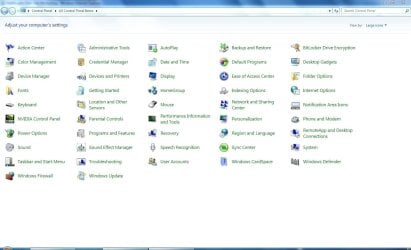
here you go. its windows 7
Attached Thumbnails
sort icons in control panel-capture.jpg  
My System SpecsSystem Spec
11-02-2009   #6


Vista and now 7 in 32 and 64 bit.


They look to me like they are in Alphabetical order??
My System SpecsSystem Spec
11-02-2009   #7


Windows 7


yeah from left to right mybe but not down wards. still makes it hard to find something
My System SpecsSystem Spec
11-02-2009   #8


Windows 7 Ultimate x64 + x86 + Windows 8 x64


Simply narrow the window to show a single column or type the first few letters of the tool you need.

To be honest I tend to type the name of the CP function I require direct into the start search and the system finds it quicker than I can by opening the Control panel
My System SpecsSystem Spec
11-12-2009   #9


xp/vista/w7


Interim measure: CP shortcuts folder

The left to right ordering in the Windows 7 Control Panel is excruciatingly annoying. I looked around for a Windows 7 tweaking tool that might present a different CP view and didn't see anything.
<p>
So, I put together a folder of shortcuts of Windows 7 CP items, which can in fact be ordered any way one likes, since it's just an ordinary folder. I set the "Comment" fields of the shortcuts to match the roll-over text of the actual Control Panel items, so when the folder Comment column is enabled, the list of shortcuts look a lot like the XP/Vista CP details view.

<p>

This folder of Windows 7 shortcuts can be downloaded here:

<p>

W7 CP Shortcuts Folder Download
<>

The downloaded file is a self-extracting 7z bundle that outputs the folder "Windows 7 ListView Control Panel"
My System SpecsSystem Spec
01-02-2010   #10


Win 7


Kudos!

Hey Reliance PC,

I just had to write and give you kudos for the Control Panel Shortcuts folder--great work! Norton told me not to download it since it was so new so, of course, I disregarded their warning, then clicked on their dialog box's "Safe" choice to provide feedback to Norton that your work is safe...and excellent!
Rich
My System SpecsSystem Spec
Reply

 sort icons in control panel problems?


Thread Tools


Similar Threads for: sort icons in control panel
Thread Forum
Control Panel Icons Have no text Customization
Control Panel Icons Sometimes Go missing General Discussion
Icons Control Panel Customization
Control Panel Icons Customization
Two Control Panel Icons on Taskbar General Discussion


All times are GMT -5. The time now is 05:02 AM.


Windows 7 Forums is an independent web site and has not been authorized,
sponsored, or otherwise approved by Microsoft Corporation.
"Windows 7" and related materials are trademarks of Microsoft Corp.
© Designer Media Ltd
  

1 2 3 4 5 6 7 8 9 10 11 12 13 14 15 16 17 18 19 20 21 22 23 24 25 26 27 28 29 30