Windows 7 Forums Search

Go Back Windows 7 Forums > Seven Forums > General Discussion » Solved unable to open vista partition

Welcome to Windows 7 Forums. Our forum is dedicated to helping you find solutions with any problems, errors or issues you are experiencing with Windows 7. The Windows 7 forum also covers news and updates and has an extensive Windows 7 tutorial section that covers a wide range of tips and tricks.

Windows 7 - unable to open vista partition


02-05-2009   #1 (permalink)


Vista Home Premium 32 BIT and Windows 7 32 BIT
Delhi , India


unable to open vista partition

hi i have installed vista and windows 7 dual boot ... but i am unable to open the vista partition on windows 7 ... any idea ?

My System SpecsSystem Spec
02-05-2009   #2 (permalink)


7
Chicago


Quote   Quote: Originally Posted by bossmayank619 View Post
hi i have installed vista and windows 7 dual boot ... but i am unable to open the vista partition on windows 7 ... any idea ?
Windows security is based on user GUIDs not user names. Your best bet is to take ownership of the root and make sure your machine names are identical between the partitions. If you need specific steps write back here -- I should be on most of the night.
My System SpecsSystem Spec
02-05-2009   #3 (permalink)


Vista Home Premium 32 BIT and Windows 7 32 BIT
Delhi , India


yes i would love to
My System SpecsSystem Spec
02-05-2009   #4 (permalink)


Vista x64 / 7 X64


Hi,

Are you able to see the Vista partition ?

If not, give it a drive letter in Disk Management.

SIW2
My System SpecsSystem Spec
02-05-2009   #5 (permalink)


7
Chicago


Quote   Quote: Originally Posted by bossmayank619 View Post
yes i would love to
OK, first. If the drive is not appearing in Windows Explorer, you'll need to do as SIW2 said and use Computer Management -> Disk Management to assign a drive letter. Once you see the drive, if you are unable to access it you'll need to take ownership. That's covered here: Take Ownership of file - Vista Forums
My System SpecsSystem Spec
02-06-2009   #6 (permalink)


Vista Home Premium 32 BIT and Windows 7 32 BIT
Delhi , India


well i see it as local disc c NTFS no size or anything. but strange when i install anything it goes into f drive that is windows 7 partition even when the path shows as c\program . do i still have to give it a drive letter.
My System SpecsSystem Spec
02-06-2009   #7 (permalink)


Vista Ultimate x64
Appelhülsen Germany


Hi bossmayank,

Quote   Quote: Originally Posted by bossmayank619 View Post
well i see it as local disc c NTFS no size or anything.


When you look from Vista all drives will be visible, if you look from 7 the Vista C:\ drive will be hidden I suppose as an attempt to stop people from accidentally deleting things.


Quote   Quote: Originally Posted by bossmayank619 View Post
but strange when i install anything it goes into f drive that is windows 7 partition even when the path shows as c\program
When you install anything from 7, it will install into the 7, C:\ Partition as C is the default install Partition, but obviously you cannot have two drive C`s Hence the confusion and the drive letter F:\ which should correspond to the Vista F:\

Quote   Quote: Originally Posted by bossmayank619 View Post
do i still have to give it a drive letter.
No I think you would be best to leave it as it is, so that you do not mess anything up

All other partitions (except C:\ and F:\) could be changed so that the partition letters are the same from Vista and 7 This will help if you want to use a particular folder for example for music as it will be in the same place regardless from which OS

I hope this makes some sort of sense

Pooch
My System SpecsSystem Spec
02-06-2009   #8 (permalink)


7
Chicago


Quote   Quote: Originally Posted by bossmayank619 View Post
well i see it as local disc c NTFS no size or anything. but strange when i install anything it goes into f drive that is windows 7 partition even when the path shows as c\program . do i still have to give it a drive letter.
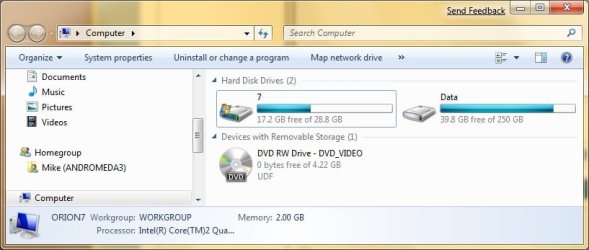
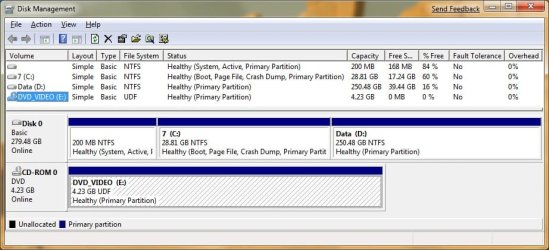
Please post the following screen shots:

1) Explorer "Computer" viewunable to open vista partition-untitled.jpg
2) Run diskmgmt.msc unable to open vista partition-untitled2.jpg
My System SpecsSystem Spec
02-06-2009   #9 (permalink)


Vista Home Premium 32 BIT and Windows 7 32 BIT
Delhi , India


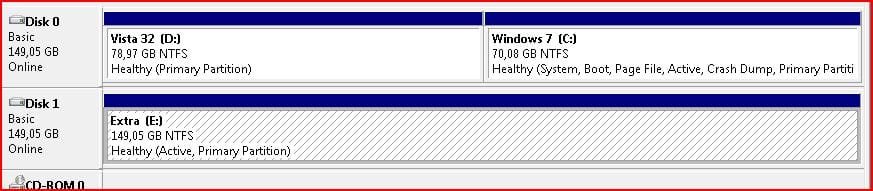
well thats why i though but in windows 7 the vista partition shows as local drive c and windows 7 partition still shows as f: but i`ll try that take ownerhsip thing to work and check if i can still get into my vista partition through that.
My System SpecsSystem Spec
02-06-2009   #10 (permalink)


Vista Home Premium 32 BIT and Windows 7 32 BIT
Delhi , India


nope the take ownership didnt worked i get take ownership opyion everywhere other then the local drives so luck.
My System SpecsSystem Spec
Reply

Thread Tools


Similar Threads for: unable to open vista partition
Thread Forum
Unable to open Outlook 2007 in Windows 7 (7000 build) Browsers & Mail
New to Vista, Need Help with Open With General Discussion
Unable to minimize, maximize, or close open windows General Discussion
Unable to partition my c drive General Discussion
Can't see my Vista partition from Windows 7... General Discussion


All times are GMT -5. The time now is 06:35 AM.


Windows 7 Forums is an independent web site and has not been authorized,
sponsored, or otherwise approved by Microsoft Corporation.
"Windows 7" and related materials are trademarks of Microsoft Corp.
© Designer Media Ltd

1 2 3 4 5 6 7 8 9 10 11 12 13 14 15 16 17 18 19 20 21 22 23 24 25 26