| Windows 7: Desktop icons change after renaming!! |
05 Nov 2009
|
#1 | | |
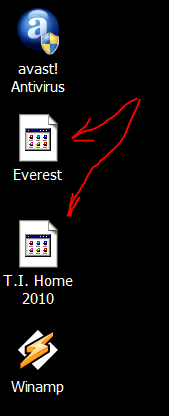
Desktop icons change after renaming!! I'm running Win 7 Home premium 64. Everything is running great, but I have one small complaint. As you know, some desktop icons have a really long name, so I like to rename them with a shorter name. When I do, some of them turn into a generic icon the next time I reboot. If I just keep the name given to the icon by the software install, everything is fine. I am including a pic. I've tried refreshing the icons, but that doesn't work. If I change the color depth to 16 bit, then back to 32 bit, that fixes it. I will have to see if it sticks next time I reboot. But why does it happen in the first place? Capture.PNG | My System Specs |
| System Manufacturer/Model Number Home built OS Win 7 Home premium 64 CPU Core 2 Duo E8500 Wolfdale 3.16GHz Motherboard MSI P45 Platinum Memory Eight gigs Corsair DDR2 8500 1066 RAM @ 5 5 5 18/800/1.8 Graphics Card EVGA GTX 260 Sound Card X-fi extreme gamer Monitor(s) Displays 26" Viewsonic Keyboard Logitech G15 Mouse Logitech MX 518 PSU CORSAIR CMPSU-1000HX 1000W PSU Case LianLi Cooling Zalman 9900 CPU cooler, factory LianLi case fans. Hard Drives Two SATA WD 500 gig, 7200 RPM, 32 MB cache Caviar Black OS drive in RAID0
SATA WD 1 TB, 7200 RPM, 32 MB cache Caviar Black Storage drive Internet Speed Not the best! |
05 Nov 2009
|
#2 | | Windows 7 Professional x64 Ponta Poră, MS |
Have you removed something like .lnk or .exe or whatever? | My System Specs | | System Manufacturer/Model Number Custom Built OS Windows 7 Professional x64 CPU Intel Core i7 2600k - 3.4 GHz Motherboard Asus Maximus IV Z68 - Extreme Memory 4x4 Ripjaws X79 Series 2133 MHz (9-11-10-28) Graphics Card 1x eVGA GTX 580 - 3GB Classified Sound Card Realtek ALC 889 HD Audio Monitor(s) Displays Full HD Philips TV 32" Screen Resolution 1920x1080 Keyboard Logitech K800 Wireless Mouse Logitech Performance MX Laser PSU 800W Coolermaster Silentpro Gold Case Sentey - Renegade GS-6200 Cooling Stock Hard Drives 1x Crucial m4 SSD 512 GB Internet Speed 10MB Internet Connection |
05 Nov 2009
|
#3 | | |

Quote: Originally Posted by AlexRD Have you removed something like .lnk or .exe or whatever? The only thing I did was rename a few of my icons. That's when it happens. If I used my imaging software and restored back to the point where I hadn't renamed them, they would be fine. I had this same problem with Vista.
I think it has something to do with changing settings in advanced appearance. I like to adjust font size etc. | My System Specs | | System Manufacturer/Model Number Home built OS Win 7 Home premium 64 CPU Core 2 Duo E8500 Wolfdale 3.16GHz Motherboard MSI P45 Platinum Memory Eight gigs Corsair DDR2 8500 1066 RAM @ 5 5 5 18/800/1.8 Graphics Card EVGA GTX 260 Sound Card X-fi extreme gamer Monitor(s) Displays 26" Viewsonic Keyboard Logitech G15 Mouse Logitech MX 518 PSU CORSAIR CMPSU-1000HX 1000W PSU Case LianLi Cooling Zalman 9900 CPU cooler, factory LianLi case fans. Hard Drives Two SATA WD 500 gig, 7200 RPM, 32 MB cache Caviar Black OS drive in RAID0
SATA WD 1 TB, 7200 RPM, 32 MB cache Caviar Black Storage drive Internet Speed Not the best! |
05 Nov 2009
|
#4 | | Windows 7 Ultimate x86-64 |
Can you try deleting one shortcut, then going to the everest folder, choose the .exe and choose send to desktop after right-clicking the icon. Then reboot. See if that stays the same. | My System Specs | | System Manufacturer/Model Number Sony Vaio Z46GDU OS Windows 7 Ultimate x86-64 CPU P9700@2.8GHz 1066MHz FSB Motherboard Sony branded Memory 6GB DDR3 1066MHz Graphics Card 9300M GS 256MB Dedicated (Speed) + Intel4500MHD (Stamina) Sound Card Realtek HD Audio Monitor(s) Displays 13.1' WXGA Screen Resolution 1600x900 Hard Drives 320GB 7200RPM w/ 16MB cache Internet Speed 1MB/s |
05 Nov 2009
|
#5 | | |

Quote: Originally Posted by Frostmourne Can you try deleting one shortcut, then going to the everest folder, choose the .exe and choose send to desktop after right-clicking the icon. Then reboot. See if that stays the same. The icons are also the generic ones under start>all programs. Only the ones that are generic on the desktop. They are also generic in their folder under program files.
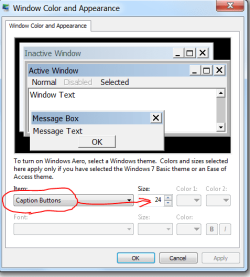
What's weird is, if I decrease "caption buttons" size in Windows color and appearance, the icons system wide turn back to normal. Increase it back to 24, which is what it is in my screen capture, and I get those few generic icons again system wide. Any number over 17, and I get the generic icons. Problem is, 17 makes my icons down by the clock super tiny. Capture.PNG | My System Specs | | System Manufacturer/Model Number Home built OS Win 7 Home premium 64 CPU Core 2 Duo E8500 Wolfdale 3.16GHz Motherboard MSI P45 Platinum Memory Eight gigs Corsair DDR2 8500 1066 RAM @ 5 5 5 18/800/1.8 Graphics Card EVGA GTX 260 Sound Card X-fi extreme gamer Monitor(s) Displays 26" Viewsonic Keyboard Logitech G15 Mouse Logitech MX 518 PSU CORSAIR CMPSU-1000HX 1000W PSU Case LianLi Cooling Zalman 9900 CPU cooler, factory LianLi case fans. Hard Drives Two SATA WD 500 gig, 7200 RPM, 32 MB cache Caviar Black OS drive in RAID0
SATA WD 1 TB, 7200 RPM, 32 MB cache Caviar Black Storage drive Internet Speed Not the best! |
05 Nov 2009
|
#6 | | Windows 7 Ultimate x86-64 |
Its a problem with advanced appearances. I wouldn't use it, it can get confusing if you change too many settings. Choose the default windows 7 aero theme. Does that work? | My System Specs | | System Manufacturer/Model Number Sony Vaio Z46GDU OS Windows 7 Ultimate x86-64 CPU P9700@2.8GHz 1066MHz FSB Motherboard Sony branded Memory 6GB DDR3 1066MHz Graphics Card 9300M GS 256MB Dedicated (Speed) + Intel4500MHD (Stamina) Sound Card Realtek HD Audio Monitor(s) Displays 13.1' WXGA Screen Resolution 1600x900 Hard Drives 320GB 7200RPM w/ 16MB cache Internet Speed 1MB/s |
05 Nov 2009
|
#7 | | |

Quote: Originally Posted by Frostmourne Its a problem with advanced appearances. I wouldn't use it, it can get confusing if you change too many settings. Are there known issues with advanced appearances? | My System Specs | | System Manufacturer/Model Number Home built OS Win 7 Home premium 64 CPU Core 2 Duo E8500 Wolfdale 3.16GHz Motherboard MSI P45 Platinum Memory Eight gigs Corsair DDR2 8500 1066 RAM @ 5 5 5 18/800/1.8 Graphics Card EVGA GTX 260 Sound Card X-fi extreme gamer Monitor(s) Displays 26" Viewsonic Keyboard Logitech G15 Mouse Logitech MX 518 PSU CORSAIR CMPSU-1000HX 1000W PSU Case LianLi Cooling Zalman 9900 CPU cooler, factory LianLi case fans. Hard Drives Two SATA WD 500 gig, 7200 RPM, 32 MB cache Caviar Black OS drive in RAID0
SATA WD 1 TB, 7200 RPM, 32 MB cache Caviar Black Storage drive Internet Speed Not the best! |
05 Nov 2009
|
#8 | | Windows 7 Ultimate x86-64 |
Depends on what you change. Reset the original aero theme. | My System Specs | | System Manufacturer/Model Number Sony Vaio Z46GDU OS Windows 7 Ultimate x86-64 CPU P9700@2.8GHz 1066MHz FSB Motherboard Sony branded Memory 6GB DDR3 1066MHz Graphics Card 9300M GS 256MB Dedicated (Speed) + Intel4500MHD (Stamina) Sound Card Realtek HD Audio Monitor(s) Displays 13.1' WXGA Screen Resolution 1600x900 Hard Drives 320GB 7200RPM w/ 16MB cache Internet Speed 1MB/s |
06 Nov 2009
|
#9 | | |

Quote: Originally Posted by Frostmourne Depends on what you change. Reset the original aero theme. Well, I have all my fonts set up, including font size. I don't really want to change anything. I decided to just delete all the desktop icons and use Nexus for my icons. Nexus works great!! Capture.PNG | My System Specs | | System Manufacturer/Model Number Home built OS Win 7 Home premium 64 CPU Core 2 Duo E8500 Wolfdale 3.16GHz Motherboard MSI P45 Platinum Memory Eight gigs Corsair DDR2 8500 1066 RAM @ 5 5 5 18/800/1.8 Graphics Card EVGA GTX 260 Sound Card X-fi extreme gamer Monitor(s) Displays 26" Viewsonic Keyboard Logitech G15 Mouse Logitech MX 518 PSU CORSAIR CMPSU-1000HX 1000W PSU Case LianLi Cooling Zalman 9900 CPU cooler, factory LianLi case fans. Hard Drives Two SATA WD 500 gig, 7200 RPM, 32 MB cache Caviar Black OS drive in RAID0
SATA WD 1 TB, 7200 RPM, 32 MB cache Caviar Black Storage drive Internet Speed Not the best! Desktop icons change after renaming!! problems? All times are GMT -5. The time now is 12:05 AM. | |