Windows 7 Forums


Windows 7: hdtv as second display

05 Nov 2009   #1

windows 7 home premium
 
 
hdtv as second display

Hello there!Guys could you please help.I'm not very good at computers.I have a laptop SONY VAIO ,CPU Intel Core 2 Duo Processor T8100 ENHANCED INTEL SPEEDSTEP 2.10 GHz,memory 4GB/Go DDR2 SDRAM,grafics NVIDIA GeFORCE 8400M GT GPU,BLURAY COMBO DRIVE,1080p.When i bought the laptop i had vista home premium and now i bought the windows 7 home premium wich came with 2 cd(32bit) or (64bit).Before when i had the vista i could connect my hdtv wich is a sony 40inch thru the HDMI and it would recognise it but now when i install windows 7 it doesn't.Oh by the way i did update the driver and i install the 32 bit version.I'm not even sure if i can install the 64 bit.Is not even working with tv out ( svideo ).THANKS

My System SpecsSystem Spec

05 Nov 2009   #2

Windows 7 Ultimate x86-64


1) Did you install x86 or x64 version of 7?

2) What outputs does your laptop have?

3) What inputs does your tv have?

The best option would be hdmi.
My System SpecsSystem Spec
05 Nov 2009   #3

windows 7 home premium


My laptop got the hdmi and s-video and tv the same
i install the 32 bit version
My System SpecsSystem Spec
.


05 Nov 2009   #4

Windows 7 Ultimate x86-64


Then connect an HDMI cable from your laptop to your TV, and adjust any settings.
My System SpecsSystem Spec
05 Nov 2009   #5

windows 7 home premium


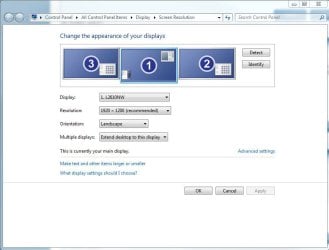
I did and i adjust the settings several times but it doesn't recognise the tv.it's just show the main display.i pres detect and nothing.as i said when i had the vista it was working but now i dont know what to do.
My System SpecsSystem Spec
05 Nov 2009   #6

Windows 7 Ultimate x86-64


What is the resolution of the tv and your laptop? Go into the gpu control panel and look at a setting for tv's.
My System SpecsSystem Spec
05 Nov 2009   #7

windows 7 home premium


What is gpu.how do i get there.what i did was go to control panel- adjust screen resolution and then i changed the resolution to several options still not see second display.just display 1.i tried detect but nothing
My System SpecsSystem Spec
05 Nov 2009   #8

windows 7 home premium


RESOLUTION ON THE DISPLAY IS 1280 BY 800 TRUE COLOR 32BIT DEFAULT REFRESH AND ON THE HDTV IS 1080p FULL HD.
My System SpecsSystem Spec
05 Nov 2009   #9

Windows 7 Ultimate x86-64


In control panel look for nvidia control panel, plug in the cable and look at the display options. GPU is your graphics card. You might have to lower the resolution of the TV. Check the control panel.
My System SpecsSystem Spec
05 Nov 2009   #10

windows 7 home premium


I did look in control panel for nvidia control panel and i couldn't find it.
My System SpecsSystem Spec
Reply

 hdtv as second display problems?


Thread Tools


Similar help and support threads for: hdtv as second display
Thread Forum
HDMI - HDMI gettting fuzzy display on HDTV. Graphic Cards
Solved Nvidia 9200 in PC connected to Samsung HDTV by HDMI does not display Graphic Cards
HDTV out display issues Graphic Cards
Ati HD4650 can't display on philips HDTV via HDMI under Win7 32bit Graphic Cards
Display/Screen not centered to HDTV Graphic Cards


All times are GMT -5. The time now is 05:55 PM.


Seven Forums Android App Seven Forums IOS App Follow us on Facebook

Windows 7 Forums is an independent web site and has not been authorized,
sponsored, or otherwise approved by Microsoft Corporation.
"Windows 7" and related materials are trademarks of Microsoft Corp.
© Designer Media Ltd
  

1 2 3 4 5 6 7 8 9 10 11 12 13 14 15 16 17 18 19 20 21 22 23 24 25 26 27 28 29 30 31 32