Regarding your "hidden" files, two recommendations:
1) Take a look at the search indexing options to exclude specific folders, if these "hidden" folders are appearing in the folder structure of the index.
Click the START orb and then type "Indexing Options" at the search bar there. Double-click or hit enter on the returned result to launch the Indexing Options:
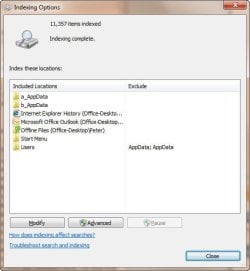
Once that windows opens, play around with the MODIFY button on your listed folders to see if your "hidden" folders are children of the folders listed. If so, you can specifically exclude them.
You can also exclude specific file extensions if your financial statements are in a format not used by other programs (*.doc or *.xls, for example).
2)
(and more importantly) Consider encrypting your financial data instead of using ZDNet's quasi-hidden file app (I am not familiar with it but it seems it really is not hiding your files).
If you don't have Windows 7 Ultimate, you can use this free, open source utility called TrueCrypt, found at
Truecrypt.org
This utility works well under Win7 and provides military-grade encryption to the masses. Easily installed, you simply create either a "File" container (a file to act as the encrypted repository for your files you desire to encrypt) or a partition container (an entire hard drive partition).
Once you create the container you mount it using the TrueCrypt interface whenever you must use the protected files. Mounting the container prompts you for a password that you assigned when you created the container, and then you interact with the encrypted files as you would any other drive on your computer (meaning that applications will see them as they would any file).
When done with the files, you unmount the encrypted container and the files
REALLY disappear. Of course, this is only as good as your password selection, so don't be choosing your wife's maiden name as a pwd.
If you decide to follow this suggestion and need help getting started with TrueCrypt the software includes an excellent, screen-by-screen tutorial for getting up and running. However if that doesn't answer your questions post back here and I will be happy to assist.