Windows 7 Forums Search
Welcome to Windows 7 Forums. Our forum is dedicated to helping you find solutions with any problems, errors or issues you are experiencing with Windows 7. The Windows 7 forum also covers news and updates and has an extensive Windows 7 tutorial section that covers a wide range of tips and tricks.


Windows 7 - How to make a hard disc a system disc

 
11-06-2009   #1


Dual Booting Windows Vista32 bit And Windows 7 Home premium (x64) (build 7600)


How to make a hard disc a system disc

I think I may have found an answer to my boot problem. After reading the tutorial on system image restore I saw this statement.

"You can fool it into thinking that simply by marking the 7 partition as active.

May be as well to make it a "secondary" system partition , by copying across the relevant files - in case you forget to hand the active flag back"

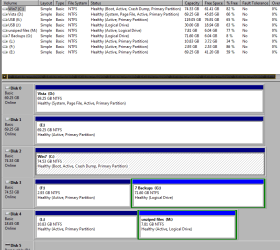
How would I be able to make my "C" Windows 7 drive my system drive instead of my "D" Vista drive. Right now my "D" Vista is my system drive.
Or, can I have two system drives at the same time? Remember these are on TWO SEPERATE hard drives.

Attached Thumbnails
How to make a hard disc a system disc-fyrmnj.png  
My System SpecsSystem Spec
11-06-2009   #2


7600.20510 x86


First make sure you are set to see hidden and protected files in Windows Explorer.

Copy bootmgr file from D: to C:
Copy boot folder from D: to C: and tell it to skip over copying bcd and bcd.log when it prompts.

Run this command from an elevated command prompt. You may copy and paste into it. Hit enter.

bcdedit /export C:\boot\bcd

Reboot into bios and change the primary boot device to be your C: drive.

Boot to Windows and make sure C: is now the system drive. If so, you may delete the boot folder and bootmgr file on D:

If you want two "system drives" so in case one fails you'll be able to boot from the other, don't delete anything and use bios to change drives in this instance.
My System SpecsSystem Spec
11-06-2009   #3


Dual Booting Windows Vista32 bit And Windows 7 Home premium (x64) (build 7600)


Quote   Quote: Originally Posted by torrentg View Post
First make sure you are set to see hidden and protected files in Windows Explorer.

Copy bootmgr file from D: to C:
Copy boot folder from D: to C: and tell it to skip over copying bcd and bcd.log when it prompts.

Run this command from an elevated command prompt. You may copy and paste into it. Hit enter.

bcdedit /export C:\boot\bcd

Reboot into bios and change the primary boot device to be your C: drive.

Boot to Windows and make sure C: is now the system drive. If so, you may delete the boot folder and bootmgr file on D:

If you want two "system drives" so in case one fails you'll be able to boot from the other, don't delete anything and use bios to change drives in this instance.
Thank You Thank You Thank You....you fixed something I have been working on for the last four days. Everything I tried ended up with me doing reinstalls, mbr repairs, changing boot managers, changing the boot order, and everything else you can think of. Nothing worked....this did. Now I can use my RollbackRX program with my dualboot system. Youse folkes are the best.
FyrmnJ
My System SpecsSystem Spec
.


11-06-2009   #4


7600.20510 x86


You're welcome. Very wise of you to have posted the screenshot in the OP.
My System SpecsSystem Spec
12-14-2010   #5


Windows 7 Ultimate x64


Quote   Quote: Originally Posted by torrentg View Post
First make sure you are set to see hidden and protected files in Windows Explorer.

Copy bootmgr file from D: to C:
Copy boot folder from D: to C: and tell it to skip over copying bcd and bcd.log when it prompts.

Run this command from an elevated command prompt. You may copy and paste into it. Hit enter.

bcdedit /export C:\boot\bcd

Reboot into bios and change the primary boot device to be your C: drive.

Boot to Windows and make sure C: is now the system drive. If so, you may delete the boot folder and bootmgr file on D:

If you want two "system drives" so in case one fails you'll be able to boot from the other, don't delete anything and use bios to change drives in this instance.
I did this and it didn't work.
I need to change the system disk from my F drive to my C drive, I'll attach an image.
http://img593.imageshack.us/img593/7...management.png

Please any help?

Also, After moving the exact files that you told me too, and running that scrip in cmd, When i tried to boot off the HDD that has windows installed, i couldnt get to windows... I had to tell the computer / bios to boot from the system drive which has NOTHING on it. :|

EDIT: And yes i know this is a really old thread, but i really need the help, and it is exactly what i need help with.

EDIT:
All good now!!!
My friend told me to put in my Windows 7 disc, boot off that, go into its repair section and launch its CMD. Then type in "bootrec /fixmbr" and that made it so that I could boot from the drive that actually had windows installed!

I have now installed Windows7 on my 250Gb HDD, and am using Software RAID1 to mirror my 2 1Tb HDD's, which is now lets me format because they are not needed to run my 250gb OS.

Huzzah!

Last edited by tulliphunter; 12-15-2010 at 01:03 AM..
My System SpecsSystem Spec
Reply

 How to make a hard disc a system disc problems?


Thread Tools


Similar Threads for: How to make a hard disc a system disc
Thread Forum
Make Window 7 x64 Ultimate Install Disc using Windows x64 Pro Disc Installation & Setup
Burning content - disc drive not recognising blank disc Hardware & Devices
make up a OEM disc General Discussion
install windows 7 in hard disc and XP in another hard disc in same pc Installation & Setup
Can anyone tell me how to make a AIO disc? Customization


All times are GMT -5. The time now is 05:06 AM.


Windows 7 Forums is an independent web site and has not been authorized,
sponsored, or otherwise approved by Microsoft Corporation.
"Windows 7" and related materials are trademarks of Microsoft Corp.
© Designer Media Ltd
  

1 2 3 4 5 6 7 8 9 10 11 12 13 14 15 16 17 18 19 20 21 22 23 24 25 26 27 28 29 30