| Windows 7: Transfering files from XP hard drive to Windows 7 |
08 Nov 2009
|
#1 | | |
Transfering files from XP hard drive to Windows 7 My motherboard on my laptop that was running XP went out. I bought a new laptop with Windows 7 and want to transfer some files from my old hard drive onto my new machine. From what I've read, it seems that I would have to install Windows Easy Transfer on the old machine before I can transfer the files to a machine running Windows 7. However, since my old machine won't boot, there doesn't seem to be a way around this. Other than putting my hard drive into another machine and booting off of it, is there a way to transfer my files? | My System Specs |
| |
08 Nov 2009
|
#2 | | Windows 7 Ultimate x64 SP1 |
If your system is completely non-operational, then you will probably have to remove the drive and slave it into another computer. If there is space on the drive, you could create a new partition and copy the data you want to save to the new partition. Or, you could copy what you want to save to a USB flash drive, SD card, etc. | My System Specs | | System Manufacturer/Model Number Dell XPS 15 L502x OS Windows 7 Ultimate x64 SP1 CPU Core i7-2670QM Memory 8GB DDR3 PC3-10600 Graphics Card Intel HD Graphics 3000 + GeForce GT 540M Screen Resolution 1920x1080 Hard Drives 1TB 5400RPM Seagate |
08 Nov 2009
|
#3 | | |
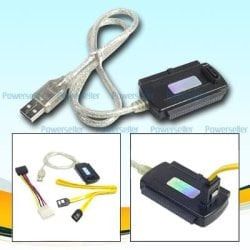
Thank you for your response. I'm sort of a novice about these kind of things, so I apologize if I'm not understanding you right or if I wasn't clear in my original post. I've read that I can buy a USB to IDE adapter and plug the old hard drive into my new computer and transfer the files. Before purchasing this, I wanted to make sure that it would work and that's when I read that Windows Easy Transfer would have to be utilized when transferring files from an XP machine to Windows 7. However, are you saying that this isn't necessary if I use this adapter and plug it into the new laptop as a slave device? | My System Specs | | |
08 Nov 2009
|
#4 | | Win7 Enterprise, Win7 x86 (Ult 7600), Win7 x64 Ult 7600, TechNet RTM on AMD x64 (2.8Ghz) SomeWhere in the HOT Arizona Desert ! |
| My System Specs | | Computer type PC/Desktop System Manufacturer/Model Number Built them myself, Science Experiments ! OS Win7 Enterprise, Win7 x86 (Ult 7600), Win7 x64 Ult 7600, TechNet RTM on AMD x64 (2.8Ghz) CPU AMD fx8350 4ghz, AMD-32 2400mhz, AMD-64 3200mhz, AMDx64 2.8G Motherboard SIS 755, ECS-K8M890M-M (Ult 7600), GigaByte & others Memory 2gb, 4gb on the Ult 7600, 4gb on Technet RTM, 32gb on FX8350 Graphics Card Draw my own Graphics, several nVidia cards Sound Card on motherboard Monitor(s) Displays 19" flat scr, 28" I-Inc widescr,22" Emprex Widescr, 23" Acer Screen Resolution 1280 x 1024, 1440 x 900, 1920 x 1080 Keyboard Compaq & Dell recycled from GoodWill Mouse Made in China Optical Wired Mouse PSU 430w, 550w, 600w, 700, 800, etc Case All Generic Full Towers Cooling Open Air & a few fans, some w/ colored LEDs Hard Drives 6 pata Ide HD's & 2 Sata HD's
added 80gb external on Ult 7600 computer,
numerous extra 1tb, 2TB, 3Tb SATA HD's
A collection of ext HD Docks w/ HDs Internet Speed Fast Cable InterNet Antivirus AVG Free on 24 different Desktops, NO Problems! Browser IE 8 is preferred, but use FireFox sometimes Other Info Linksys Routers, switches, & Hubs
Too Many USB Flash Drives to count, Biggest is 64GB !
Eight computers in my home network.
Sixteen computers at my business network.
Linked via TeamViewer !
Lots of old used spare computer parts everywhere! |
08 Nov 2009
|
#5 | | Windows XP Pro, Windows 7 |
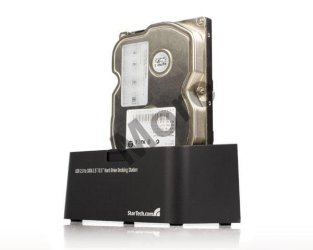
External USB Enclosure I would pull the drive from the machine and put it in an external USB enclosure, then plug it into the laptop and transfer all the files over. | My System Specs | | OS Windows XP Pro, Windows 7 |
09 Nov 2009
|
#6 | | |
Coppertrail,
Thank you, but what I'm asking is if this will work if the original drive is from a Windows XP machine and my new laptop is Windows 7. Will the files transfer over if I just plug the old hard drive into my new machine? Nothing else would need to be done to the old hard drive beforehand, ie install Windows Easy Transfer? | My System Specs | | |
09 Nov 2009
|
#7 | | Windows 7 SP1, Home Premium, 64-bit |
No, you wouldn't have to do anything to the old hard drive--but you shouldn't try to copy over installed programs. Just go after your personal data---bookmarks, email, pictures, video, mp3, Word files, etc. | My System Specs | | System Manufacturer/Model Number Ignatz Special; 4 speed manual gearbox; factory air conditioning; one of one OS Windows 7 SP1, Home Premium, 64-bit CPU Intel Sandy Bridge i5-2500, not overclocked Motherboard Gigabyte H67A-UD3H-B3, full ATX Memory 4 GB Crucial DDR3-1333 Graphics Card none; graphics are integrated on CPU Sound Card onboard: Realtek ALC892; external: USB Behringer UF0-202 Monitor(s) Displays NEC 90GX2-BK 19" LCD Screen Resolution 800 x 640 Keyboard Leopold Tenkeyless with Cherry Blue switches, USB Mouse Logitech or Microsoft optical wired; either USB or PS 2 PSU Seasonic SS-560KM, modular Case Antec Solo II Cooling CPU: Scythe Big Shuriken; Case: Scythe Slipstream 800 & 500 Hard Drives System: Intel 320 Series SSD, 80 GB;
Data: Samsung Spinpoint 103SJ, 1 TB;
Backup: WD Caviar Green WD15EADS-00P8B0, 1.5TB Other Info Power consumption of this system, including monitor: 68 watts at idle; 144 watts at full load |
09 Nov 2009
|
#8 | | Win7 Enterprise, Win7 x86 (Ult 7600), Win7 x64 Ult 7600, TechNet RTM on AMD x64 (2.8Ghz) SomeWhere in the HOT Arizona Desert ! |

Quote: Originally Posted by DanH Coppertrail,
Thank you, but what I'm asking is if this will work if the original drive is from a Windows XP machine and my new laptop is Windows 7. Will the files transfer over if I just plug the old hard drive into my new machine? Nothing else would need to be done to the old hard drive beforehand, ie install Windows Easy Transfer?
If you use the adapter or an enclosure for the old laptop HD & it is not damaged in any way, you should be able to copy files, docs, pics, music, etc. But programs will have to be installed new. If you want settings from old HD you should look at the WET tutorial Windows Easy Transfer - Transfer To & From Computers | My System Specs | | Computer type PC/Desktop System Manufacturer/Model Number Built them myself, Science Experiments ! OS Win7 Enterprise, Win7 x86 (Ult 7600), Win7 x64 Ult 7600, TechNet RTM on AMD x64 (2.8Ghz) CPU AMD fx8350 4ghz, AMD-32 2400mhz, AMD-64 3200mhz, AMDx64 2.8G Motherboard SIS 755, ECS-K8M890M-M (Ult 7600), GigaByte & others Memory 2gb, 4gb on the Ult 7600, 4gb on Technet RTM, 32gb on FX8350 Graphics Card Draw my own Graphics, several nVidia cards Sound Card on motherboard Monitor(s) Displays 19" flat scr, 28" I-Inc widescr,22" Emprex Widescr, 23" Acer Screen Resolution 1280 x 1024, 1440 x 900, 1920 x 1080 Keyboard Compaq & Dell recycled from GoodWill Mouse Made in China Optical Wired Mouse PSU 430w, 550w, 600w, 700, 800, etc Case All Generic Full Towers Cooling Open Air & a few fans, some w/ colored LEDs Hard Drives 6 pata Ide HD's & 2 Sata HD's
added 80gb external on Ult 7600 computer,
numerous extra 1tb, 2TB, 3Tb SATA HD's
A collection of ext HD Docks w/ HDs Internet Speed Fast Cable InterNet Antivirus AVG Free on 24 different Desktops, NO Problems! Browser IE 8 is preferred, but use FireFox sometimes Other Info Linksys Routers, switches, & Hubs
Too Many USB Flash Drives to count, Biggest is 64GB !
Eight computers in my home network.
Sixteen computers at my business network.
Linked via TeamViewer !
Lots of old used spare computer parts everywhere! |
09 Nov 2009
|
#9 | | Windows XP Pro, Windows 7 |
I did this with my Mom's computer. She had an XP Laptop and we got her a Win 7 desktop. I pulled the drive from her laptop and put it in a USB enclosure. A word of advice though: Before you plug in your old hard drive, completely disable UAC on the Windows 7 machine. I ran into permissions issues on the old hard drive, I had to take ownership of several of her folders on her old drive. But once I disabled UAC, it worked fine. And it will not modify your old drive as long as you copy rather than move the files. You'll need to re-install any programs because of registry entries, etc. | My System Specs | | OS Windows XP Pro, Windows 7 Transfering files from XP hard drive to Windows 7 problems? All times are GMT -5. The time now is 08:45 PM. | |