

I was doing some benchmarks with Sandra & noticed in W7 that my memory bandwidth was reduced from XP & Vista...but why? 
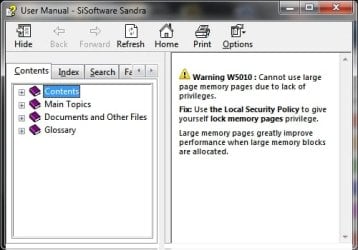
So I looked all the way at the bottom of the bench to see a exclamation with a warning. So I double clicked it & it brought this up.
" Warning W5010 : Cannot use large page memory pages due to lack of privileges.
Fix: Use the Local Security Policy to give yourself lock memory pages privilege.
Large memory pages greatly improve performance when large memory blocks are allocated."
So I gave myself privileges to enable this and was very surprise with the performance increase although I still don't understand what it did & why so much of a memory bandwidth increase...
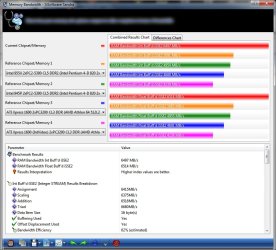
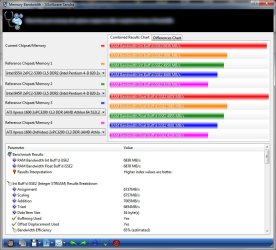
Screenshots below say it all... from 62% (6497mbs) memory bandwidth efficiency to 65% (6838mbs) with lock pages in memory enabled.
Does anyone here know what this does exactly & can you explain it to me to where I understand if this is a setting that is good or bad to have on for system performance.
Thanks...btw, I have 4Gbs of installed memory on W7 32bit.
So I looked all the way at the bottom of the bench to see a exclamation with a warning. So I double clicked it & it brought this up.
" Warning W5010 : Cannot use large page memory pages due to lack of privileges.
Fix: Use the Local Security Policy to give yourself lock memory pages privilege.
Large memory pages greatly improve performance when large memory blocks are allocated."
So I gave myself privileges to enable this and was very surprise with the performance increase although I still don't understand what it did & why so much of a memory bandwidth increase...
Screenshots below say it all... from 62% (6497mbs) memory bandwidth efficiency to 65% (6838mbs) with lock pages in memory enabled.
Does anyone here know what this does exactly & can you explain it to me to where I understand if this is a setting that is good or bad to have on for system performance.
Thanks...btw, I have 4Gbs of installed memory on W7 32bit.
Attachments

My Computer
At a glance
Windows® 7 Ultimate x64 SP1Intel Core 2 Duo E8400 (E0) @ 4.0GHzG.SKILL-F2-8500CL5D-4GBPK (2x2Gbs) (5-5-5-15)...EVGA GTX 470 SC (845/1690/2000) 160Gbs
- Computer Manufacturer/Model Number
- ABS Tech Ultimate X9
- OS
- Windows® 7 Ultimate x64 SP1
- CPU
- Intel Core 2 Duo E8400 (E0) @ 4.0GHz
- Motherboard
- ASUS P5Q Pro Turbo / 1780 FSB
- Memory
- G.SKILL-F2-8500CL5D-4GBPK (2x2Gbs) (5-5-5-15) @ 1067Mhz
- Graphics Card(s)
- EVGA GTX 470 SC (845/1690/2000) 160Gbs
- Sound Card
- VIA HD Audio / Boston Acoustics
- Monitor(s) Displays
- Acer X222W HD 22" LCD 2500:1 / 5ms
- Screen Resolution
- 1680x1050
- Hard Drives
- Seagate Barracuda SATAII 2 x 320GB
Seagate Barracuda SATAII 1Tb
Intel® Rapid Storage Technology v10.1.0.1008
AHCI-NCQ Enabled
- PSU
- Silent Pro GOLD 80 PLUS 800w /95% efficiency / SLI-Crossfire
- Case
- ABS Stealth Black-Custom
- Cooling
- CoolerMaster V6GT 6 Heatpipe 200w CPU Cooler
- Keyboard
- Logitech G15 Gaming Keyboard (Old Style Blue!)
- Mouse
- Logitech MX518 Gaming Mouse
- Internet Speed
- 1Mbs-up/ 6Mbs-down


