| Windows 7: Start Menu Question |
12 Nov 2009
|
#1 | | |
Start Menu Question I have a number of items in my start menu and am about to run out of space for them, that is, I'm running out of vertical range. I'm just wondering what happens if your start menu fills up? Do some items get truncated, is another column created?
How should I look at this? | My System Specs |
| |
12 Nov 2009
|
#2 | | |
Why not try for your self by adding more items? | My System Specs | | OS Win7 7600 x64 Memory 8gig Graphics Card Nvidia Monitor(s) Displays dual wide screen 22inch each Hard Drives 2x 500gig |
12 Nov 2009
|
#3 | | |

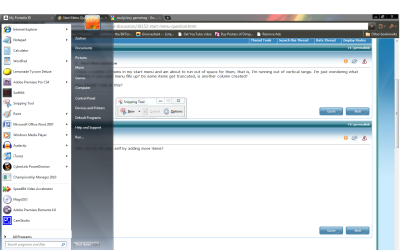
Quote: Originally Posted by ilesal Why not try for your self by adding more items? Not very helpful are you  ? Anyway......  I tried it and the result is in the screenshot.
Thanks,
ZeshanA
If a user helps you, click the scales at the top right of their post and click "I Approve!" | My System Specs | | |
12 Nov 2009
|
#4 | | |
Thank you for your efforts to help. It is hard to tell just what the screen shot implies because I am not familiar with how you have things setup. On my machine, if I add more than the screen can hold, the new entries are simply pushed to the bottom, out of site.
The moral may be that if I have so many programs in my start menu that the screen can't hold them, maybe I need to look at the problem differently. I would have guessed that when such a thing happens an up or down arrow would appear to let you know there is something above or below the flyout, but such does not appear to be the case, unless there is some other way to configure my desktop.
Thank you again. | My System Specs | | |
12 Nov 2009
|
#5 | | Windows 7 Home Premium SP1, clean install, upgrade disc CT |
Eveyone has different needs and desires, but let me tell youwhat I do. I do not have too many programs. The ones that I use but not that often, I have pinned to the start menu. The ones that I use constantly, I have a short cut right on my desk top. Too many for your desk top, here is a trick.
Go to any desktop icon, right click on it, press down control on your keyboard and then with the roller on your mouse, make the icons smaller. Give it a try. | My System Specs | | System Manufacturer/Model Number Dell XPS 420 OS Windows 7 Home Premium SP1, clean install, upgrade disc CPU Intel Core2 processsor Q8200(2.33Ghz 1333FSB) Quad Core Tech Motherboard Dell Memory 6 gb Graphics Card ATI Radeon 256MB HD3650 Sound Card Intergrated 7.1 Channel Audio Monitor(s) Displays Dell SP2009W 20" Keyboard Dell USB Keyboard Mouse Dell Premium Optical USB Cooling Fan Hard Drives 640 GB Serial ATA Hard drive Internet Speed DSL 2.85 |
12 Nov 2009
|
#6 | | |

Quote: Originally Posted by ZeshanA 
Quote: Originally Posted by ilesal Why not try for your self by adding more items? Not very helpful are you  ? Anyway......  I tried it and the result is in the screenshot. I was not being funny, sorry if it was miss read. I just wondered why you had not tried it out? As you have so many programs it would be easier than most people who have a limited number of frequently used programs to test it for you.
As others have said, everyone has different needs, I like my system to remain light weight and only have essential software, daily used stuff on superbar, often used on my explorer icon jump list and occasional used in the start menu, I have seen desktops with 40 odd icons on before! I do not know how people can bpg down the OS like that, several media player, several web browsers, several tuneup software etc. | My System Specs | | OS Win7 7600 x64 Memory 8gig Graphics Card Nvidia Monitor(s) Displays dual wide screen 22inch each Hard Drives 2x 500gig |
12 Nov 2009
|
#7 | | Windows 7 Ultimate x64 SP1 Philadelphia, PA |
If I have that much installed on a system, I'll look for things to delete (just the shortcuts), or I'll group them together in new folders. For example, I have a folder called DVD Applications. In it I have just the shortcuts for DVDShrink, DVDfab HD Decrypter, and Handbrake. That's three items down to one, in terms of vertical size. I create one folder for Games, and put just the shortcut to the main game executable in it. | My System Specs | | OS Windows 7 Ultimate x64 SP1 CPU Intel Core i7-2600 Motherboard Gigabyte GA-P67A-UD3P-B3 Memory 12 GB Patriot Extreme DDR3-1333 Graphics Card Nvidia GTX 470 Monitor(s) Displays Dell UltraSharp 2209WA PSU OCZ ModStream 700W Case CoolerMaster HAF 912 Advanced Cooling CoolerMaster Hyper 212 Plus Hard Drives OCZ Agility3 240 GB, WD5001AALS, WD7501AALS |
13 Nov 2009
|
#8 | | |

Quote: Originally Posted by antman i cannot access the overloaded pinned items. And i lose the recent apps section.
You could pin some to the taskbar instead, and do some re-ordering of the all programs folder.
There is also a tutorial here for resurrecting the quick launch. Quick Launch - Enable or Disable omg antman you're banned!!! I can't believe it!! | My System Specs | | |
13 Nov 2009
|
#9 | | |

Quote: Originally Posted by ZeshanA 
Quote: Originally Posted by antman i cannot access the overloaded pinned items. And i lose the recent apps section.
You could pin some to the taskbar instead, and do some re-ordering of the all programs folder.
There is also a tutorial here for resurrecting the quick launch. Quick Launch - Enable or Disable omg antman you're banned!!! I can't believe it!! This is my first post here (and may possibly be my last after this post), but why is that guy banned because he gave a perfectly acceptable answer and the other poster (ilesal) posted a non answer with his rather persnickety "Why not try for your self by adding more items?" ? Hardly what I would call fair. | My System Specs | | System Manufacturer/Model Number Dell Inspiron 660s OS Windows 7 64 bit CPU Intel Pentium processor G630(2 .60GHz, 3MB) Memory 8GB SDRAM at 1600MHz Monitor(s) Displays Dell ST2320L Screen Resolution 1920 X 1080 Internet Speed Cable 30 MB per second download |
13 Nov 2009
|
#10 | | Windows 7 Home Premium 64 Long Beach, CA |
Wow, forum drama.
The most frequently used programs get bumped near the top of the Start Menu items, and you can pin some programs permanently onto the list.
Conversely, you can also remove programs from the recent list, however, if you use them again, they come back. I haven't figured out a way to remove a program permanently from the list yet.
You can specify how many recent programs get displayed, and you can even turn program tracking off. | My System Specs | | System Manufacturer/Model Number Self-Built OS Windows 7 Home Premium 64 CPU Wolfdale Core 2 Duo E8400 Motherboard Gigabyte EP45-DS3L Memory 8GB PC2 6400 Graphics Card NVIDIA GeForce 260 GTX Sound Card Realtek 5.1 audio Monitor(s) Displays Samsung 23" widescreen Screen Resolution 2048x1152 Keyboard Logitech wireless keyboard Mouse Logitech G5 gaming mouse PSU Corsair 650W Case Antec 900 Cooling Arctic Cooling Freezer 7 Pro Hard Drives Seagate 640GB 7200 RPM SATA Internet Speed 3 Mbps DSL Other Info Built in December 2008 for US$985 Start Menu Question problems? All times are GMT -5. The time now is 10:32 AM. | |